> For the complete documentation index, see [llms.txt](https://docs.dapta.ai/llms.txt). Markdown versions of documentation pages are available by appending `.md` to page URLs; this page is available as [Markdown](https://docs.dapta.ai/ai-text-agents/channels/us-sms-compliance-a2p-10dlc.md).
# US SMS Compliance (A2P 10DLC)
Register your business, brand, and messaging sequence so your US phone numbers can legally send SMS through Dapta. A step-by-step guide to the A2P 10DLC compliance wizard.
A2P 10DLC (Application-to-Person, 10-Digit Long Code) is the registration standard that US mobile carriers require for any business sending SMS from a 10-digit US phone number.
If you send US SMS without registering, carriers filter or block your messages and apply extra fees. Dapta gives you a self-service wizard that walks you through the full registration so your numbers are approved to send.
> **💡 Note:** A2P 10DLC is **US-only**. The wizard locks the country to the United States, the tax identifier to EIN, and the regions of operation to USA and Canada. If you only send outside the US, you do not need this.
***
### How registration works
Dapta handles the carrier registration behind the scenes. There are four steps, and each one unlocks the next:
1. **Business profile** — who your business is
2. **Brand registration** — verifies your business with the carriers
3. **Sequence** — describes the messages you will send
4. **Phone numbers** — links your US numbers to the approved sequence
You complete the steps in order. A submitted business profile unlocks the brand, an approved or pending brand unlocks the sequence, and a created sequence unlocks number association.
> **Tip:** The accuracy of your information drives your **Trust Score** with the carriers, which sets your daily message limits and throughput. Carrier review currently takes around 10 to 15 days.
***
### Before you begin
Have these ready:
* A **purchased US phone number** in Dapta (see [Buying Phone Numbers through Dapta](/ai-voice-agents/phone-numbers/buying-phone-numbers-through-dapta.md))
* Your **legal business name** and **EIN** exactly as they appear on your IRS CP 575 letter
* An **authorized representative** (name, business email, business title, phone)
* Your **business address**
* A public **website**, **privacy policy URL**, and **terms and conditions URL**
***
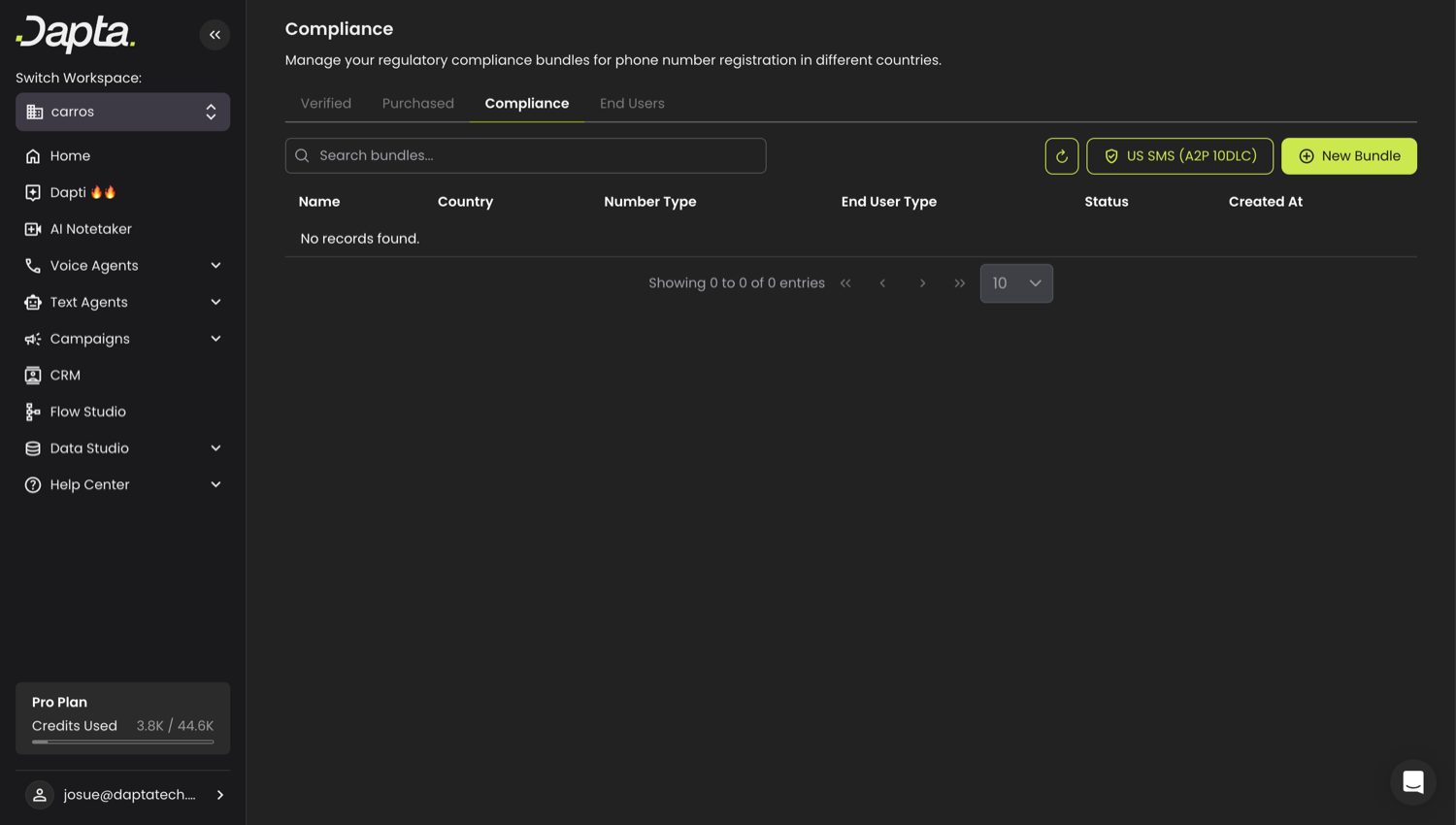
### Where to find it
1. Go to **Voice Agents → Phone Numbers**
2. Open the **Compliance** tab
3. Click **US SMS (A2P 10DLC)**
Phone Numbers → Compliance → US SMS (A2P 10DLC)
***
### Step 1: Business profile
This step creates the verification bundles (a Customer Profile and an A2P Trust Product) that confirm your business identity with the carriers.
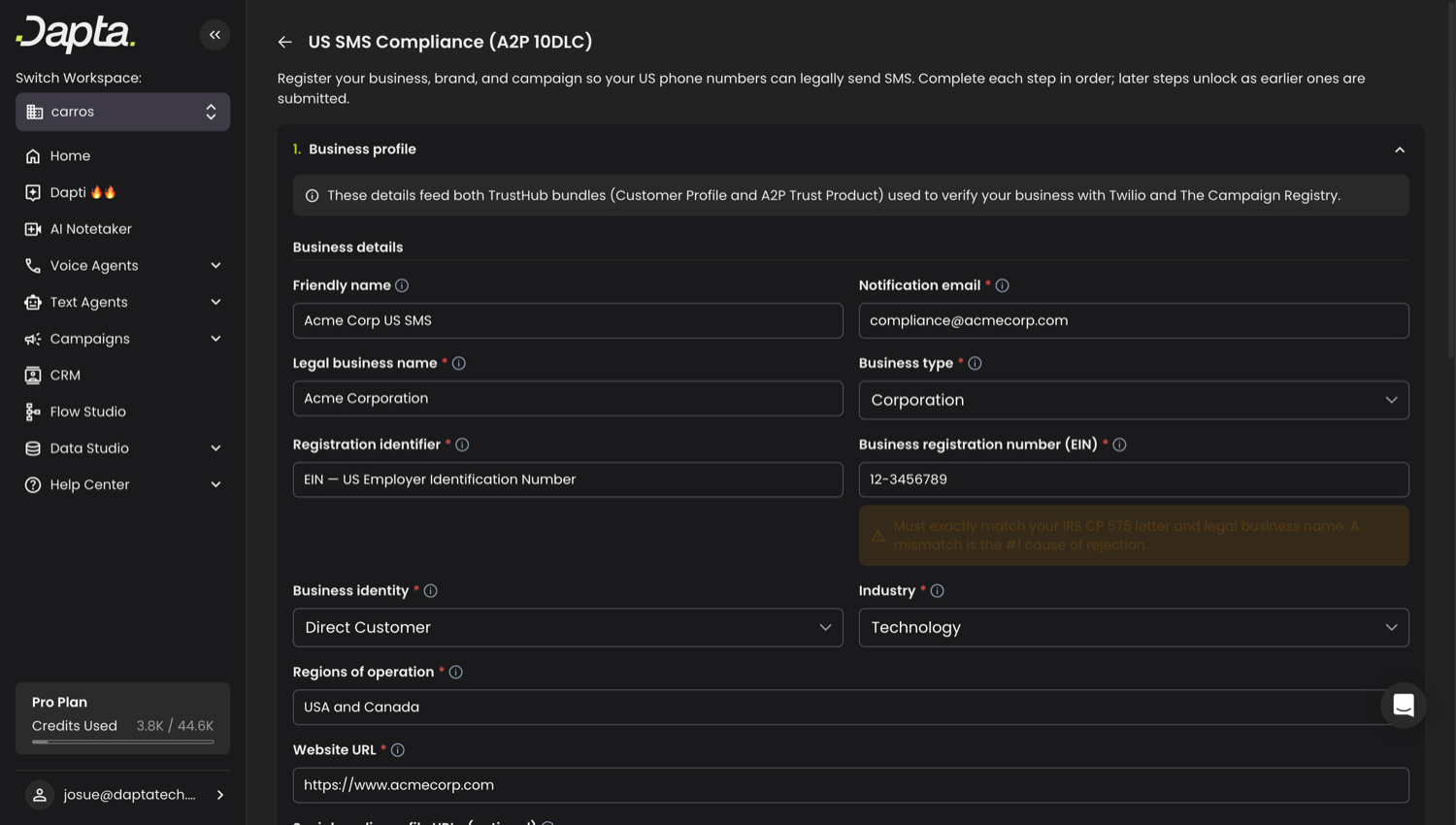
Business details and identity
Fill in the following:
| Field | What to enter |
| -------------------------------------- | ------------------------------------------------------------------------------- |
| **Friendly name** | A label for your own reference |
| **Notification email** | Where Dapta sends status updates (use a business email, not a free address) |
| **Legal business name** | Must match your registered legal business name exactly |
| **Business type** | Corporation, LLC, Partnership, Sole Proprietorship, Co-operative, or Non-profit |
| **Business registration number (EIN)** | Your EIN in `00-0000000` format |
| **Business identity** | Direct Customer, or reseller/partner |
| **Industry** | The closest match to your business |
| **Website URL** | A live, public site that matches your business name |
| **Authorized representative** | First and last name, business email, phone, title, and job position |
| **Business address** | Street, city, state, postal code (the country is locked to US) |
| **Company type** | Private, Public, Non-profit, or Government |
> **⚠️ Important:** Your **legal business name and EIN must match your IRS CP 575 letter exactly.** A mismatch is the number one cause of rejection.
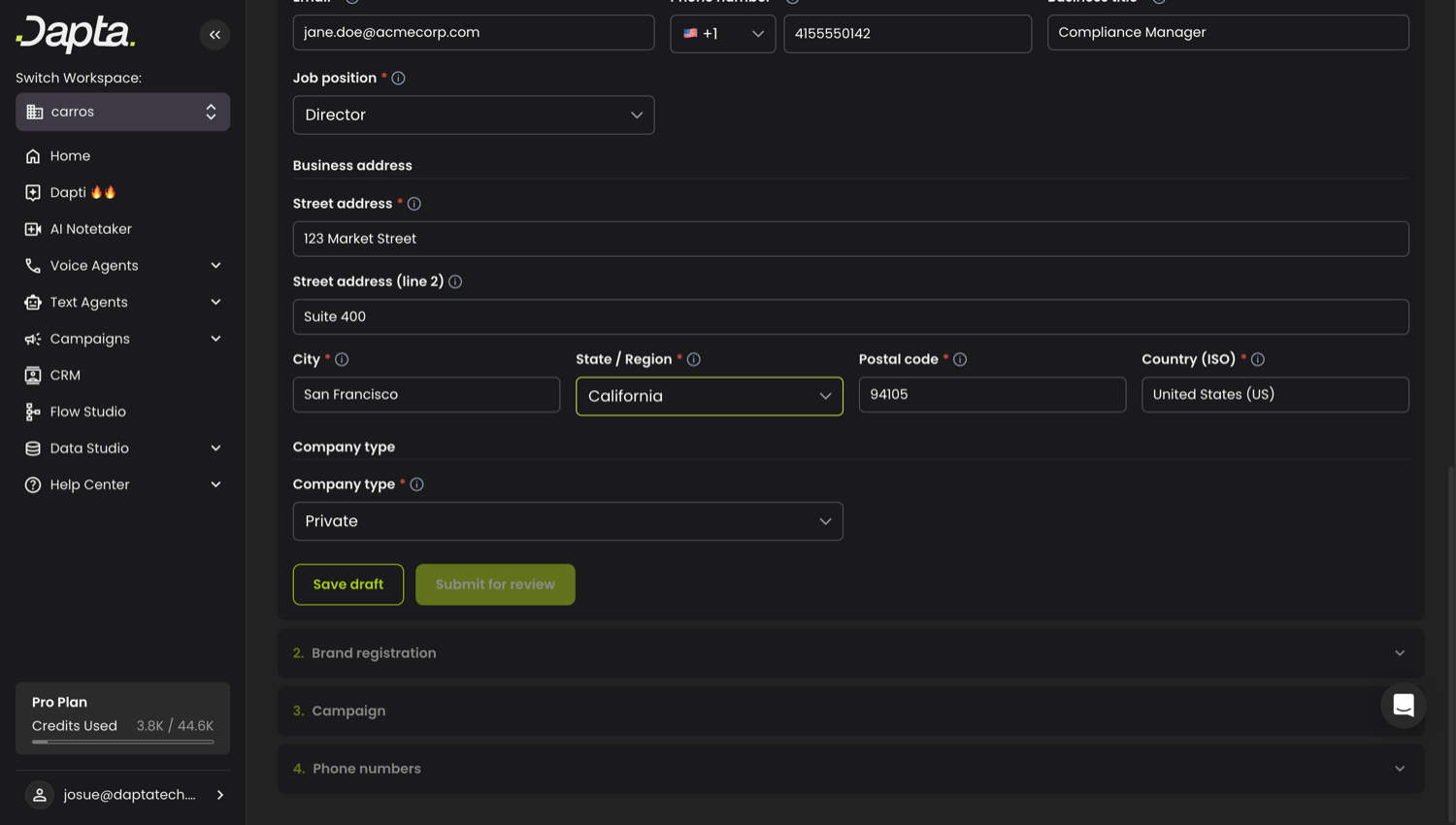
You can **Save draft** at any time to keep your progress, or **Submit for review** when the form is complete. Submitting sends your profile for carrier verification.
Address, company type, and the Save draft / Submit for review actions
***
### Step 2: Brand registration
Once your business profile is submitted, the brand step unlocks. Registering a brand tells the carriers who you are. Choose a brand type:
| Brand type | Best for | One-time cost |
| ----------------------- | ---------------------------------------------------------------------- | ---------------- |
| **Low-Volume Standard** | Most businesses. Up to roughly 1,000 messages per day across sequences | \~5,400 credits |
| **Standard** | Higher throughput and a higher trust score. Includes external vetting | \~55,200 credits |
After you register, the brand moves through these statuses: **Pending → In review → Approved** (or Failed / Suspended). You can refresh the status from the wizard. An approved or pending brand unlocks the sequence step.
***
### Step 3: Sequence
The sequence describes the messages you send and how people consent to receive them. This is the step carriers scrutinize most, so Dapta runs a **pre-submit validation check** that flags blocking issues before you submit.
Fill in:
* **Use case** — the category of messages (for example 2FA, Marketing, Customer Care). It must match what you actually send.
* **Sequence description** — a plain-language explanation of what the sequence does and who receives it (40 to 4096 characters).
* **Message flow (opt-in description)** — exactly how people opt in to receive messages. It must match the consent wording on your website. This is the number one cause of rejection (40 to 2048 characters).
* **Sample messages** — 2 to 5 real examples (20 to 1024 characters each). Include your brand name and at least one with "Reply STOP to unsubscribe".
* **Privacy policy URL** and **Terms and conditions URL** — both are mandatory for new sequences.
* **Embedded content flags** — declare whether messages contain links or phone numbers.
* **Opt-in / opt-out / help keywords** (optional) — the words users text and the replies they receive. Opt-out must include STOP.
**Cost:** \~18,000 credits one-time for vetting, plus a monthly fee per use case (\~1,800 credits/month for the Low-Volume use case, or \~12,000 credits/month for other use cases).
> **💡 Note:** Run **Validate** first. If the check passes you can create the sequence. If it finds blocking issues, fix them and validate again. Advisories are warnings that do not block submission.
The sequence moves through **Pending → In progress → Verified** (or Failed). If a sequence is rejected, you can adjust the editable fields and resubmit. On resubmit the use case and keywords are locked; only the description, message flow, samples, embedded-content flags, privacy policy, and terms can change.
***
### Step 4: Phone numbers
Once the sequence exists, associate your US phone numbers with it. Select the numbers you want to register and click **Associate**.
> **⚠️ Important:** A number can only send US SMS once the sequence is **Verified**. Sending earlier returns error 30034, and you are still charged for the attempt.
***
### Cost summary
All amounts are in Dapta credits.
| Item | Cost |
| -------------------------------------- | ------------------- |
| Low-Volume Standard brand | \~5,400 (one-time) |
| Standard brand | \~55,200 (one-time) |
| Sequence vetting | \~18,000 (one-time) |
| Sequence monthly (Low-Volume use case) | \~1,800 / month |
| Sequence monthly (other use cases) | \~12,000 / month |
***
### Common reasons sequences get rejected
* Legal business name or EIN does not match your registered details
* The opt-in description does not match the consent wording on your website
* Sample messages do not match the selected use case, or omit "Reply STOP to unsubscribe"
* Missing or unreachable privacy policy / terms URLs
* A website that is parked, login-gated, or unrelated to the business
* A personal or free email for the authorized representative
---
# Agent Instructions
This documentation is published with GitBook. GitBook is the documentation platform designed so that both humans and AI agents can read, navigate, and reason over technical content effectively. Learn more at gitbook.com.
## Querying This Documentation
If you need additional information that is not directly available in this page, you can query the documentation by asking a question.
Perform an HTTP GET request on the following URL with the `ask` and `goal` query parameters:
```
GET https://docs.dapta.ai/ai-text-agents/channels/us-sms-compliance-a2p-10dlc.md?ask=&goal=
```
`ask` is the immediate question: it should be specific, self-contained, and written in natural language.
`goal` is what the user is ultimately trying to achieve, the reason they need the answer. Sharing it helps GitBook give you a better, more relevant answer. A goal is most helpful when it describes the outcome the user wants rather than restating the question. For example, with `ask=how do I create an API token`, a goal like `automate deployments from our CI pipeline` lets GitBook tailor the answer to that use case.
The response will contain a direct answer to the question and relevant excerpts and sources from the documentation.
Use this mechanism when the answer is not explicitly present in the current page, you need clarification or additional context, or you want to retrieve related documentation sections.