> For the complete documentation index, see [llms.txt](https://docs.dapta.ai/llms.txt). Markdown versions of documentation pages are available by appending `.md` to page URLs; this page is available as [Markdown](https://docs.dapta.ai/ai-voice-agents/how-to-set-up-your-ai-voice-agent/voice-agent-settings-guide/speech-settings-pronunciation.md).
# Speech Settings - Pronunciation
Teach your voice agent how to pronounce specific names, brands, and terms by mapping a word to how it should sound out loud.
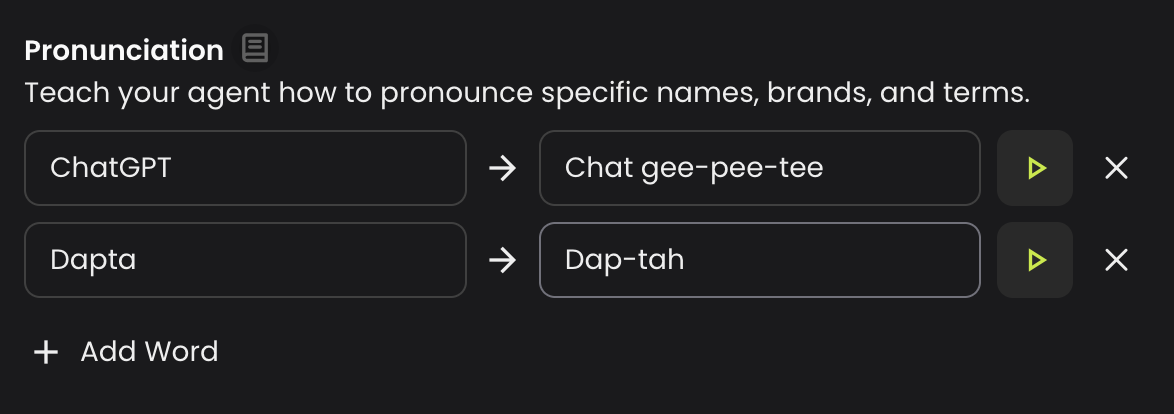
Teach your agent how to pronounce specific names, brands, and terms. Add a word as it's written and tell the agent how to say it out loud, so tricky names always sound right on a call.
Each pronunciation rule has two fields:
* **Word as written** — the term exactly as it appears in your prompt or data (for example, `ChatGPT`).
* **How to say it** — a simple, spelled-out version of how it should sound (for example, `Chat gee-pee-tee`).
When the agent is about to say the written word during a call, it uses your spelled-out version instead.
***
**Adding a rule**
Click **Add Word** to create a new row, then fill in both fields. Use the **play** button (▶) to hear how the spelled-out version sounds in your agent's current voice, and the **✕** button to remove a rule you no longer need.
{% hint style="info" %}
Write the **How to say it** field the way it should *sound*, not the way it's spelled — break the word into syllables and use hyphens or spaces to guide the agent (for example, `Dapta` → `Dap-tah`). The written word can be up to 50 characters and the spoken version up to 100.
{% endhint %}
{% hint style="warning" %}
**Every occurrence of the written word is replaced, including inside longer words.** A rule matches the text wherever it appears, not just when it stands alone. For example, a rule for `am/pm` would also affect words that contain those letters, so `example` or `program` could be mispronounced. Prefer full, distinctive words as your **Word as written** to avoid replacing text you didn't intend.
{% endhint %}
***
**When to use it**
Pronunciation rules are ideal for:
* Brand and product names (`ChatGPT`, `Cal.com`)
* Company or people's names with non-obvious pronunciation
* Acronyms that should be spelled out letter by letter
* Industry-specific or foreign terms
> **💡 Tip:** For pronunciation tweaks that are specific to phone numbers, emails, or codes inside a single prompt, you can also spell them out directly in your instructions — see [Improving pronunciation](/ai-voice-agents/how-to-set-up-your-ai-voice-agent/improving-pronunciation.md).
---
# Agent Instructions
This documentation is published with GitBook. GitBook is the documentation platform designed so that both humans and AI agents can read, navigate, and reason over technical content effectively. Learn more at gitbook.com.
## Querying This Documentation
If you need additional information that is not directly available in this page, you can query the documentation by asking a question.
Perform an HTTP GET request on the following URL with the `ask` and `goal` query parameters:
```
GET https://docs.dapta.ai/ai-voice-agents/how-to-set-up-your-ai-voice-agent/voice-agent-settings-guide/speech-settings-pronunciation.md?ask=&goal=
```
`ask` is the immediate question: it should be specific, self-contained, and written in natural language.
`goal` is what the user is ultimately trying to achieve, the reason they need the answer. Sharing it helps GitBook give you a better, more relevant answer. A goal is most helpful when it describes the outcome the user wants rather than restating the question. For example, with `ask=how do I create an API token`, a goal like `automate deployments from our CI pipeline` lets GitBook tailor the answer to that use case.
The response will contain a direct answer to the question and relevant excerpts and sources from the documentation.
Use this mechanism when the answer is not explicitly present in the current page, you need clarification or additional context, or you want to retrieve related documentation sections.