> For the complete documentation index, see [llms.txt](https://docs.dapta.ai/llms.txt). Markdown versions of documentation pages are available by appending `.md` to page URLs; this page is available as [Markdown](https://docs.dapta.ai/ai-voice-agents/voice-emotions.md).
# Voice Emotions
Give your voice agent emotional expression. Pick an expressive voice using the Emotionality rating, and see the emotions your agent used right inside the call transcript.
**Voice Emotions** lets your AI voice agent speak with emotional tone instead of a flat, monotone delivery. Expressive voices can sound warm, excited, empathetic, or firm depending on the moment in the conversation, and you can review exactly which emotions the agent used directly in the call transcript.
{% hint style="info" %}
Emotions are **expressed by your agent's voice** — they are chosen to fit the conversation as the agent speaks. This is not sentiment analysis of the customer; the tags you see in the transcript reflect how the **agent** delivered each line.
{% endhint %}
## Emotionality
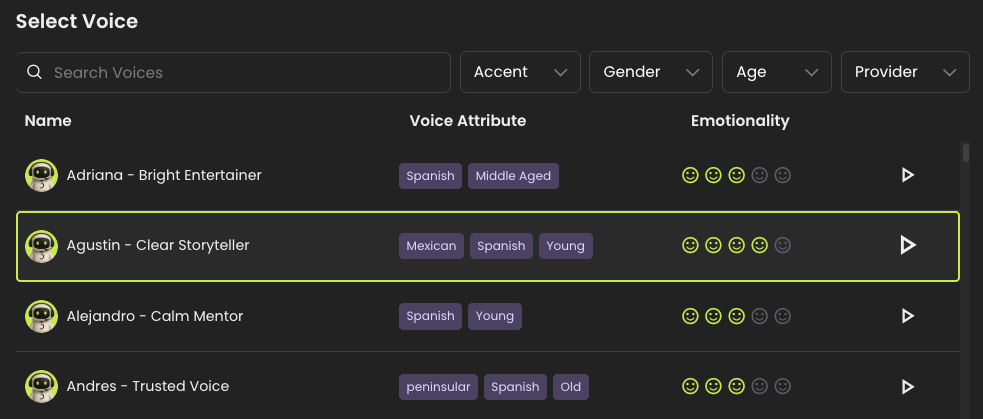
Not every voice can express emotion. When you pick a voice, the **Select Voice** window shows an **Emotionality** rating for each voice so you can tell at a glance how expressive it is.
The rating is shown as a row of up to **five faces** — the more faces that are filled in (green), the more emotionally expressive the voice. Voices that don't support emotional expression show a dash (**—**) in the **Emotionality** column.
The Emotionality rating in the Select Voice window.
> **💡 Tip:** Pick a voice with a higher **Emotionality** rating when your use case benefits from a warmer, more human delivery — for example surveys, customer care, or sensitive conversations.
## Emotion tags in the transcript
When your agent uses an expressive voice, its spoken lines in the **call transcript** are annotated with **emotion tags** — small colored labels that show the tone the agent used for that part of the message.
Your agent can express the following emotions:
| Tag | When the agent uses it |
| ----------- | -------------------------------------------- |
| **Content** | Calm, warm, reassuring tone |
| **Excited** | Enthusiasm, good news, positive energy |
| **Sad** | Empathy, apologies, sensitive topics |
| **Angry** | Firm or assertive responses (used sparingly) |
| **Scared** | Concern or a sense of urgency |
Emotion tags shown inline on the agent's lines in the transcript.
A few details on how the tags display:
* The first time an emotion appears in a transcript it shows as a full **colored tag**. If the **same** emotion comes up again later, it appears as a small colored **dot** to keep the transcript easy to read — hover over the dot to see its label.
* A **neutral** tone is the default and is **not** tagged, so untagged text simply means the agent spoke neutrally there.
---
# Agent Instructions
This documentation is published with GitBook. GitBook is the documentation platform designed so that both humans and AI agents can read, navigate, and reason over technical content effectively. Learn more at gitbook.com.
## Querying This Documentation
If you need additional information that is not directly available in this page, you can query the documentation dynamically by asking a question.
Perform an HTTP GET request on the current page URL with the `ask` query parameter, and the optional `goal` query parameter:
```
GET https://docs.dapta.ai/ai-voice-agents/voice-emotions.md?ask=&goal=
```
`ask` is the immediate question: it should be specific, self-contained, and written in natural language.
`goal` is optional and describes the broader end goal you are ultimately trying to accomplish on behalf of the user. GitBook uses it to tailor the answer towards what is most useful for that goal.
The response will contain a direct answer to the question and relevant excerpts and sources from the documentation.
Use this mechanism when the answer is not explicitly present in the current page, you need clarification or additional context, or you want to retrieve related documentation sections.