> For the complete documentation index, see [llms.txt](https://docs.dapta.ai/llms.txt). Markdown versions of documentation pages are available by appending `.md` to page URLs; this page is available as [Markdown](https://docs.dapta.ai/dapta-docs-es/integraciones/salesforce.md).
# Salesforce
Cómo conectar Dapta y Salesforce
La integración con Salesforce es un proceso que requiere varios pasos de configuración en Salesforce antes de cualquier conexión o configuración en Dapta. Estos son los pasos:
\
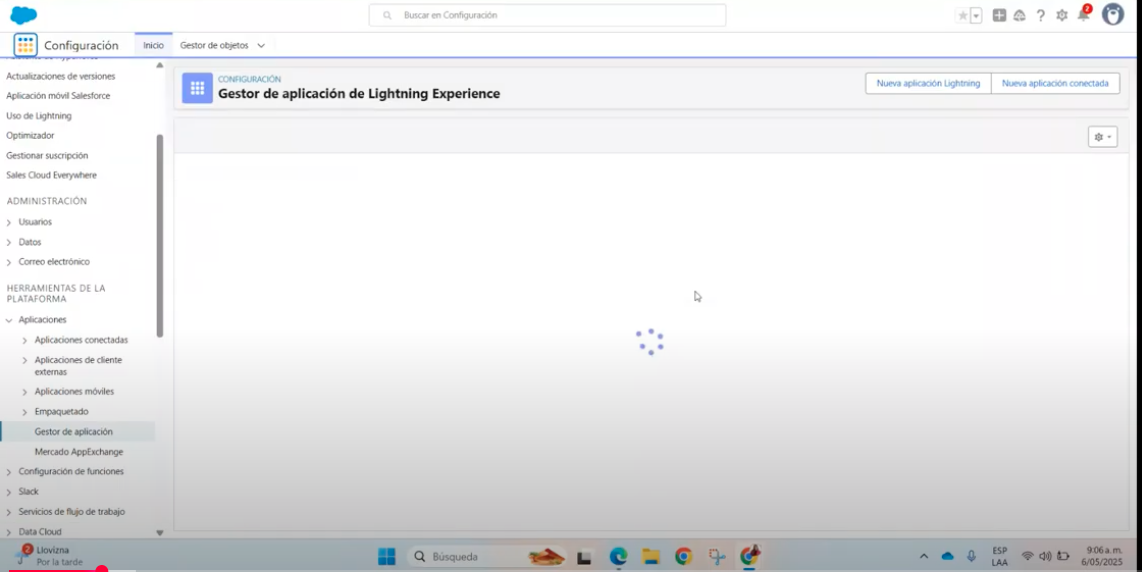
**Ingrese a Configuración**
Abra su cuenta de Salesforce y vaya a la configuración de ajustes en la parte superior derecha con el ícono de la herramienta.
**Configuración de la aplicación**
Vaya a “Herramientas de la plataforma” y al apartado llamado “Gestión de aplicaciones” si está configurado en inglés o “Gestor de aplicaciones” en español
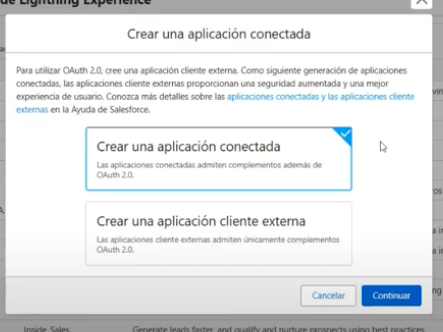
**Nueva aplicación**
Haga clic en "Crear nueva aplicación". Es muy importante que, si aparecen dos opciones para crearla, elijas "Nueva aplicación conectada" y luego "Crear una aplicación conectada".
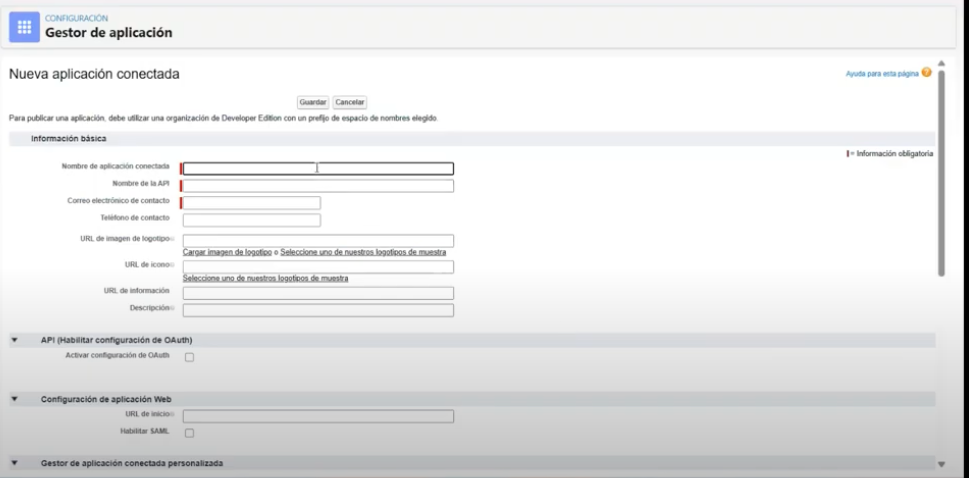
**Dapta URL**
Una vez en esta pantalla, asegúrese de completar la información requerida de Dapta.
Para el nombre, puede usar cualquier nombre que le ayude a identificar la aplicación. Se recomienda algo como "Dapta conector". Para el correo electrónico, puede configurar uno propio para recibir correos electrónicos de Salesforce que detecten inconsistencias.
\
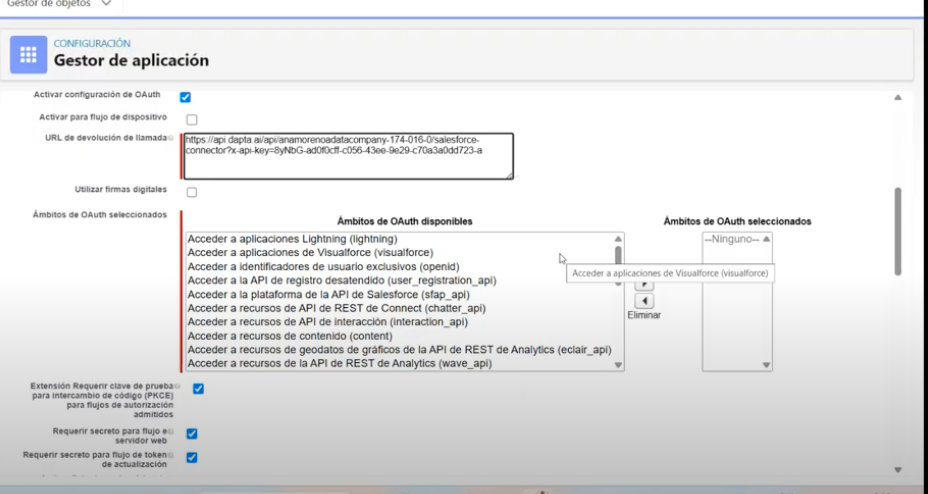
**Definición de permisos**
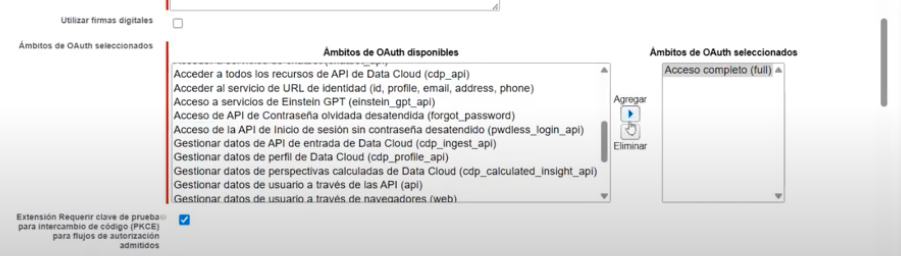
Una vez configurado, verifique los permisos necesarios. Para este tipo de integración, es fundamental configurar los permisos en "Acceso completo" para poder realizar operaciones de lectura y escritura a través de la API de Salesforce.
También es importante verificar las opciones "Activar la configuración de OAuth" y "Requerir secreto" para la actualización del servidor web y del token. También se requiere la clave para "PKCE".
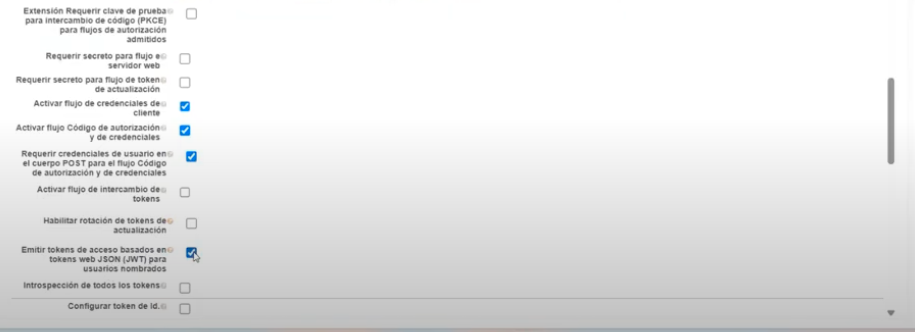
El último paso es verificar estas cuatro opciones:
Estas opciones son "Activar el flujo de credenciales del cliente", "Activar el flujo de autorización y credenciales", "Requerir credenciales de usuario en el cuerpo POST para el flujo de autorización y credenciales" y "Emitir token de acceso basado en tokens web JSON (JWT) para usuarios designados". Estas nos permitirán conexión mediante la API de Salesforce. Al guardar, se creará la aplicación.
**Ejecutar como usuario administrador**
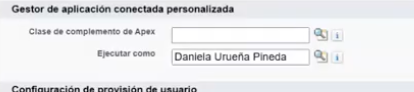
Una vez creada la app puedes ir a la opción “Modificar” en las tres pestañas superiores e ir a la opción “Administrador de apps conectadas”
ESTO ES MUY IMPORTANTE. Asegúrese de marcar la opción "Ejecutar como" y de escribir su nombre de usuario. Esto no es muy intuitivo, pero debe escribir el nombre de usuario que aparece en su cuenta de Salesforce en la esquina superior derecha.
Asegúrese de escribirlo tal como aparece en la plataforma. Si no completa este paso, la conexión no funcionará.
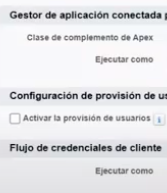
Asegúrese de escribir también su nombre de usuario en la sección "Credenciales del cliente".
**Solicitar el token auth**
Una vez creada la aplicación, asegúrese de ir a “Administrar” y seleccionar la opción “Administrar” en “clave y secreto del consumidor”.
Esto le proporcionará la “clave del consumidor” y el “secreto del cliente”.

**Realizar las solicitudes de API**
Una vez que tenga toda la información, puede proceder a completar las solicitudes a través de Dapta.
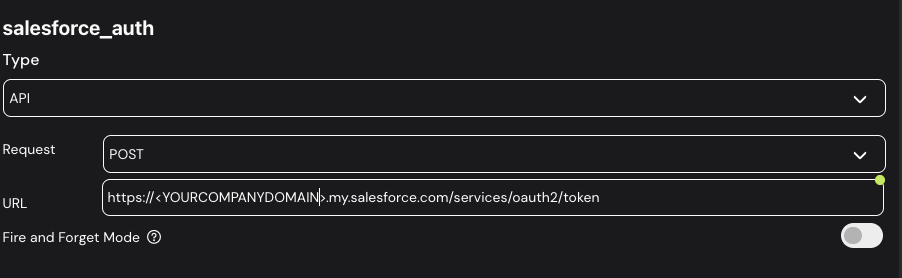
Lo primero que necesitará es un nodo de API personalizado con un método POST que solicite el token de Salesforce de esta manera.
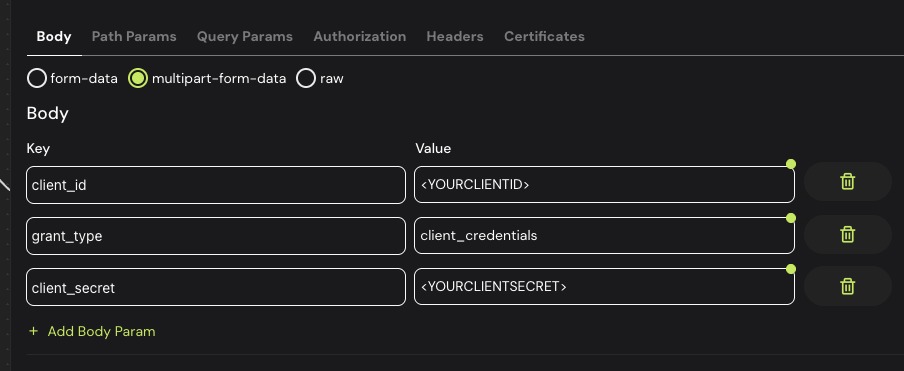
Asegúrese de reemplazar “YOURCOMPANYDOMAIN” con el dominio real de su empresa y agregue el siguiente cuerpo que contendrá las credenciales que extrajo en los pasos anteriores.
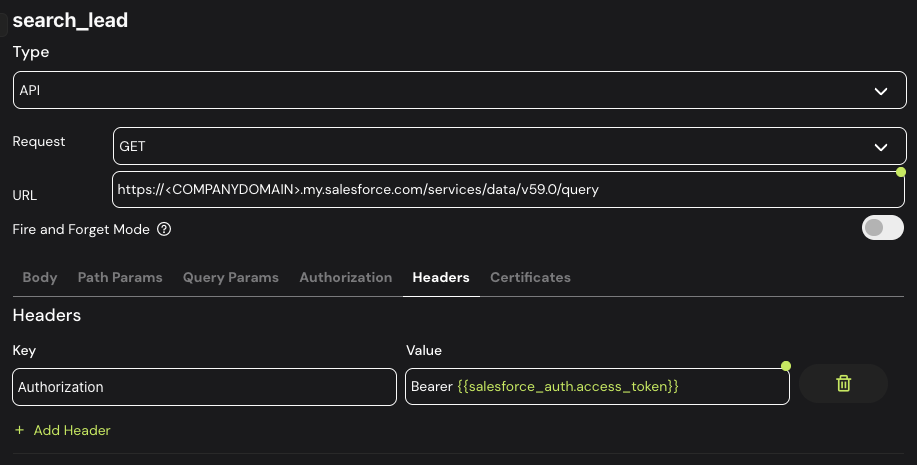
Este método de publicación generará un token con el que podrá realizar cualquier solicitud get o post agregándolo al encabezado como un token Bearer.
**Recomendaciones**
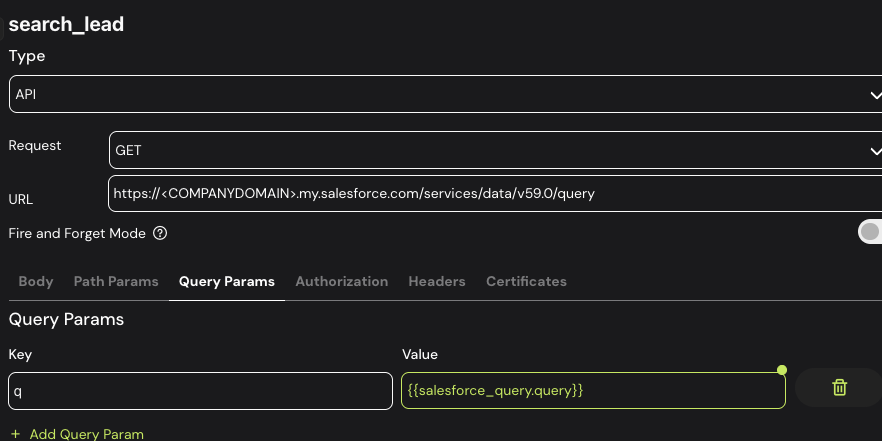
La API de Salesforce le permite realizar consultas basadas en un formato SQL, por lo que si desea buscar información en particular, puede hacerlo configurando el siguiente cuerpo en el punto final ejemplificado anteriormente.

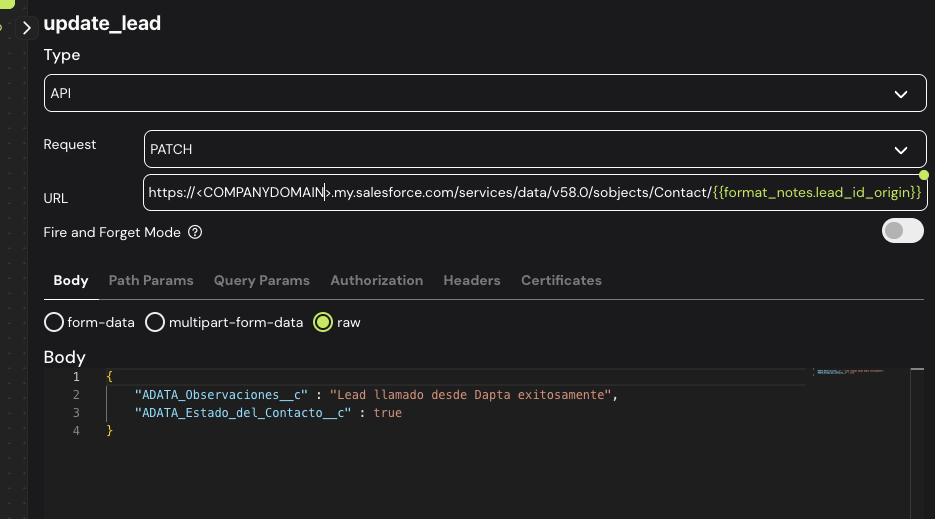
Si desea publicar información, ya sea actualizando objetos o creando nuevos, puede utilizar los métodos PATCH y POST habituales con la estructura de información que tenga en su CRM.
---
# Agent Instructions
This documentation is published with GitBook. GitBook is the documentation platform designed so that both humans and AI agents can read, navigate, and reason over technical content effectively. Learn more at gitbook.com.
## Querying This Documentation
If you need additional information that is not directly available in this page, you can query the documentation by asking a question.
Perform an HTTP GET request on the following URL with the `ask` and `goal` query parameters:
```
GET https://docs.dapta.ai/dapta-docs-es/integraciones/salesforce.md?ask=&goal=
```
`ask` is the immediate question: it should be specific, self-contained, and written in natural language.
`goal` is what the user is ultimately trying to achieve, the reason they need the answer. Sharing it helps GitBook give you a better, more relevant answer. A goal is most helpful when it describes the outcome the user wants rather than restating the question. For example, with `ask=how do I create an API token`, a goal like `automate deployments from our CI pipeline` lets GitBook tailor the answer to that use case.
The response will contain a direct answer to the question and relevant excerpts and sources from the documentation.
Use this mechanism when the answer is not explicitly present in the current page, you need clarification or additional context, or you want to retrieve related documentation sections.