> For the complete documentation index, see [llms.txt](https://docs.dapta.ai/llms.txt). Markdown versions of documentation pages are available by appending `.md` to page URLs; this page is available as [Markdown](https://docs.dapta.ai/dapta-forms/builder/create-a-form.md).

# Create a form

Create a new Dapta Form from the Forms page: name it, choose between the Slides and One page layouts, start from scratch or from a template, and duplicate or delete forms from the list.

Every form starts from the **Forms** page. You give it a name, pick how questions are shown, and then either start with a blank canvas or load one of four ready-made templates that you can edit live.

***

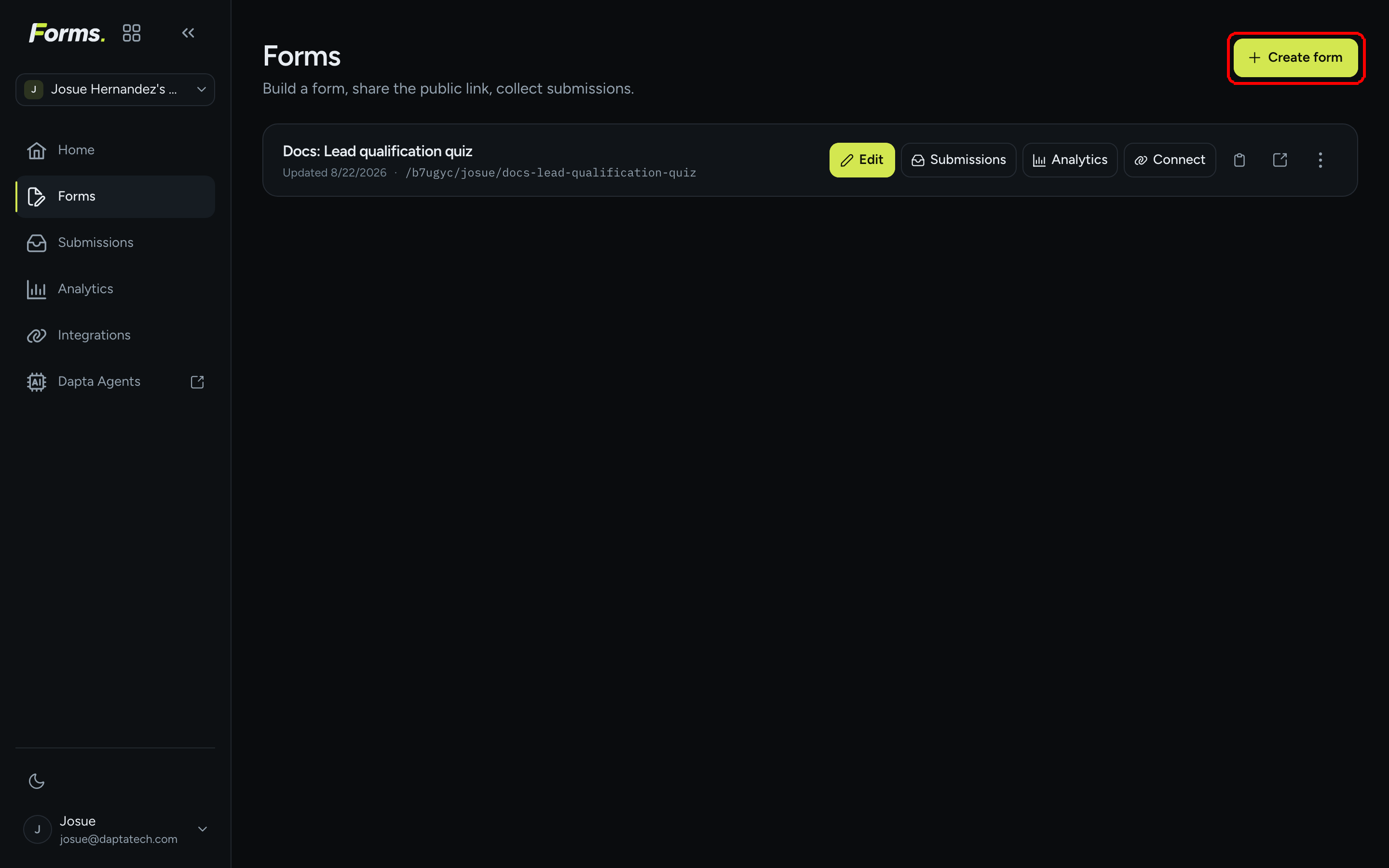
**Step 1:** Sign in at [forms.dapta.ai](https://forms.dapta.ai), open **Forms** in the left menu and click **Create form** in the top right corner.

<figure><img src="https://3835013762-files.gitbook.io/~/files/v0/b/gitbook-x-prod.appspot.com/o/spaces%2FCy5rSNtQmtqYCGzJlNEB%2Fuploads%2Fgit-blob-2796b0a6c2b31565101baee6c6fc2928b1cc3672%2Fforms-create-a-form-01-create-button.png?alt=media" alt="The Forms page with the Create form button highlighted in the top right corner"><figcaption><p>Every form you own is listed here. <strong>Create form</strong> opens the new form dialog.</p></figcaption></figure>

***

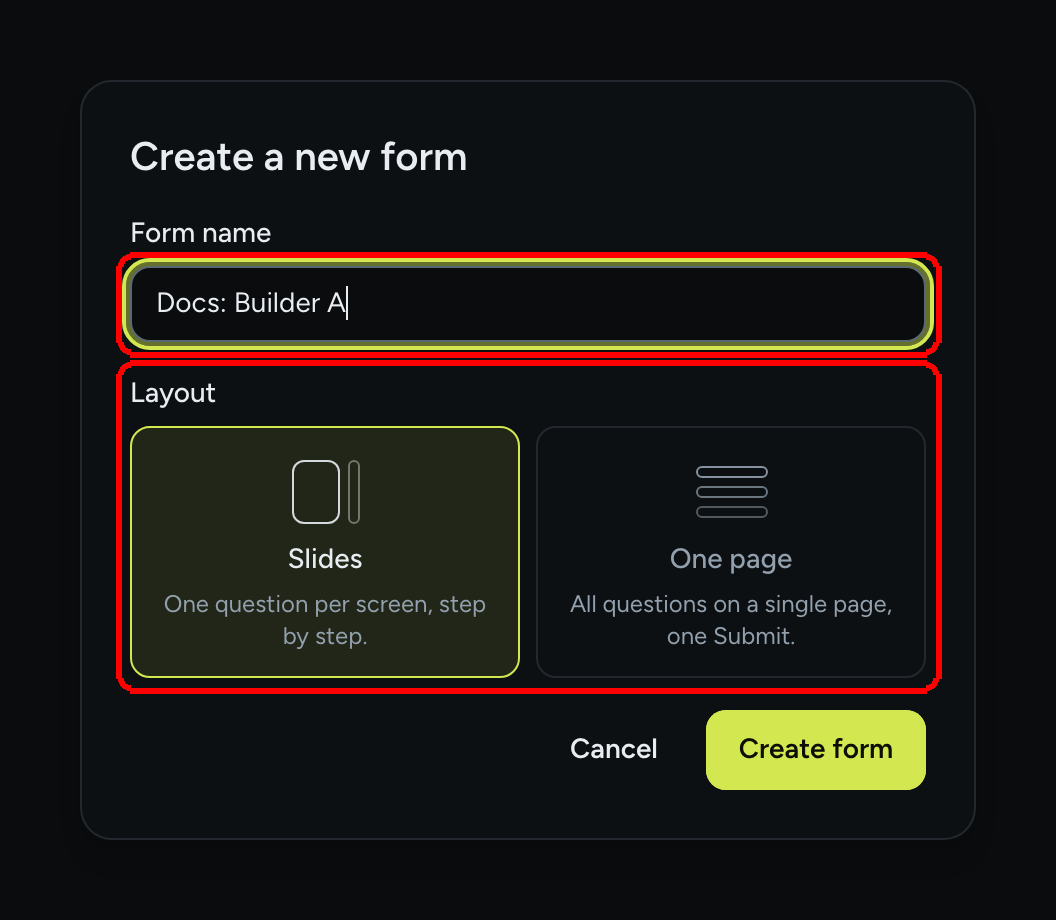
**Step 2:** In the **Create a new form** dialog, type a **Form name** and pick a **Layout**. Click **Create form**.

<figure><img src="https://3835013762-files.gitbook.io/~/files/v0/b/gitbook-x-prod.appspot.com/o/spaces%2FCy5rSNtQmtqYCGzJlNEB%2Fuploads%2Fgit-blob-c60b7fc5085541597ea2367f1215688642c8aa65%2Fforms-create-a-form-02-dialog.png?alt=media" alt="Create a new form dialog with the Form name field and the Slides and One page layout cards"><figcaption><p>The name is required (<strong>Give your form a name.</strong> appears if you leave it empty). The layout can be changed later.</p></figcaption></figure>

| Layout       | What respondents see                                                                                                                                                       |
| ------------ | -------------------------------------------------------------------------------------------------------------------------------------------------------------------------- |
| **Slides**   | One question per screen, step by step. Respondents move with **Next**, single choice questions advance on tap, and the progress bar fills as they go. This is the default. |
| **One page** | All questions on a single page, one **Submit**. The whole form is visible at once and is validated when the respondent submits.                                            |

The form name is internal: it is what you see in the Forms list and in the editor topbar. It also generates the public slug (for example `Lead qualification quiz` becomes `docs-builder-a`), and the slug is made unique automatically if another form already uses it. You can rename the form at any time by clicking its name in the editor topbar.

> **💡 Tip:** You can switch between **Slides** and **One page** later from **Design → Layout**. Read [One-page layout](/dapta-forms/builder/one-page-layout.md) to see what changes when every question sits on a single page.

***

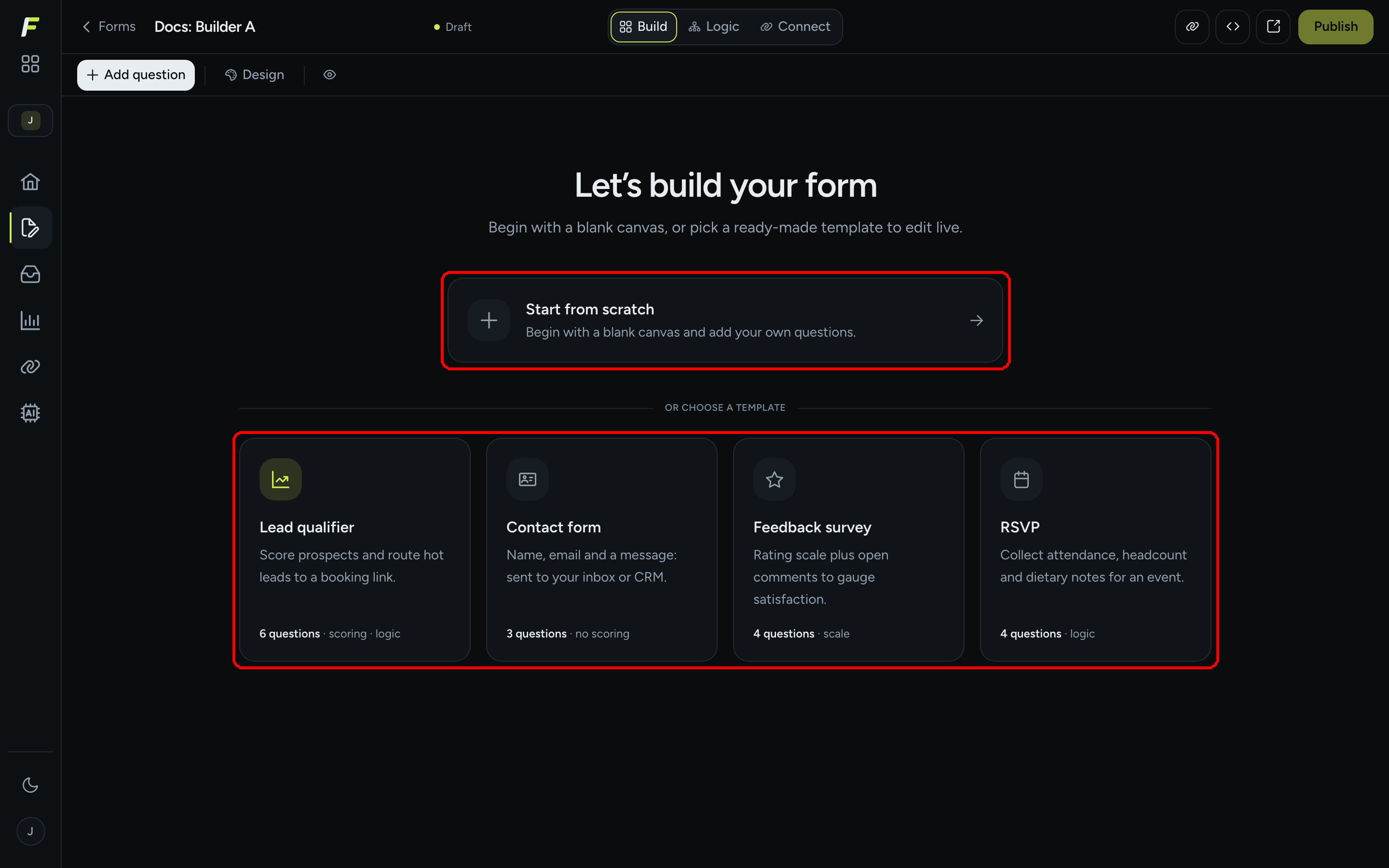
**Step 3:** The editor opens on the empty state **Let's build your form**. Choose how you want to begin:

<figure><img src="https://3835013762-files.gitbook.io/~/files/v0/b/gitbook-x-prod.appspot.com/o/spaces%2FCy5rSNtQmtqYCGzJlNEB%2Fuploads%2Fgit-blob-e2cb54c004b64437bb4ee907c4589d018c2c870c%2Fforms-create-a-form-03-empty-state.png?alt=media" alt="The editor empty state with the Start from scratch card and the four templates Lead qualifier, Contact form, Feedback survey and RSVP"><figcaption><p>Start blank, or pick a template and edit it live.</p></figcaption></figure>

* **Start from scratch** opens the **Add a question** gallery so you can drop in your first question. See [Question types](/dapta-forms/builder/question-types.md).
* **Or choose a template** loads a complete form you can edit right away:

| Template            | What it contains                                                                        |
| ------------------- | --------------------------------------------------------------------------------------- |
| **Lead qualifier**  | 6 questions · scoring · logic. Scores prospects and routes hot leads to a booking link. |
| **Contact form**    | 3 questions · no scoring. Name, email and a message, sent to your inbox or CRM.         |
| **Feedback survey** | 4 questions · scale. A rating scale plus open comments to gauge satisfaction.           |
| **RSVP**            | 4 questions · logic. Collects attendance, headcount and dietary notes for an event.     |

Templates are a starting point, not a lock-in: every question, option, point value and rule they bring can be edited or deleted like anything you add yourself.

***

**Step 4:** Build, preview and publish. Nothing is public until you click **Publish** in the topbar. Your edits are saved automatically all along: the status pill next to the form name reads **Draft** while the form still has no questions, and **Saved** from the first question onwards. See [Building Forms](/dapta-forms/builder.md) for the editor tour and [Autosave, drafts & publishing](/dapta-forms/builder/autosave-and-publishing.md).

***

## Duplicate or delete a form

Back on the **Forms** page, each row has quick actions (**Edit**, **Submissions**, **Analytics**, **Connect**, **Copy link**, **Open form**) and a **⋮** menu on the far right with two more:

* **Duplicate** creates a copy named `{name} (copy)` with the same questions, logic, design and settings. Submissions are not copied. The copy starts as a draft with its own public slug.
* **Delete** asks **Delete this form and all its submissions?** and, if you confirm, removes the form together with its submissions, analytics events, bookings and per-form notification settings. There is no undo.

> **⚠️ Note:** There is no "unpublish" action. If a form must stop accepting answers, delete it, or remove the link from wherever you shared it.

## What's next

* [Building Forms](/dapta-forms/builder.md): a tour of the editor.
* [Question types](/dapta-forms/builder/question-types.md): the 14 question tiles and how to add them.
* [Preview on desktop, tablet and mobile](/dapta-forms/builder/preview.md): check the form before you publish.


---

# Agent Instructions
This documentation is published with GitBook. GitBook is the documentation platform designed so that both humans and AI agents can read, navigate, and reason over technical content effectively. Learn more at gitbook.com.

## Querying This Documentation
If you need additional information that is not directly available in this page, you can query the documentation dynamically by asking a question.

Perform an HTTP GET request on the current page URL with the `ask` query parameter, and the optional `goal` query parameter:

```
GET https://docs.dapta.ai/dapta-forms/builder/create-a-form.md?ask=<question>&goal=<endgoal>
```

`ask` is the immediate question: it should be specific, self-contained, and written in natural language.
`goal` is optional and describes the broader end goal you are ultimately trying to accomplish on behalf of the user. GitBook uses it to tailor the answer towards what is most useful for that goal.

The response will contain a direct answer to the question and relevant excerpts and sources from the documentation.

Use this mechanism when the answer is not explicitly present in the current page, you need clarification or additional context, or you want to retrieve related documentation sections.