> For the complete documentation index, see [llms.txt](https://docs.dapta.ai/llms.txt). Markdown versions of documentation pages are available by appending `.md` to page URLs; this page is available as [Markdown](https://docs.dapta.ai/dapta-forms/connect/delivery-and-retries.md).

# Delivery, retries & history

How Dapta Forms delivers submissions to webhooks, HubSpot and email without ever blocking a respondent: the queue, the retry schedule with backoff, what Delivered, In progress, Failed and Skipped mean

Every integration in Dapta Forms follows the same rule: **store the submission first, deliver afterwards, retry on failure, and keep a log.** This page explains that pipeline so you know what to expect when an endpoint is slow, a CRM is down, or a respondent submits twice.

***

## Nothing blocks a submission

When a respondent passes the partial submit point or finishes the form, their answers are saved immediately and they see the next step or the ending screen. Only then does Dapta Forms queue one delivery per enabled integration:

| Integration      | What gets queued                                          | On which phase                                                                                               |
| ---------------- | --------------------------------------------------------- | ------------------------------------------------------------------------------------------------------------ |
| **Webhook**      | One POST per webhook                                      | Partial and/or complete, per the **Trigger on** boxes                                                        |
| **HubSpot**      | Contact upsert and mapped properties                      | Partial and complete (score, outcome, static properties, note and form-submission activity only on complete) |
| **Emails**       | **New submission notice** and **Respondent confirmation** | Complete only                                                                                                |
| **Booking sync** | HubSpot booking properties                                | After a scheduler booking                                                                                    |

A slow or broken destination therefore never slows the respondent down, and it never loses the answers: the submission is already in **Submissions** and the CSV export before any delivery is attempted.

***

## Retry schedule

A delivery is picked up within a few seconds. If it fails (non-2xx status, redirect, timeout after 10 seconds, network error, provider error) it is retried with exponential backoff: about **1 s, 2 s, 4 s, 8 s…** between attempts, capped at 5 minutes, for a maximum of **5 attempts**. While retries are pending the row reads **In progress** and the attempt count increases.

<figure><img src="https://3835013762-files.gitbook.io/~/files/v0/b/gitbook-x-prod.appspot.com/o/spaces%2FCy5rSNtQmtqYCGzJlNEB%2Fuploads%2Fgit-blob-fdc02ef1ddf31e17592e47b4543d8a07d5fa4350%2Fforms-delivery-and-retries-02-in-progress.png?alt=media" alt="The Webhook history dialog with two rows marked In progress, HTTP 500, 2 attempts"><figcaption><p>Between retries a delivery shows as <strong>In progress</strong> with its attempt count.</p></figcaption></figure>

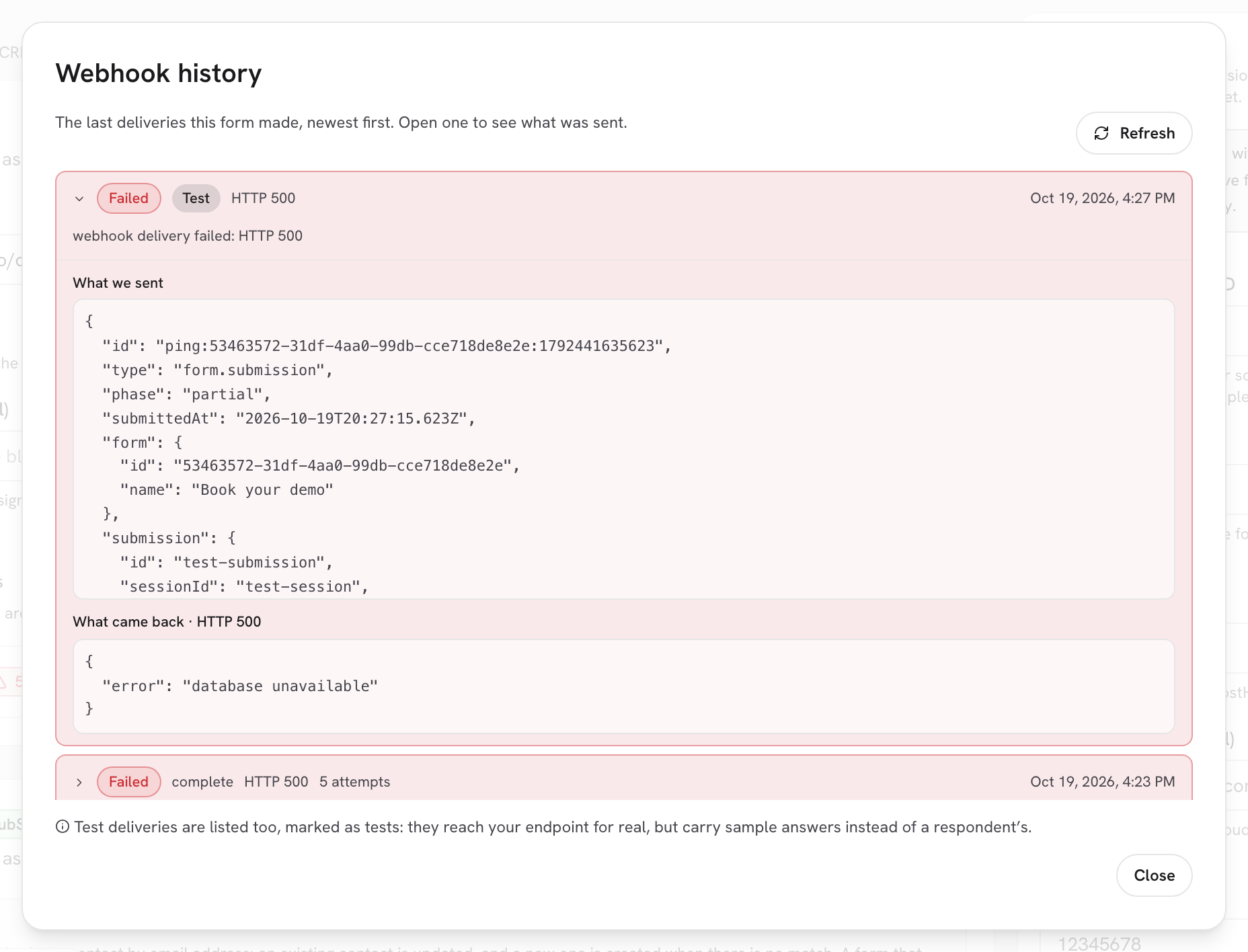
After the fifth failure the delivery is marked **Failed** and kept as a record, with the last error and the endpoint's last response.

<figure><img src="https://3835013762-files.gitbook.io/~/files/v0/b/gitbook-x-prod.appspot.com/o/spaces%2FCy5rSNtQmtqYCGzJlNEB%2Fuploads%2Fgit-blob-0cb98abb7b0b1aac3f26d71de2ca8cd8519f6a61%2Fforms-delivery-and-retries-03-failed-row.png?alt=media" alt="A Failed row expanded in the Webhook history dialog showing 5 attempts, the body under What we sent and the response under What came back HTTP 500"><figcaption><p>A delivery that gave up after <strong>5 attempts</strong>. The transcript stays available.</p></figcaption></figure>

***

## What the statuses mean

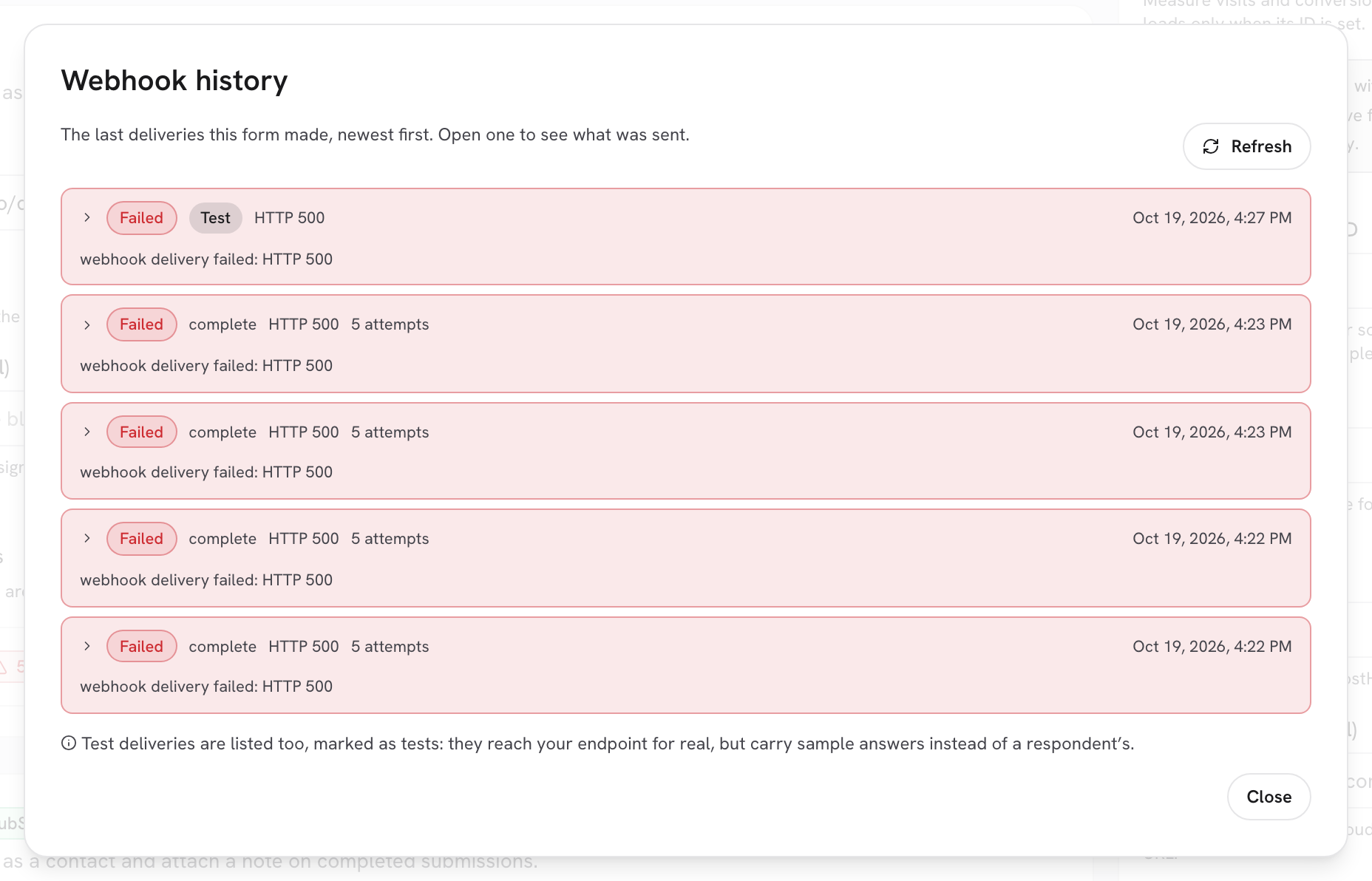
<figure><img src="https://3835013762-files.gitbook.io/~/files/v0/b/gitbook-x-prod.appspot.com/o/spaces%2FCy5rSNtQmtqYCGzJlNEB%2Fuploads%2Fgit-blob-7d6da891fb691c8cd0c53343357d1ba34e49032b%2Fforms-delivery-and-retries-01-history-statuses.png?alt=media" alt="The Webhook history dialog listing Delivered rows, some with a Test badge"><figcaption><p>Status pills and the <strong>Test</strong> badge in a history dialog.</p></figcaption></figure>

| Status          | Meaning                                                                                                                                                                                                  | Retried?                                                                       |
| --------------- | -------------------------------------------------------------------------------------------------------------------------------------------------------------------------------------------------------- | ------------------------------------------------------------------------------ |
| **Delivered**   | The destination accepted it (2xx for a webhook, a successful API call for HubSpot, the mail was handed off for emails).                                                                                  | No need.                                                                       |
| **In progress** | Queued, being sent, or waiting for its next attempt.                                                                                                                                                     | Yes, automatically.                                                            |
| **Failed**      | Retries exhausted. The row keeps the last error message and, for webhooks, **What came back**.                                                                                                           | No. Fix the destination; the next submission or **Send test** will go through. |
| **Skipped**     | Deliberately not performed because it could no longer apply (for example a booking sync on a form whose HubSpot destination was turned off in the meantime). Recorded once with a reason, never retried. | No.                                                                            |

> **⚠️ Note:** There is no manual resend button. Failed deliveries are a log, not a queue you can replay. If a lead was lost because your endpoint was down, export the submission from **Submissions** or ask the respondent to submit again.

***

## Per-integration history

Every card in the **Connect** tab has its own log: **Webhook history**, **HubSpot history** and **Email history**, each opened with **View history** and showing the latest 25 rows, newest first. Webhook rows include the full request and response; HubSpot rows include the action and any error the CRM returned; email rows show which notice was sent.

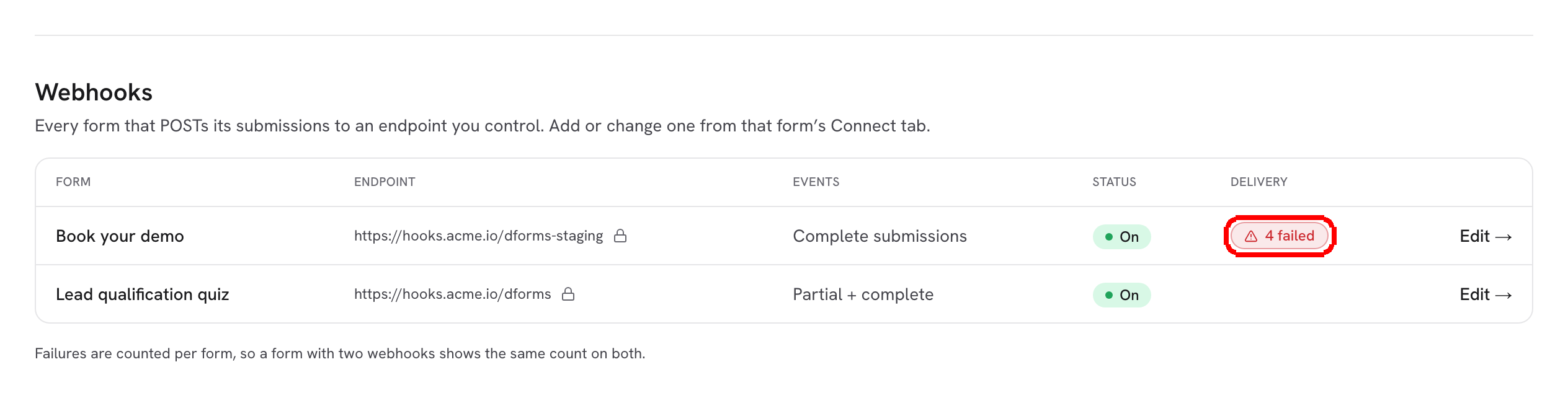
At the account level, the **Webhooks** inventory on the [Connections](/dapta-forms/connect/connections.md) page shows a **Delivery** column per form: empty when healthy, or a red **{n} failed** with **Last failure {date}**. Failures are counted per form, so a form with two webhooks shows the same count on both rows.

<figure><img src="https://3835013762-files.gitbook.io/~/files/v0/b/gitbook-x-prod.appspot.com/o/spaces%2FCy5rSNtQmtqYCGzJlNEB%2Fuploads%2Fgit-blob-54b662bb64626d3cfdefb75f1bf167892d346b91%2Fforms-delivery-and-retries-04-connections-delivery.png?alt=media" alt="The Webhooks table on the Connections page with a red 4 failed badge in the Delivery column"><figcaption><p>The inventory flags forms whose webhook has failed deliveries.</p></figcaption></figure>

***

## No duplicates on resubmit

Each delivery carries an idempotency key (`submission:{submissionId}:{phase}:webhook:{index}`, sent as `x-forms-delivery` and as `id` in the body). If the same session submits the same phase again, for example because the respondent went back and pressed Submit twice, pending deliveries for that phase are replaced rather than doubled, and a phase that already landed is not queued again. HubSpot is keyed by the respondent's email, so a repeat updates the same contact instead of creating a new one. On your own endpoint, store the key and ignore a request whose key you already processed.

## What's next

* [Webhooks](/dapta-forms/connect/webhooks.md) and [Test & delivery history](/dapta-forms/connect/webhooks/test-and-history.md)
* [How the HubSpot sync works & troubleshooting](/dapta-forms/connect/hubspot/how-sync-works.md)
* [Submission emails](/dapta-forms/connect/emails.md)
* [Troubleshooting](/dapta-forms/troubleshooting.md)


---

# Agent Instructions
This documentation is published with GitBook. GitBook is the documentation platform designed so that both humans and AI agents can read, navigate, and reason over technical content effectively. Learn more at gitbook.com.

## Querying This Documentation
If you need additional information that is not directly available in this page, you can query the documentation dynamically by asking a question.

Perform an HTTP GET request on the current page URL with the `ask` query parameter, and the optional `goal` query parameter:

```
GET https://docs.dapta.ai/dapta-forms/connect/delivery-and-retries.md?ask=<question>&goal=<endgoal>
```

`ask` is the immediate question: it should be specific, self-contained, and written in natural language.
`goal` is optional and describes the broader end goal you are ultimately trying to accomplish on behalf of the user. GitBook uses it to tailor the answer towards what is most useful for that goal.

The response will contain a direct answer to the question and relevant excerpts and sources from the documentation.

Use this mechanism when the answer is not explicitly present in the current page, you need clarification or additional context, or you want to retrieve related documentation sections.