> For the complete documentation index, see [llms.txt](https://docs.dapta.ai/llms.txt). Markdown versions of documentation pages are available by appending `.md` to page URLs; this page is available as [Markdown](https://docs.dapta.ai/dforms/connect/webhooks/payload-reference.md).
# Payload & headers reference
The exact JSON body and HTTP headers dForms sends to a webhook: form, submission, data, utm and visit objects, the partial or complete phase, the x-forms-event, x-forms-delivery, x-forms-timestamp and
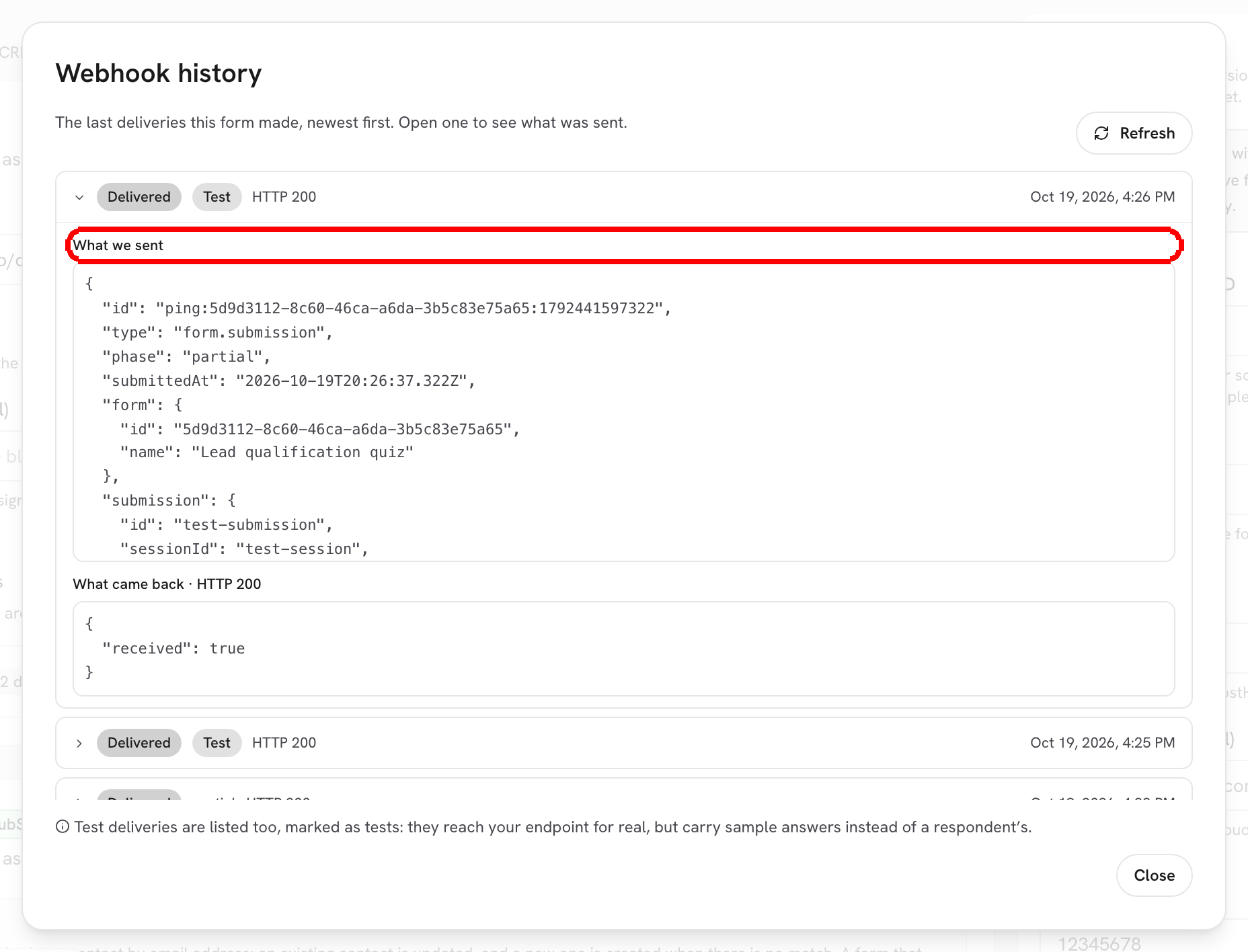
Every webhook delivery is a `POST` with a JSON body in one stable shape. This page documents that shape field by field, the headers that travel with it, and what is different in a test delivery. You can see the exact body of any past delivery in the **Webhook history** dialog under **What we sent**.
Open any delivery in Webhook history to read the body that was sent.
***
## Sample body
The shape below is real; the values are made up. Keys inside `data` are your own **Field key**s from the Build tab.
```json
{
"id": "submission:6f1c0c2e-7d2a-4c9b-9e41-2f3a1b5c8d90:complete:webhook:0",
"type": "form.submission",
"phase": "complete",
"submittedAt": "2026-08-22T02:13:04.790Z",
"form": {
"id": "19511bc5-a8e0-4445-b9b7-05bfffbb73a2",
"name": "Lead qualification quiz"
},
"submission": {
"id": "6f1c0c2e-7d2a-4c9b-9e41-2f3a1b5c8d90",
"sessionId": "e19fd932-ee1f-4454-bf03-3418bdf54edb",
"score": 12,
"outcome": "Hot lead"
},
"data": {
"email_1": "ada@example.com",
"multiple_choice_2": "option_1",
"firstname": "Jane",
"lastname": "Doe",
"utm": {
"utm_source": "docs",
"utm_medium": "guide",
"utm_campaign": "webhooks"
}
},
"utm": {
"utm_source": "docs",
"utm_medium": "guide",
"utm_campaign": "webhooks"
},
"visit": {
"pageUri": "https://www.example.com/pricing?utm_source=docs&utm_medium=guide&utm_campaign=webhooks",
"pageName": "Pricing | Example",
"embedded": true,
"hutk": "0a1b2c3d4e5f60718293a4b5c6d7e8f9"
}
}
```
## Fields
| Field | Type | Meaning |
| ---------------------- | -------------- | ----------------------------------------------------------------------------------------------------------------------------------------------------------------------------------------------------------------------------------------------------------------------------------------------------------------------------------------------------------------------------------------------------------------------------------------------------------- |
| `id` | string | The idempotency key of this delivery, the same value as the `x-forms-delivery` header. Format `submission:{submissionId}:{phase}:webhook:{index}`. Store it and ignore a second request with the same `id`. |
| `type` | string | Always `form.submission`. |
| `phase` | string | `partial` when the respondent passed the partial submit point, `complete` when they finished. One session can produce both, in that order. |
| `submittedAt` | string | ISO-8601 timestamp (UTC) of this phase. |
| `form.id` | string | The form's ID. |
| `form.name` | string | The form's name at the time of sending. |
| `submission.id` | string | The submission's ID. Identical for the partial and the complete delivery of the same session, which is how you link them. |
| `submission.sessionId` | string | The respondent's session. |
| `submission.score` | number | Total score from the scoring settings, recomputed on the server. `0` when scoring is not used. |
| `submission.outcome` | string or null | The heading of the outcome (score range) that matched, exactly as the respondent saw it. `null` when no range matches or scoring is off. |
| `data` | object | One entry per answered question, keyed by **Field key** (for example `email_1`, `multiple_choice_2`). Single-choice and dropdown answers carry the option **Value**; multiple choice carries an array of values; sliders a number; a **Name** question arrives as `firstname` and `lastname`; a **File upload** arrives as an object, see below. Hidden fields are included. Unanswered questions are absent. `data.utm` holds the captured UTM parameters. |
| `utm` | object | The UTM parameters captured from the public link (`utm_source`, `utm_medium`, `utm_campaign`, `utm_term`, `utm_content`), repeated at the top level for convenience. A form embedded with the full snippet takes them from the page that embeds it when its own link has none. Empty object when there were none. |
| `visit` | object | The page the form was answered on. Absent when no page was reported, for example on a submission posted through the API without one. |
| `visit.pageUri` | string or null | The page's address: the page that embeds the form, or the form's own link (keeping only its UTM parameters) when it was opened directly. Without the embed script on your page, usually only your site's address. |
| `visit.pageName` | string or null | The page's title, or the form's public title on a direct link. |
| `visit.embedded` | boolean | `true` when the form was answered inside a frame on another page. |
| `visit.hutk` | string | The visitor's HubSpot cookie (`hubspotutk`, 32 hex characters), for a receiver that syncs HubSpot through its own flows. Only present when the page runs your HubSpot tracking code and the visitor has not opted out. See [Landing page & HubSpot attribution](/dforms/connect/hubspot/attribution.md). |
> **💡 Tip:** In **Webhook history**, **What we sent** and **What came back** show the HubSpot cookie as `[hidden]`. Your endpoint receives the real value.
## File answers
A [File upload](/dforms/builder/question-types/file-upload.md) answer is the one entry in `data` that is not a scalar. It arrives as an object:
```json
"file_1": {
"name": "portfolio-cover.png",
"size": "66398",
"mime": "image/png",
"key": "uploads/.../a4398e1d-....png",
"url": "https://app.dforms.ai/file/v1.ZDdmMDg5OTEt....0nFJmgjfB1rQ..."
}
```
| Field | Meaning |
| ------ | -------------------------------------------------------------------------------------------------------------------------------- |
| `name` | The filename from the respondent's own computer. This is the one worth showing people. |
| `size` | Size in bytes, as a string. |
| `mime` | The content type the respondent's browser reported. It is never verified, so treat it as a hint and trust the extension instead. |
| `key` | Where the file is stored. It is not a URL and it is not something you can fetch. |
| `url` | A permanent link that opens the file without signing in. See below. |
The payload never carries the file's contents, only the link to open it.
### The file link
`url` is the field to use when a person or another tool needs the file: write it into a spreadsheet column, a CRM note or a message.
* **No sign-in.** Anyone who opens it gets the file. PDFs and images (`png`, `jpg`, `gif`, `webp`) open in the browser tab; every other file downloads under its original name. A file over 25 MB always downloads.
* **It does not expire.** It works today and in a year. Each click sends the browser to a fresh storage address that lives a few minutes, so save the `url`, never the address you land on.
* **It stops working when the response is deleted** from **Submissions**. From then on it answers *not found*.
* **Same link in both phases.** The partial and the complete delivery carry the same `url` for the same file.
> **⚠️ Note:** Treat the `url` as a secret. Whoever has it can open the file, and webhook payloads tend to end up in automation logs, spreadsheets and CRM notes. If your form collects ID documents, CVs or anything else sensitive, decide where the link is stored before you connect the webhook.
> **⚠️ Note:** Do not map a **File upload** question to a HubSpot property. HubSpot properties hold text, so a file answer does not arrive there as anything a person can read. If you want the file reachable from HubSpot, have your own automation write the webhook's `url` into a text property instead.
## Headers
| Header | Example | Meaning |
| ------------------- | ------------------------------------- | --------------------------------------------------------------------------------------------------------------------------------------------------------------------- |
| `content-type` | `application/json` | The body is always JSON. |
| `x-forms-event` | `form.submission` | The event name, same as `type` in the body. |
| `x-forms-delivery` | `submission:6f1c…:complete:webhook:0` | The idempotency key (same as `id` in the body). Unique per submission, phase and webhook. Retries of the same delivery reuse it. |
| `x-forms-timestamp` | `1787364784` | Unix time in seconds when the delivery was created. Use it to reject stale requests if you want replay protection. |
| `X-Forms-Signature` | `sha256=b5b239…` | Present only when a **Signing secret** is set: `sha256=` + hex HMAC-SHA256 of the raw body. See [Verify the signature](/dforms/connect/webhooks/verify-signature.md). |
Header names are case-insensitive; most frameworks expose them lowercase.
## Test deliveries
**Send test** posts the same envelope with sample answers so your endpoint sees the real shape. Differences from a real delivery:
* `id` and `x-forms-delivery` use the prefix `ping:` instead of `submission:`.
* `phase` is `partial`, `submission.id` is `test-submission` and `submission.sessionId` is `test-session`.
* `data` contains `"test": true` plus one sample answer per question: `sample@example.com` for Email, `+15555550123` for Phone, `https://example.com` for Website, `5` for Slider, `sample-option` for choice questions, `Sample` / `Respondent` for Name, a file object named `sample.pdf` for File upload (its `url` answers *not found*, because the sample response does not exist), `Sample answer` for everything else.
* `utm` is empty.
* `visit` is a fixed sample: the page `https://example.com/landing?utm_source=test`, titled `Example landing page`, `embedded: true`, and a placeholder cookie of 32 zeros that no HubSpot portal knows.
> **💡 Tip:** Treat `id` (or `x-forms-delivery`) as the primary key on your side. If your endpoint answers slowly and dForms retries, you will receive the same key again and can safely skip it.
## What's next
* [Verify the signature](/dforms/connect/webhooks/verify-signature.md)
* [Test & delivery history](/dforms/connect/webhooks/test-and-history.md)
* [Hidden fields & URL prefill](/dforms/builder/hidden-fields-and-url-prefill.md): how hidden answers and UTMs get into `data`.
---
# Agent Instructions
This documentation is published with GitBook. GitBook is the documentation platform designed so that both humans and AI agents can read, navigate, and reason over technical content effectively. Learn more at gitbook.com.
## Querying This Documentation
If you need additional information that is not directly available in this page, you can query the documentation by asking a question.
Perform an HTTP GET request on the following URL with the `ask` and `goal` query parameters:
```
GET https://docs.dapta.ai/dforms/connect/webhooks/payload-reference.md?ask=&goal=
```
`ask` is the immediate question: it should be specific, self-contained, and written in natural language.
`goal` is what the user is ultimately trying to achieve, the reason they need the answer. Sharing it helps GitBook give you a better, more relevant answer. A goal is most helpful when it describes the outcome the user wants rather than restating the question. For example, with `ask=how do I create an API token`, a goal like `automate deployments from our CI pipeline` lets GitBook tailor the answer to that use case.
The response will contain a direct answer to the question and relevant excerpts and sources from the documentation.
Use this mechanism when the answer is not explicitly present in the current page, you need clarification or additional context, or you want to retrieve related documentation sections.