> For the complete documentation index, see [llms.txt](https://docs.dapta.ai/llms.txt). Markdown versions of documentation pages are available by appending `.md` to page URLs; this page is available as [Markdown](https://docs.dapta.ai/dapta-forms/connect/webhooks/test-and-history.md).

# Test & delivery history

Test a Dapta Forms webhook with Send test, understand each success and error message, and read the Webhook history dialog: Delivered, In progress, Failed and Skipped rows, attempt counts, and the What

You never have to guess whether a webhook works. **Send test** fires a real, signed sample request and tells you in plain words what your endpoint answered. **Webhook history** lists the last deliveries the form made, with the exact body that was sent and the exact response that came back.

***

## Send a test

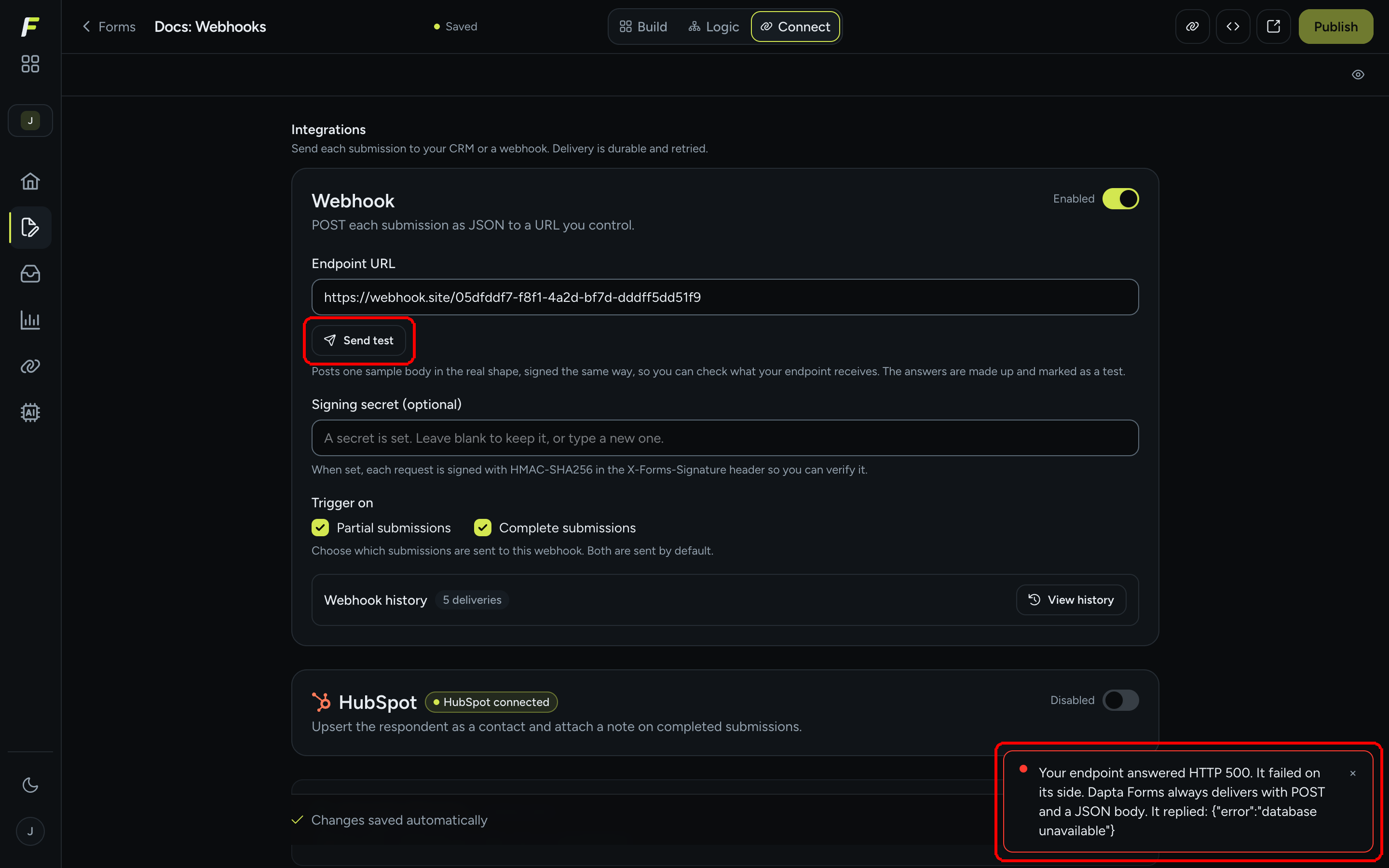
**Step 1:** In the form's **Connect** tab, with a URL saved on the **Webhook** card, click **Send test**. The button reads **Sending…** for a moment. A successful test shows the toast **Test delivered. Your endpoint accepted it.**

<figure><img src="https://3835013762-files.gitbook.io/~/files/v0/b/gitbook-x-prod.appspot.com/o/spaces%2FCy5rSNtQmtqYCGzJlNEB%2Fuploads%2Fgit-blob-706dba333ca4211ea878d4bd2dd339d06f0ae69b%2Fforms-test-and-history-01-send-test-ok.png?alt=media" alt="The Webhook card with the Send test button and a toast reading Test delivered. Your endpoint accepted it."><figcaption><p>Your endpoint answered with a 2xx status.</p></figcaption></figure>

The test request has the real shape and the real signature, with made-up answers and `"test": true` inside `data` (see [Payload & headers reference](/dapta-forms/connect/webhooks/payload-reference.md)). It reaches your endpoint for real, so anything your endpoint does with incoming data will run.

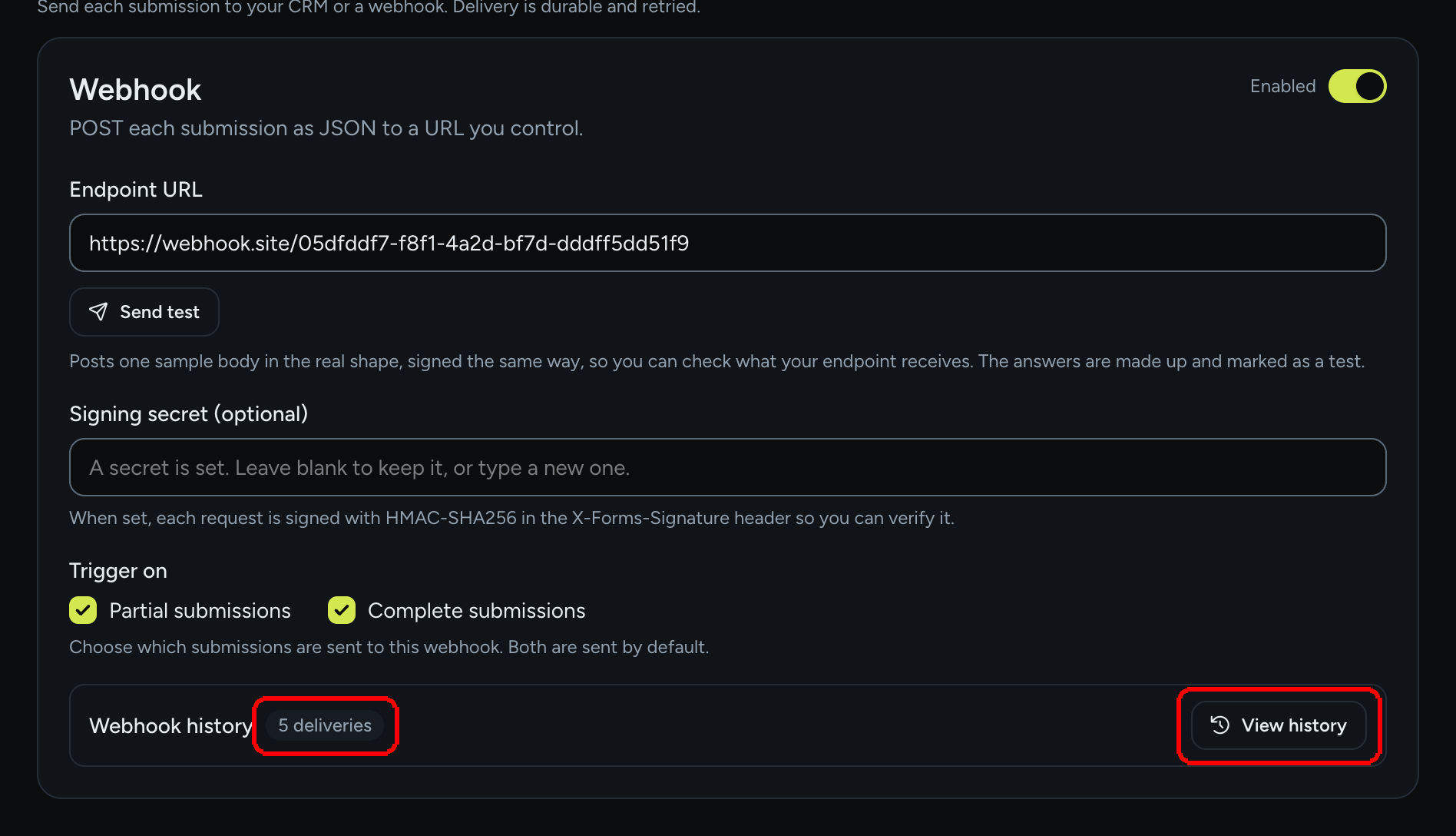
**Step 2:** If the endpoint does not accept it, the toast explains why. It always starts with what your endpoint answered and, when there was a body, quotes it after **It replied:**.

<figure><img src="https://3835013762-files.gitbook.io/~/files/v0/b/gitbook-x-prod.appspot.com/o/spaces%2FCy5rSNtQmtqYCGzJlNEB%2Fuploads%2Fgit-blob-75aa0ee2a103493dc817f3812c30647fea4903b9%2Fforms-test-and-history-04-test-failed.png?alt=media" alt="A toast reading Your endpoint answered HTTP 500. It failed on its side. Dapta Forms always delivers with POST and a JSON body. It replied: error database unavailable"><figcaption><p>A failed test quotes the status and the endpoint's own response.</p></figcaption></figure>

| Message                                                                                                 | What it means                                                                   | What to do                                                                        |
| ------------------------------------------------------------------------------------------------------- | ------------------------------------------------------------------------------- | --------------------------------------------------------------------------------- |
| **Save a webhook URL first.**                                                                           | The **Endpoint URL** is empty or not saved yet.                                 | Paste a valid `https://` URL and wait for **Changes saved automatically**.        |
| **Your endpoint answered HTTP 405** (or 501): It does not accept POST on this URL.                      | The route exists but only for GET or another method.                            | Accept POST on that path. Dapta Forms always delivers with POST and a JSON body.  |
| **HTTP 415**: It refused the content type.                                                              | Your endpoint rejects `application/json`.                                       | Accept JSON bodies.                                                               |
| **HTTP 401** or **403**: It refused the request as unauthorised. Check any token or secret it expects.  | Your endpoint wants a credential Dapta Forms does not send.                     | Use the signing secret to authenticate instead, or allow the URL without a token. |
| **HTTP 404** or **410**: There is nothing at that URL.                                                  | Wrong path or the endpoint was removed.                                         | Check the URL.                                                                    |
| **HTTP 429**: It is rate-limiting us. Try again shortly.                                                | Too many requests on your side.                                                 | Wait and retry.                                                                   |
| Other **4xx**: It read the request and rejected the body.                                               | Your endpoint parsed the JSON but did not like it.                              | Compare with the sample body; loosen validation.                                  |
| **5xx**: It failed on its side.                                                                         | Your server crashed or returned an error.                                       | Check your server logs; the response body is quoted when present.                 |
| **3xx**: It answered with a redirect, which we never follow. Use the final URL directly.                | The URL redirects (for example http to https, or a trailing slash).             | Paste the final URL.                                                              |
| **Blocked before sending: that address is private, reserved, or internal, and we never post to those.** | The host resolves to a private, loopback, link-local or cloud metadata address. | Use a public endpoint.                                                            |
| **Nothing answered at that URL. Check the host is reachable and not timing out.**                       | DNS failure, connection refused, or no answer within 10 seconds.                | Check the hostname, firewall and response time.                                   |
| **The delivery failed for a reason we could not identify.**                                             | Anything else.                                                                  | Open **View history** for the transcript.                                         |

> **💡 Tip:** Test deliveries are listed in the history too, with a **Test** badge, so a failed test is never lost in a toast.

***

## Read the delivery history

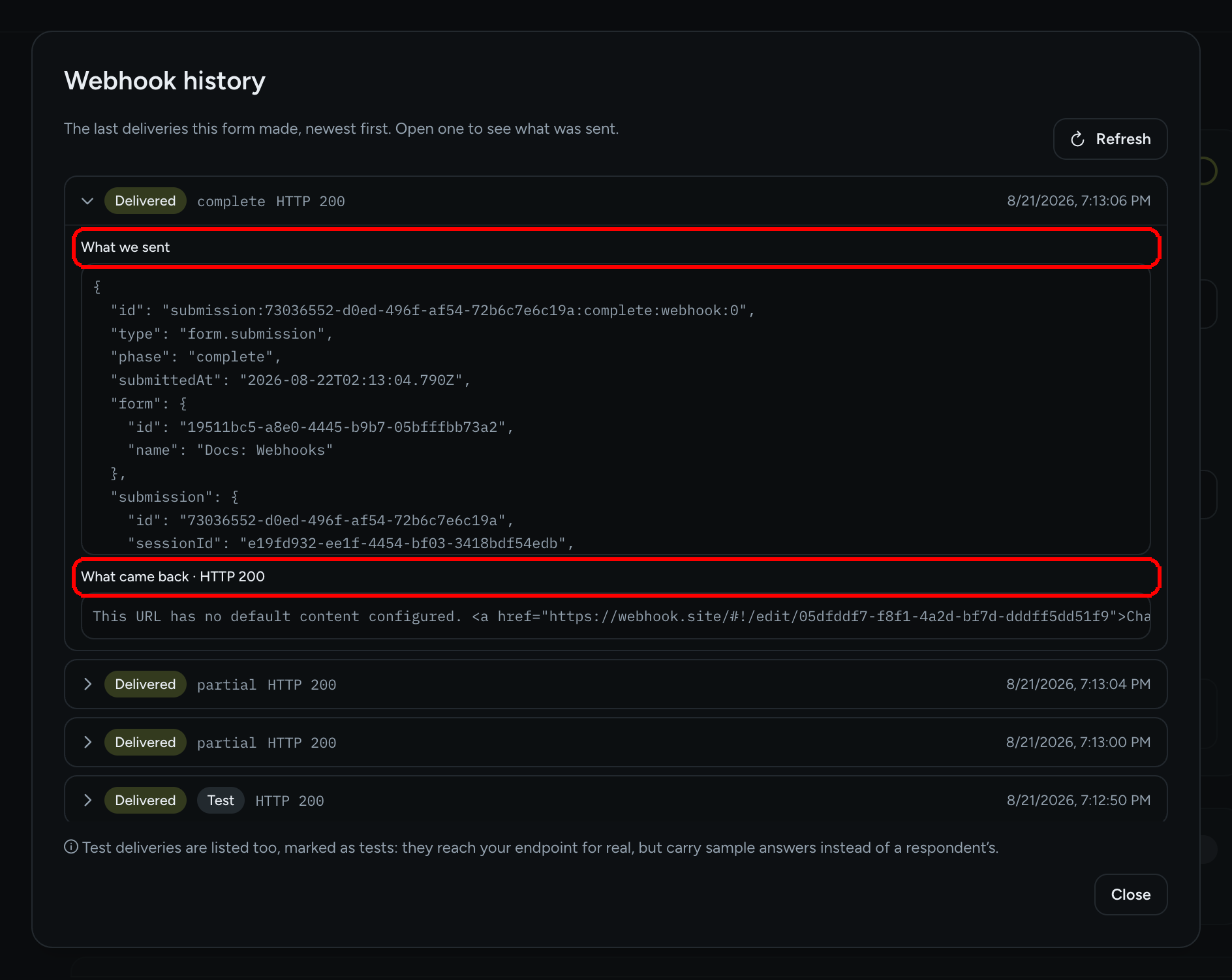
**Step 3:** At the bottom of the Webhook card, the **Webhook history** row shows a **{n} deliveries** chip (or a red **{n} failed** chip when some have given up). Click **View history**.

<figure><img src="https://3835013762-files.gitbook.io/~/files/v0/b/gitbook-x-prod.appspot.com/o/spaces%2FCy5rSNtQmtqYCGzJlNEB%2Fuploads%2Fgit-blob-7754d47008afa8dd1c5454f4c1838b48a006a2d1%2Fforms-test-and-history-02-view-history.png?alt=media" alt="The Webhook history row with a 5 deliveries chip and the View history button"><figcaption><p>The chip summarises the log; <strong>View history</strong> opens it.</p></figcaption></figure>

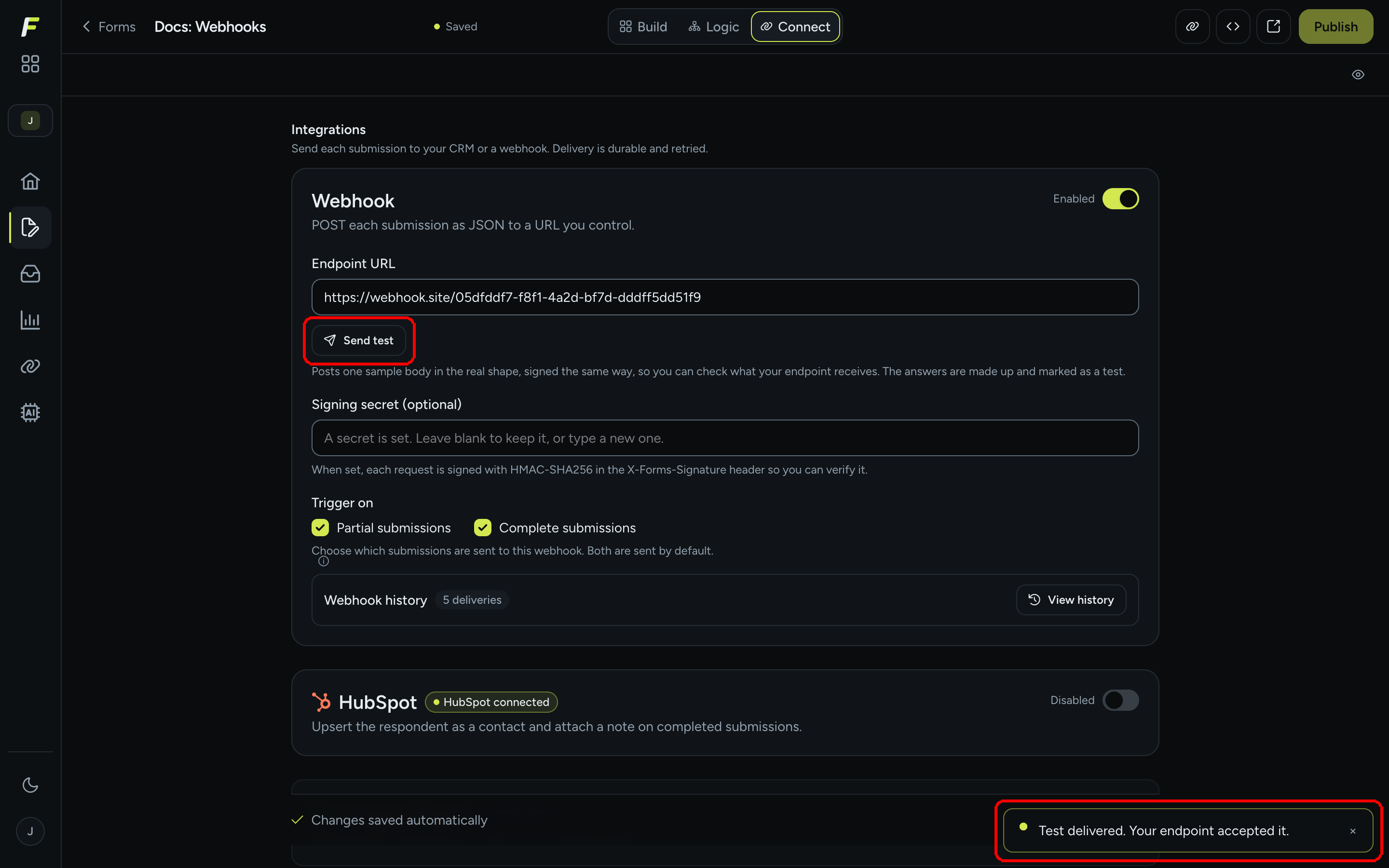
**Step 4:** The **Webhook history** dialog lists "The last deliveries this form made, newest first." Each row shows a status pill, the action (**partial**, **complete**, or a **Test** badge for pings), the HTTP status your endpoint answered, **{n} attempts** when more than one was needed, and the time. Click a row to expand it.

<figure><img src="https://3835013762-files.gitbook.io/~/files/v0/b/gitbook-x-prod.appspot.com/o/spaces%2FCy5rSNtQmtqYCGzJlNEB%2Fuploads%2Fgit-blob-a2efe7a5966beece04cbc6b9828a8daaeb9b3cbb%2Fforms-test-and-history-03-history-expanded.png?alt=media" alt="The Webhook history dialog with the first row expanded, showing the JSON under What we sent and the response under What came back HTTP 200"><figcaption><p><strong>What we sent</strong> is the exact body; <strong>What came back</strong> is your endpoint's response and status.</p></figcaption></figure>

| Element                            | Meaning                                                                                                                                                                              |
| ---------------------------------- | ------------------------------------------------------------------------------------------------------------------------------------------------------------------------------------ |
| **Delivered**                      | Your endpoint answered 2xx.                                                                                                                                                          |
| **In progress**                    | Queued or waiting between retries. The attempt count grows as retries happen.                                                                                                        |
| **Failed**                         | All 5 attempts failed. The row shows the last error, for example "webhook delivery failed: HTTP 500", or **No reason was recorded.**                                                 |
| **Skipped**                        | Deliberately not sent and never retried, for example a delivery that could no longer be performed. Rare for webhooks.                                                                |
| **Test** badge                     | A **Send test** ping. It reached your endpoint for real but carried sample answers.                                                                                                  |
| **HTTP {status}**                  | The status your endpoint answered on the last attempt.                                                                                                                               |
| **{n} attempts**                   | How many tries it took (shown from the second attempt on).                                                                                                                           |
| **What we sent**                   | The JSON body, exactly as posted.                                                                                                                                                    |
| **What came back · HTTP {status}** | Your endpoint's response body (trimmed). **Your endpoint answered with no body.** when it was empty, **Not recorded for this delivery.** for rows older than the transcript feature. |
| **Refresh**                        | Reloads the list, useful while a retry is in progress.                                                                                                                               |

The dialog keeps the latest 25 deliveries. There is no manual resend: retries are automatic, and a **Failed** row stays as a record. If you fix your endpoint, simply submit again or run **Send test**.

## What's next

* [Delivery, retries & history](/dapta-forms/connect/delivery-and-retries.md): the retry schedule and what Failed and Skipped mean across all integrations.
* [Verify the signature](/dapta-forms/connect/webhooks/verify-signature.md): make your endpoint accept only signed requests.
* [Connections (account level)](/dapta-forms/connect/connections.md): the account-wide webhooks inventory with failure counts.


---

# Agent Instructions
This documentation is published with GitBook. GitBook is the documentation platform designed so that both humans and AI agents can read, navigate, and reason over technical content effectively. Learn more at gitbook.com.

## Querying This Documentation
If you need additional information that is not directly available in this page, you can query the documentation dynamically by asking a question.

Perform an HTTP GET request on the current page URL with the `ask` query parameter, and the optional `goal` query parameter:

```
GET https://docs.dapta.ai/dapta-forms/connect/webhooks/test-and-history.md?ask=<question>&goal=<endgoal>
```

`ask` is the immediate question: it should be specific, self-contained, and written in natural language.
`goal` is optional and describes the broader end goal you are ultimately trying to accomplish on behalf of the user. GitBook uses it to tailor the answer towards what is most useful for that goal.

The response will contain a direct answer to the question and relevant excerpts and sources from the documentation.

Use this mechanism when the answer is not explicitly present in the current page, you need clarification or additional context, or you want to retrieve related documentation sections.