> For the complete documentation index, see [llms.txt](https://docs.dapta.ai/llms.txt). Markdown versions of documentation pages are available by appending `.md` to page URLs; this page is available as [Markdown](https://docs.dapta.ai/dapta-forms/logic/outcomes.md).

# Outcomes (results by score range)

Show a different result to each respondent based on their score: add score ranges in the Outcomes dialog, write a thank-you message per range with \[field] tokens, redirect a range to a URL after a del

An outcome is what a respondent sees when they finish, chosen by their score. You split the score into ranges (for example **Not a fit yet**, **Promising match**, **You're a great fit**) and give each range its own heading, message and, if you want, a redirect. Outcomes need [Scoring](/dapta-forms/logic/scoring.md) to be on.

This page continues the demo form from [Scoring](/dapta-forms/logic/scoring.md): three scored questions with a highest possible score of 14, then an **Email** and a **Name** question whose answers are reused in the messages.

***

## Step 1: Open the Outcomes dialog and add ranges

**Step 1:** Open the **Logic** tab and click **Outcomes** in the toolbar. The dialog reads **Score ranges mapped to what a respondent sees at the end. The first matching range wins.**

**Step 2:** Click **Add a range** once per result you want. Each new range starts right after the previous one, and the previous top range closes automatically so the two never overlap.

**Step 3:** For each range fill in:

* **Label**: the heading respondents see on their result screen (placeholder **e.g. You're a great fit**). The help text is explicit: it is the big line on the thank-you screen, not an internal name. Write it for the respondent.
* **From** and **To**: the score range, inclusive on both ends.

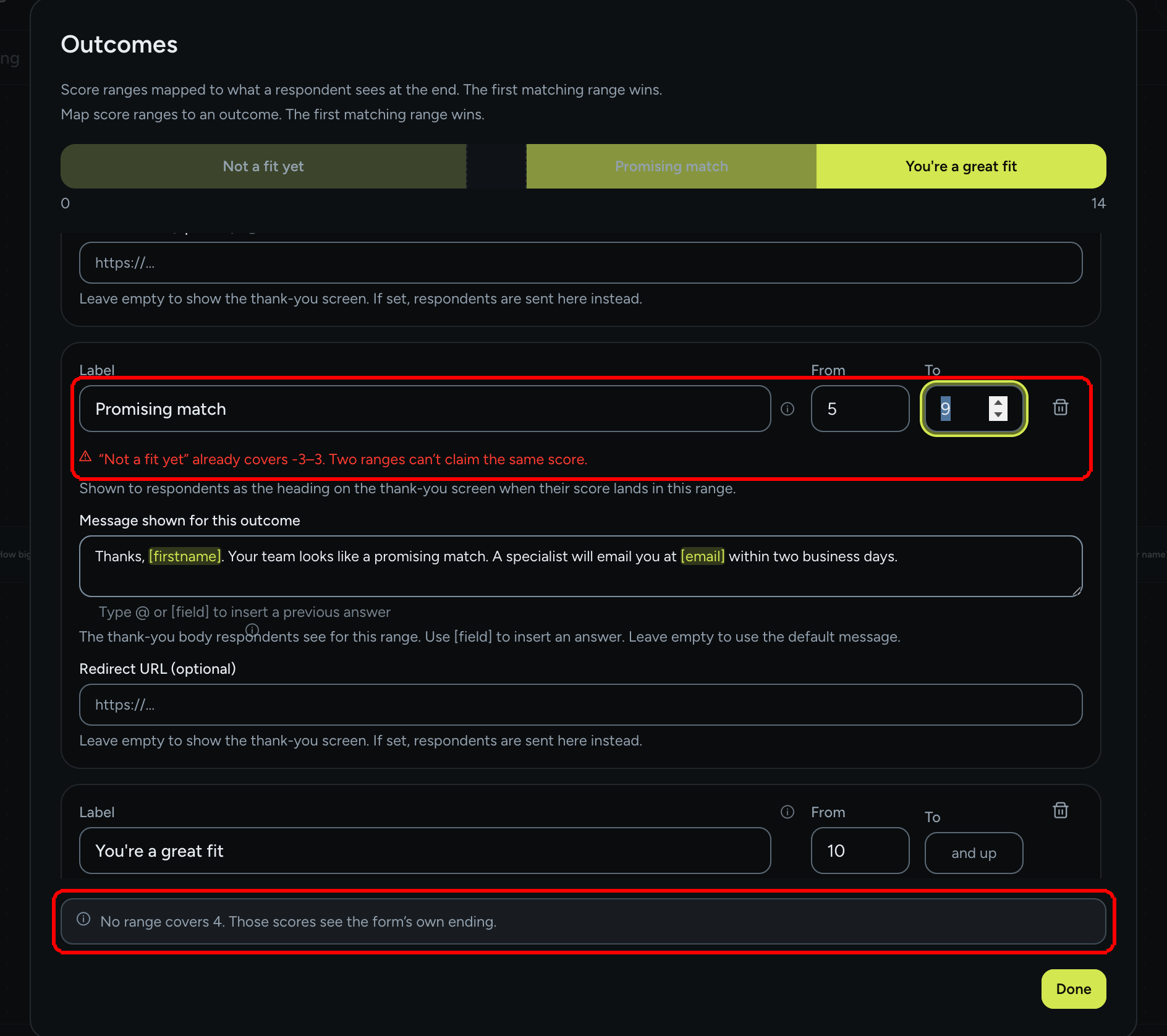
The colored bar at the top shows how the ranges divide the score, from 0 to the highest possible score.

<figure><img src="https://3835013762-files.gitbook.io/~/files/v0/b/gitbook-x-prod.appspot.com/o/spaces%2FCy5rSNtQmtqYCGzJlNEB%2Fuploads%2Fgit-blob-db2a761a5450b9db3664355311c23f2575ead300%2Fforms-outcomes-01-ranges.png?alt=media" alt="The Outcomes dialog with a three-segment score bar and the first range: Label Not a fit yet, From -3, To 4"><figcaption><p>Three ranges on the score bar. Each range has a <strong>Label</strong>, a <strong>From</strong> and a <strong>To</strong>.</p></figcaption></figure>

***

## Step 2: The top range is open-ended ("and up")

The highest range has no upper bound: its **To** field reads **and up** and cannot be typed into. The tooltip explains why: **The highest range has no upper bound, so no score is ever left without an outcome.** If you add a range above it, the old top range closes and the new one takes over the open end.

***

## Step 3: Write the message, add a redirect and a delay

Below the label of each range:

* **Message shown for this outcome**: the thank-you body for this range. Type `@` or `[` to pick an earlier answer from the **Insert a previous answer** list; the token is inserted as `[field]` (for example `[firstname]` or `[email]`) and is replaced by the respondent's answer on screen. Leave it empty to fall back to the form's own ending message (see [Ending screen](/dapta-forms/logic/ending-screen.md)).
* **Redirect URL (optional)**: if set, respondents in this range are sent to this URL instead of staying on the thank-you screen. Only `http(s)` links are accepted.
* **Show the thank-you first (ms)**: appears as soon as a redirect URL is set. **0** redirects immediately; **1500** shows the message for a second and a half, then leaves. Up to 60000 ms.

<figure><img src="https://3835013762-files.gitbook.io/~/files/v0/b/gitbook-x-prod.appspot.com/o/spaces%2FCy5rSNtQmtqYCGzJlNEB%2Fuploads%2Fgit-blob-a987f18c87e4e23df1f573684f0922be2360c7be%2Fforms-outcomes-02-top-range-redirect.png?alt=media" alt="The top range You&#x27;re a great fit with To reading and up, a message containing the [firstname] token, Redirect URL https://dapta.ai and Show the thank-you first (ms) set to 3000"><figcaption><p>The top range reads <strong>and up</strong>. A <strong>Redirect URL</strong> reveals the <strong>Show the thank-you first (ms)</strong> delay.</p></figcaption></figure>

**Step 4:** Click **Done**. Changes are saved automatically; remember to **Publish** to make them live. The outcomes also appear as **Ending** cards on the Logic canvas, each with its range.

***

## Overlaps, gaps and inverted ranges

The dialog checks your ranges as you type:

| Situation                       | What happens                                                                                                                                                                                                           |
| ------------------------------- | ---------------------------------------------------------------------------------------------------------------------------------------------------------------------------------------------------------------------- |
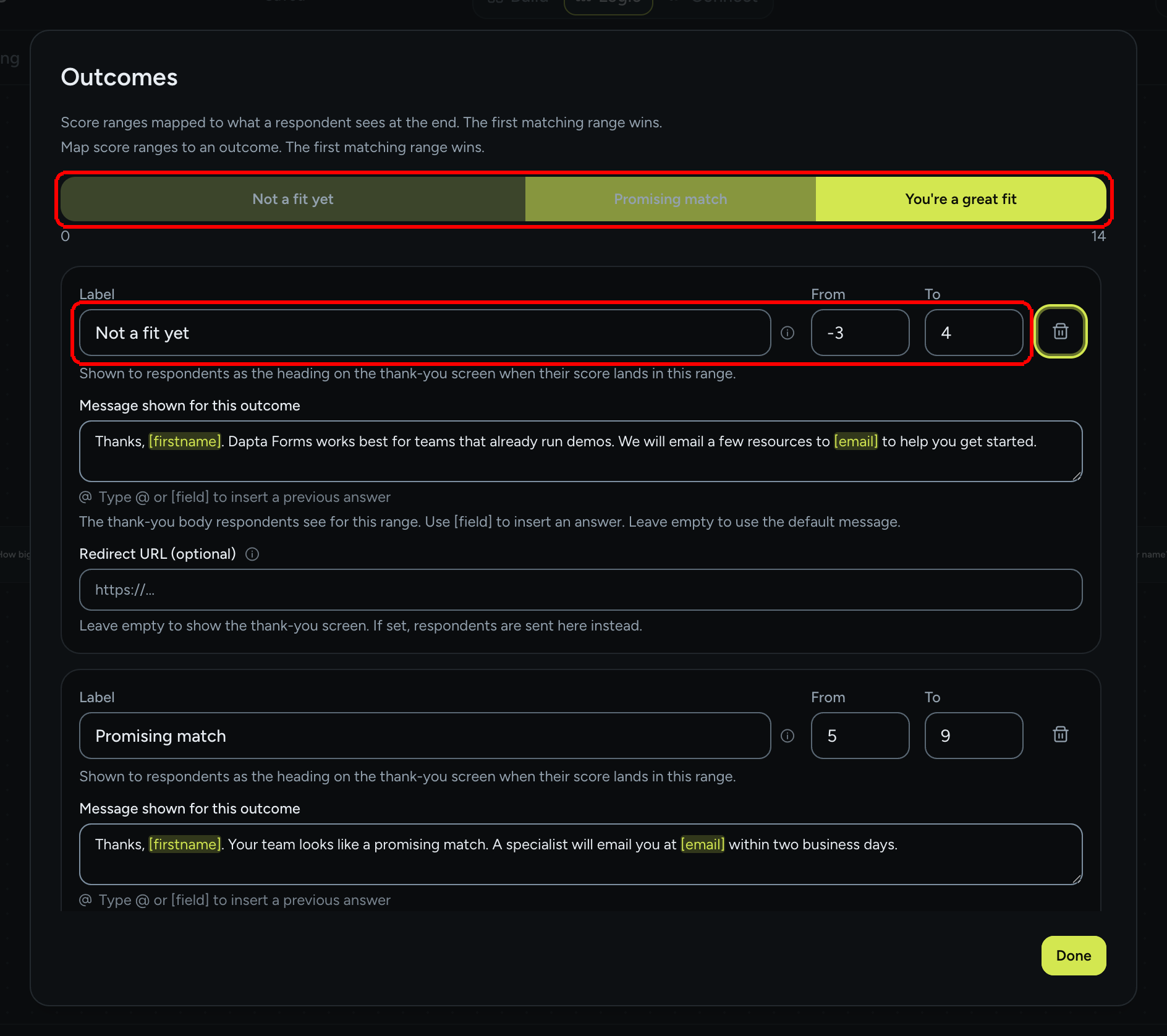
| Two ranges claim the same score | Refused. The field reverts and the row shows **"{label}" already covers {range}. Two ranges can't claim the same score.**                                                                                              |
| **To** is lower than **From**   | Refused with **A range can't end below where it starts.**                                                                                                                                                              |
| Some scores are not covered     | Allowed, but reported under the list: **No range covers {scores}. Those scores see the form's own ending.** The bar shows the hole.                                                                                    |
| Scoring is off                  | The ranges are kept but grayed out: **Scoring is off, so no range can be reached. Everyone sees the form's own thank-you screen.** Turn scoring back on in [Scoring](/dapta-forms/logic/scoring.md) to use them again. |

<figure><img src="https://3835013762-files.gitbook.io/~/files/v0/b/gitbook-x-prod.appspot.com/o/spaces%2FCy5rSNtQmtqYCGzJlNEB%2Fuploads%2Fgit-blob-f59401f04de20b2a76e3691ddc381814294ac1aa%2Fforms-outcomes-03-validation.png?alt=media" alt="The Outcomes dialog showing an overlap error under the Promising match range and a note at the bottom reading No range covers 4. Those scores see the form&#x27;s own ending."><figcaption><p>An overlap is refused on the spot. A gap is allowed and reported, with the hole visible on the bar.</p></figcaption></figure>

> **💡 Tip:** Negative scores are possible when you use negative points. The lowest range can start below zero (for example **From -3**), so that a respondent who picks every penalizing answer still lands on an outcome instead of the generic ending.

***

## How an outcome is resolved

1. When the respondent submits, the form computes the score from the answers they actually gave (skipped questions add nothing).
2. Ranges are checked from the lowest score up; the first range that contains the score wins.
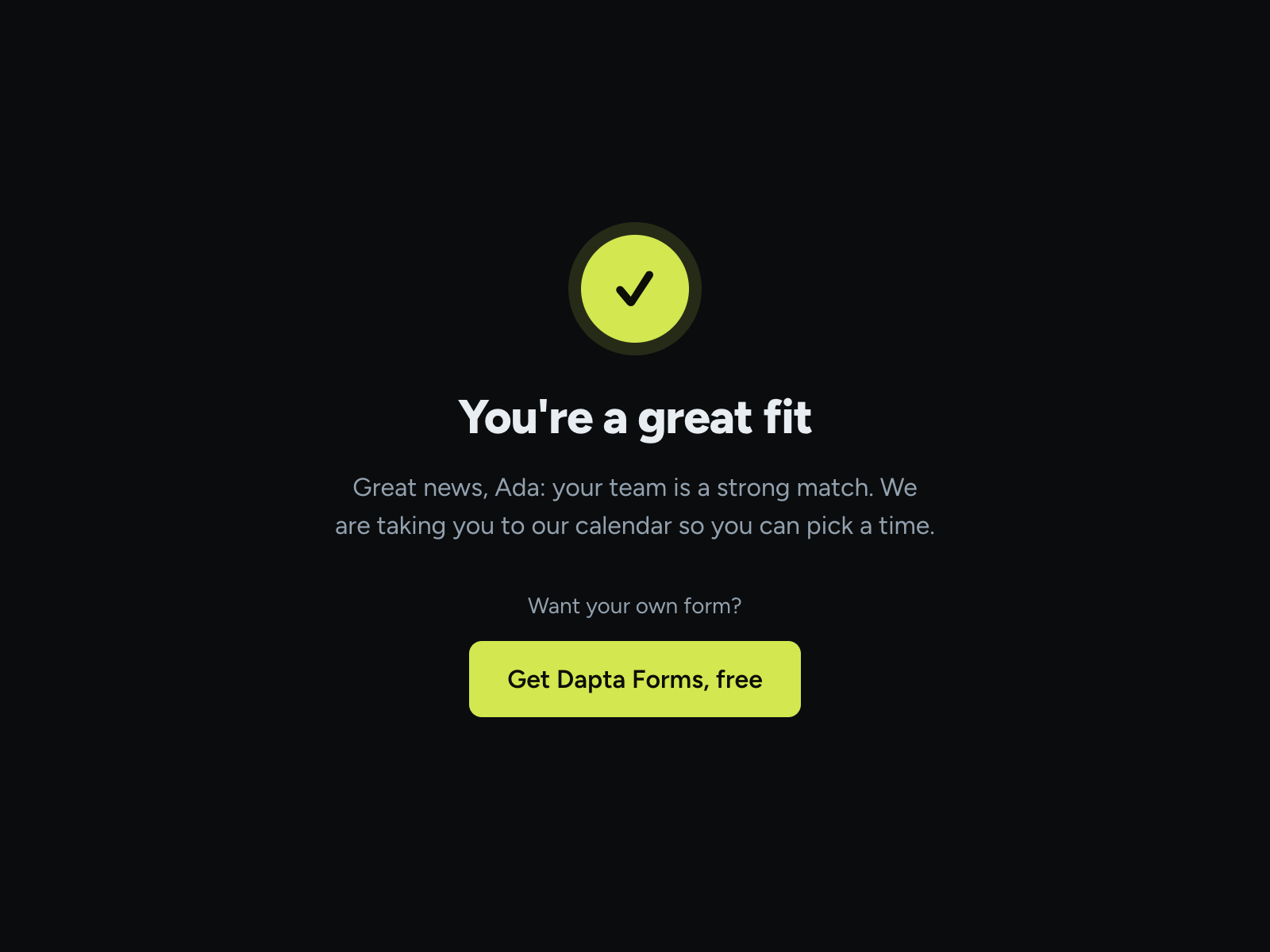
3. The result screen uses the range's **Label** as heading and its **Message shown for this outcome** as body. Any field left empty on the range falls back to the form's own ending (see [Ending screen](/dapta-forms/logic/ending-screen.md)).
4. If the range (or, failing that, the form's ending) has a **Redirect URL**, the respondent is sent there, after the delay if one is set.
5. If no range matches, the respondent sees the form's own ending.

<figure><img src="https://3835013762-files.gitbook.io/~/files/v0/b/gitbook-x-prod.appspot.com/o/spaces%2FCy5rSNtQmtqYCGzJlNEB%2Fuploads%2Fgit-blob-f80f9bc1e95cf89ad2b8d1c52f6bd5181c7e9804%2Fforms-outcomes-04-public-outcome.png?alt=media" alt="The public result screen with a check mark, the heading You&#x27;re a great fit and the message Great news, Ada: your team is a strong match"><figcaption><p>The respondent's result: the range <strong>Label</strong> as heading and the message with <code>[firstname]</code> filled in.</p></figcaption></figure>

### Forced by an answer

A range can also carry rules that make it win regardless of the score, for example "anyone who picked *Enterprise* lands here". When such rules exist, the range shows a **Forced by an answer** list that reads them back (**{field} is any of {values}**, **{field} is at least {n}**, **{field} is at most {n}**) with a **Remove** button next to each, and the note **These beat the score outright: a respondent matching one lands here no matter what they scored.** These rules are created through the API, not in the dialog; the dialog only shows and removes them, so the ranges you read on screen can be trusted.

***

## Where the outcome goes

| Place                                                          | What is sent                                                                                                                      |
| -------------------------------------------------------------- | --------------------------------------------------------------------------------------------------------------------------------- |
| [HubSpot](/dapta-forms/connect/hubspot/form-elements.md)       | The **Outcome property** mapping receives the range **Label** (the same text the respondent sees), on completed submissions only. |
| [Webhooks](/dapta-forms/connect/webhooks/payload-reference.md) | `submission.outcome` carries the label.                                                                                           |
| [Emails](/dapta-forms/connect/emails.md)                       | The `{{outcomeLabel}}` variable.                                                                                                  |
| [Submissions](/dapta-forms/results/submissions.md)             | The **Score** column; the outcome label is not a column.                                                                          |

***

## What's next

* Set the defaults every range falls back to in [Ending screen](/dapta-forms/logic/ending-screen.md).
* Add a short processing pause before the result with [Reveal screens](/dapta-forms/logic/reveal-screens.md).
* Send the score and outcome to your CRM in [Form elements](/dapta-forms/connect/hubspot/form-elements.md).


---

# Agent Instructions
This documentation is published with GitBook. GitBook is the documentation platform designed so that both humans and AI agents can read, navigate, and reason over technical content effectively. Learn more at gitbook.com.

## Querying This Documentation
If you need additional information that is not directly available in this page, you can query the documentation dynamically by asking a question.

Perform an HTTP GET request on the current page URL with the `ask` query parameter, and the optional `goal` query parameter:

```
GET https://docs.dapta.ai/dapta-forms/logic/outcomes.md?ask=<question>&goal=<endgoal>
```

`ask` is the immediate question: it should be specific, self-contained, and written in natural language.
`goal` is optional and describes the broader end goal you are ultimately trying to accomplish on behalf of the user. GitBook uses it to tailor the answer towards what is most useful for that goal.

The response will contain a direct answer to the question and relevant excerpts and sources from the documentation.

Use this mechanism when the answer is not explicitly present in the current page, you need clarification or additional context, or you want to retrieve related documentation sections.