> For the complete documentation index, see [llms.txt](https://docs.dapta.ai/llms.txt). Markdown versions of documentation pages are available by appending `.md` to page URLs; this page is available as [Markdown](https://docs.dapta.ai/dapti/capabilities/billing-and-credits.md).

# Billing & Credits

Dapti has access to your plan, credit balance, and usage history. Ask it for a usage report, compare plans, or estimate the cost of a campaign before you launch. Below are three of the most useful billing conversations.

{% hint style="info" %}
You can also access exact pricing, your invoices, and plan upgrades any time at **Billing → Plans** in the admin panel. Dapti links you straight there at the end of every billing response.
{% endhint %}

***

## Check Your Credit Usage

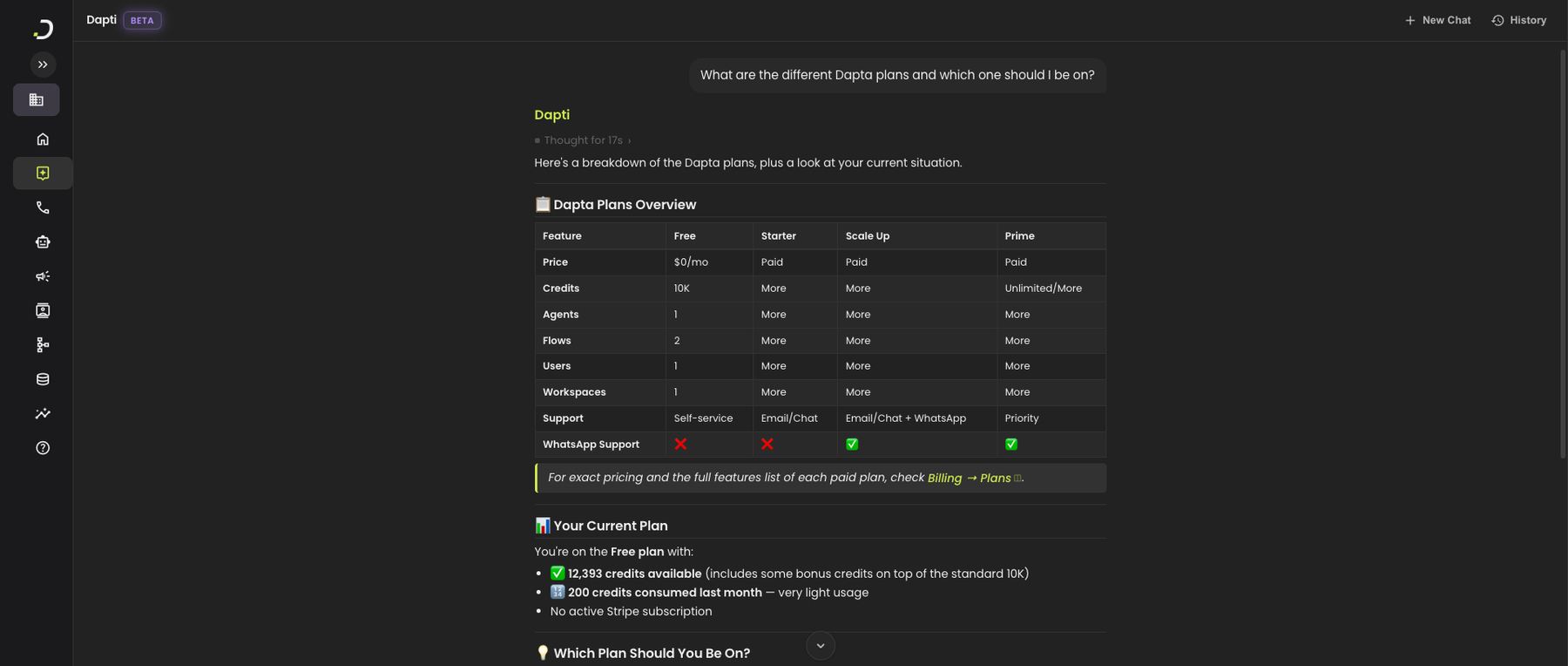
Ask Dapti for a snapshot of your current credit picture: plan, credits used, credits remaining, and a usage breakdown.

**Try this prompt:**

> *How am I doing on credits this month? Give me a usage breakdown.*

<figure><img src="/files/F8yTp74TsHViTWVZEvVx" alt="Dapti showing a credit overview for the current month with plan, credits used, credits available, and usage percentage in a table, followed by a plain-English breakdown and suggested actions when usage is low"><figcaption><p>Dapti's credit overview: plan, balance, usage percentage, and contextual guidance based on where you are.</p></figcaption></figure>

Other usage prompts you can use:

* *"How many credits did I use yesterday?"*
* *"Show me my credit usage day by day this week"*
* *"Which agent is using the most credits?"*
* *"When did I last hit my credit limit?"*

***

## Compare Plans

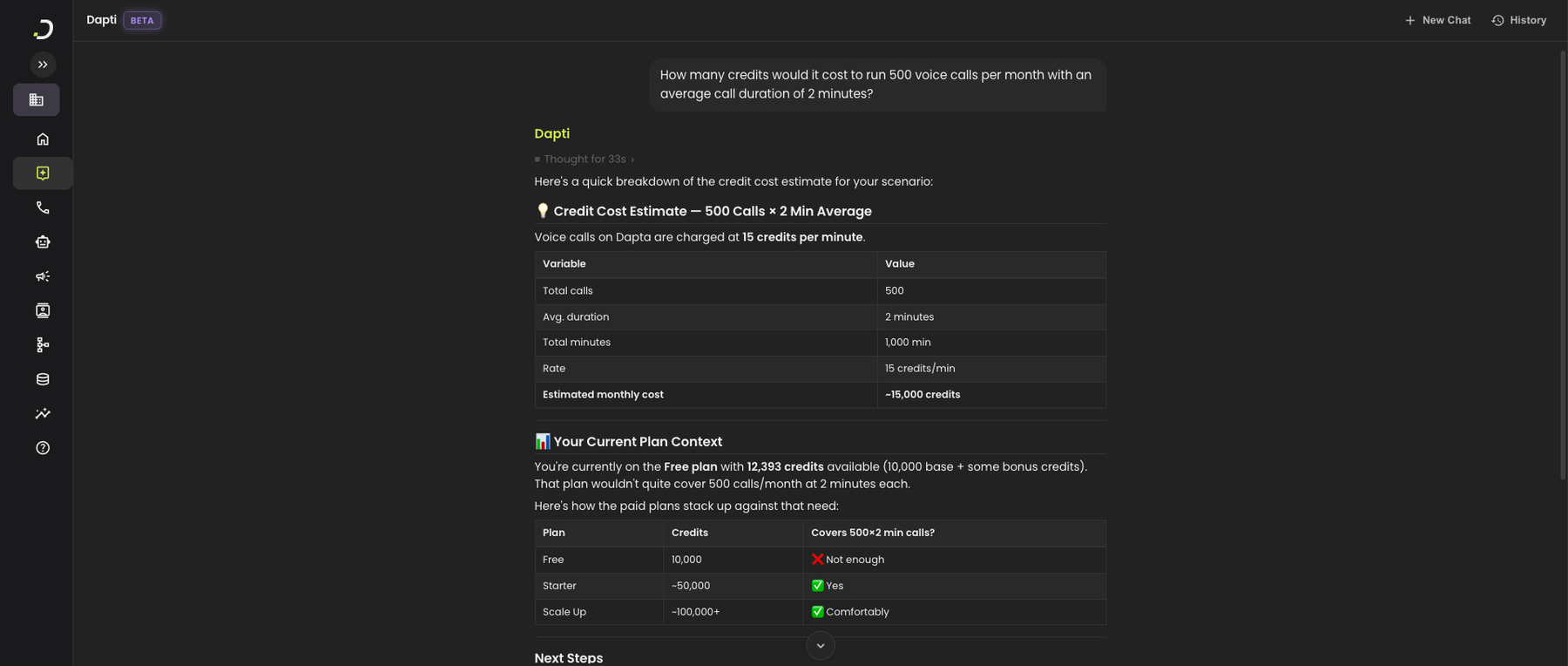
Not sure which plan is right for you? Ask Dapti to walk through every plan and what you actually get. Dapti will also recommend a tier based on your current account.

**Try this prompt:**

> *What are the different Dapta plans and which one should I be on?*

<figure><img src="/files/8v6X3EJZQPXDsaHFUgaB" alt="Dapti showing a comparison table of Dapta&#x27;s Free, Starter, Scale Up, and Prime plans across features like price, credits, agents, flows, users, workspaces, support level, and WhatsApp support, followed by a recap of the user&#x27;s current plan and credits"><figcaption><p>Dapta plans side by side, plus a recap of where you stand today.</p></figcaption></figure>

Other plan-comparison prompts you can use:

* *"What's the difference between Starter and Scale Up?"*
* *"Which plan includes WhatsApp support?"*
* *"What do I get if I upgrade to Prime?"*
* *"Am I being charged for the right plan based on how I use Dapta?"*

***

## Estimate Campaign Cost Before You Launch

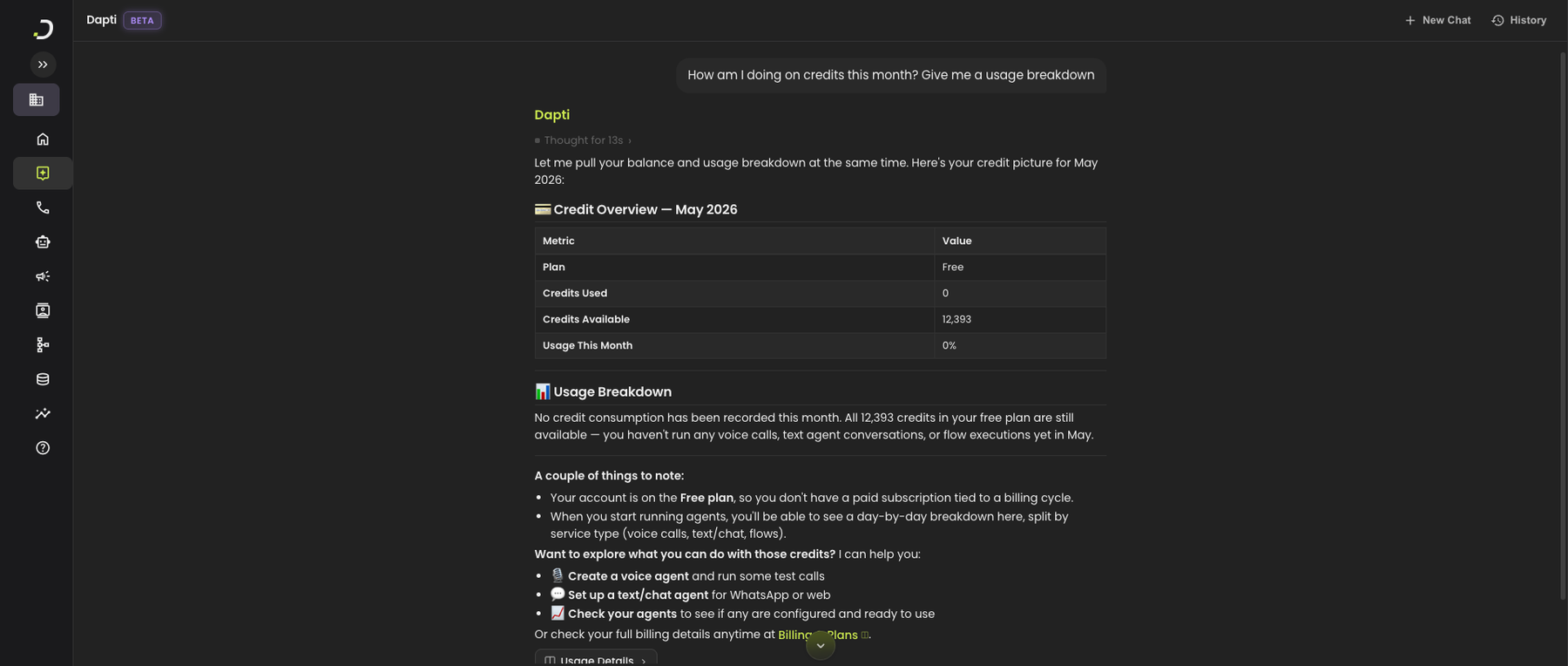
Before you spin up a big outbound campaign, ask Dapti how many credits it will consume. Dapti uses the platform's billing rates plus your inputs (calls, average duration) to give you a forecast and tell you whether your current plan covers it.

**Try this prompt:**

> *How many credits would it cost to run 500 voice calls per month with an average call duration of 2 minutes?*

<figure><img src="/files/fQi28E7RbgTLAJBZAWRb" alt="Dapti calculating credit cost for 500 voice calls of 2 minutes each, showing the math (1000 minutes at 15 credits per minute = 15,000 credits), then comparing against the user&#x27;s current plan and showing which plans (Free, Starter, Scale Up) would cover that volume"><figcaption><p>Dapti runs the math and tells you whether your current plan can cover the workload.</p></figcaption></figure>

Other cost-estimation prompts you can use:

* *"How long will my remaining credits last at my current usage rate?"*
* *"If I run 100 outbound calls a day, how many credits is that per month?"*
* *"What would it cost to add a second voice agent that takes inbound calls?"*
* *"Help me plan a credit budget for the next 90 days"*

{% hint style="success" %}
Always check the estimate before running a large campaign. It is cheaper to upgrade a plan in advance than to pause a campaign halfway through.
{% endhint %}

***

## Next Steps

{% content-ref url="/pages/9VV2mFTv81FnCZ0y12C3" %}
[Account Evaluation](/dapti/capabilities/account-evaluation.md)
{% endcontent-ref %}

{% content-ref url="/pages/UjlkeeYDNhNUVMDiFvdf" %}
[Commercial Support](/dapti/capabilities/commercial-support.md)
{% endcontent-ref %}

{% content-ref url="/pages/ITt1P6qAQhK8f6FgbVFk" %}
[Call Analytics](/dapti/capabilities/call-analytics.md)
{% endcontent-ref %}


---

# Agent Instructions
This documentation is published with GitBook. GitBook is the documentation platform designed so that both humans and AI agents can read, navigate, and reason over technical content effectively. Learn more at gitbook.com.

## Querying This Documentation
If you need additional information that is not directly available in this page, you can query the documentation dynamically by asking a question.

Perform an HTTP GET request on the current page URL with the `ask` query parameter:

```
GET https://docs.dapta.ai/dapti/capabilities/billing-and-credits.md?ask=<question>
```

The question should be specific, self-contained, and written in natural language.
The response will contain a direct answer to the question and relevant excerpts and sources from the documentation.

Use this mechanism when the answer is not explicitly present in the current page, you need clarification or additional context, or you want to retrieve related documentation sections.