> For the complete documentation index, see [llms.txt](https://docs.dapta.ai/llms.txt). Markdown versions of documentation pages are available by appending `.md` to page URLs; this page is available as [Markdown](https://docs.dapta.ai/dapti/capabilities/call-analytics.md).

# Call Analytics

Dapti has direct access to your call data. Instead of opening dashboards and filtering manually, you ask a question in plain English and Dapti pulls the numbers, reads the transcripts, and points out what matters. Below are three of the most common analytics conversations.

{% hint style="info" %}
Dapti can read connection rates, outcomes, durations, sentiment, transcripts, and the structured variables your agents capture after each call. The more context an agent collects (appointment booked, lead qualified, etc.), the richer Dapti's analysis becomes.
{% endhint %}

***

## Get a Performance Snapshot

Ask Dapti for a high-level read on how an agent (or your whole workspace) is doing over any time range you specify: today, this week, last month, or a custom range.

**Try this prompt:**

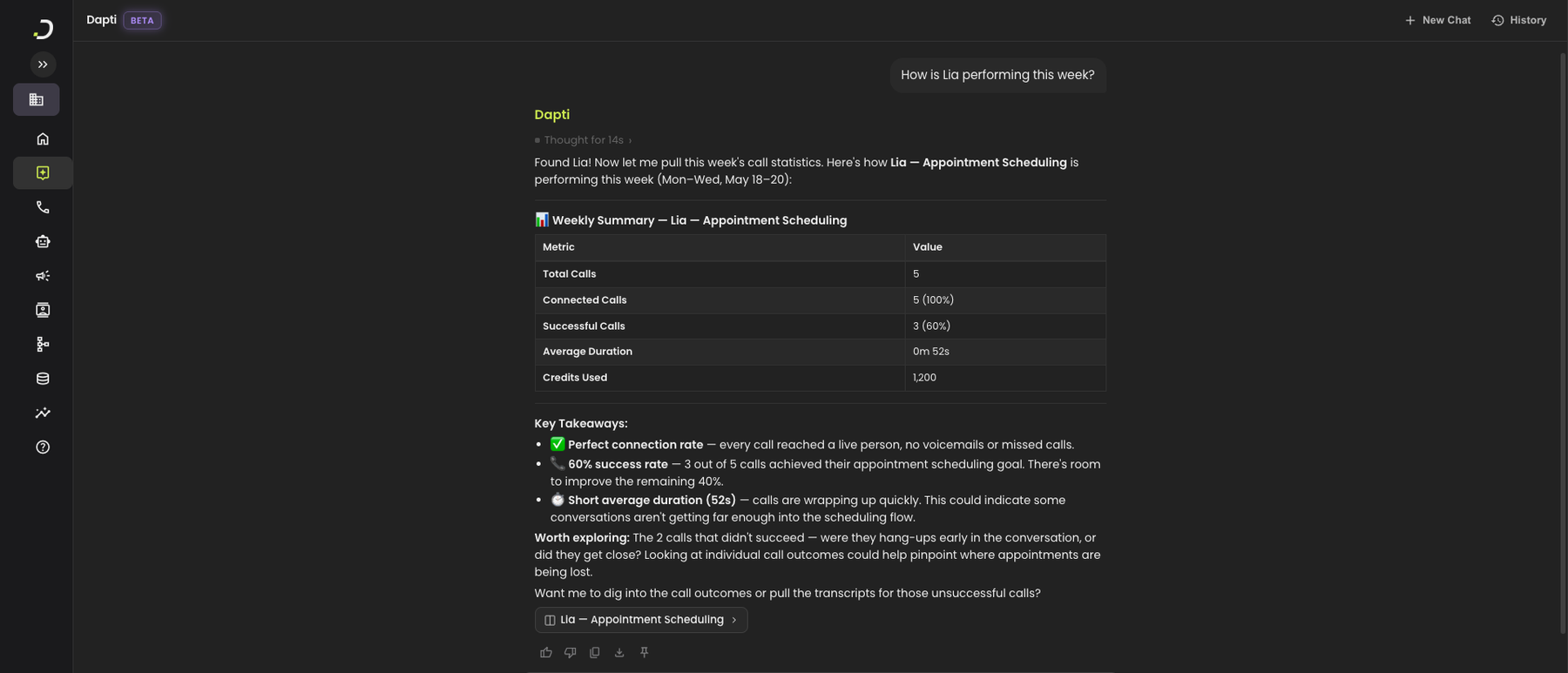
> *How is Lia performing this week?*

Dapti pulls the call counts, success rate, average duration, and credits used. It then summarizes the numbers in plain English and points out anything worth a closer look.

<figure><img src="/files/mMG8HJmrPO9OWIr0PiaU" alt="Dapti showing a weekly summary table for Lia with total calls, connected calls, successful calls, average duration, and credits used, followed by plain-English key takeaways and a follow-up question"><figcaption><p>Dapti returns a structured metrics table and a written analysis of what stands out.</p></figcaption></figure>

Other snapshot prompts you can use:

* *"Compare Lia and Sarah this month"*
* *"How was yesterday compared to the day before?"*
* *"How are my voice agents performing today?"*
* *"What is my success rate this week?"*

***

## Review Recent Calls

When you want to see what actually happened on individual calls, ask Dapti to list them with summaries. Dapti reads each transcript and tells you what the call was about, what was collected, and where it went well or got stuck.

**Try this prompt:**

> *Show me my recent Lia calls and what each one was about.*

<figure><img src="/files/f3JkmlYLHoUHArr2OKhG" alt="Dapti showing a table of 5 recent Lia calls with time, duration, outcome, sentiment, and call ID, followed by a plain-English summary of what each call was about including a flagged friction point on call 2"><figcaption><p>Dapti pairs the structured outcome data with a human-readable summary of each conversation.</p></figcaption></figure>

You can narrow the list with any filter that makes sense to you:

* *"Show me calls from the last 24 hours"*
* *"Find calls where the caller asked about pricing"*
* *"Show me failed calls this week and explain why each one failed"*
* *"Pull the calls where sentiment was negative"*

Dapti will also flag individual calls that look worth your attention, like the name-collection refusal in the screenshot above.

***

## Surface Patterns and Recommendations

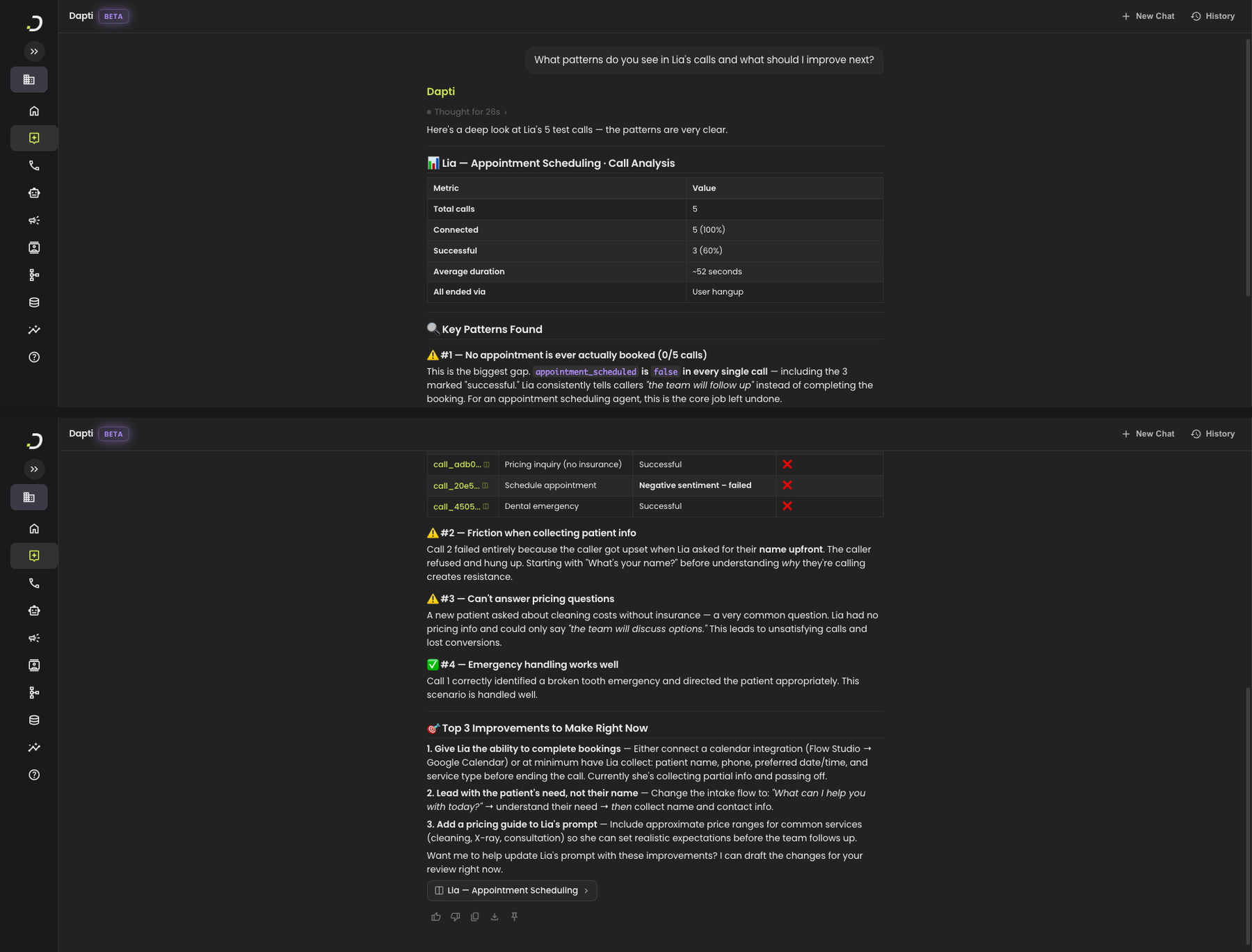
The most useful question to ask Dapti is open-ended: *what is going wrong, and what should I do about it?* Dapti reads across the calls, finds the patterns, and tells you which fix would have the biggest impact.

**Try this prompt:**

> *What patterns do you see in Lia's calls and what should I improve next?*

<figure><img src="/files/fOYN5fyWgNsJjWFDp4tK" alt="Dapti analyzing 5 calls and identifying patterns: no appointments actually booked, friction collecting patient info, no pricing answers, emergency handling works well, followed by a top-3 improvements section with specific recommendations"><figcaption><p>Dapti finds the structural issues across calls and proposes specific, prioritized improvements.</p></figcaption></figure>

In this example Dapti flagged that:

1. Every "successful" call still ended without an appointment actually being booked.
2. The agent created friction by asking for the caller's name before understanding why they called.
3. Pricing questions had no good answer.
4. Emergency handling was working correctly.

It then proposed three concrete fixes in priority order, including the option to apply the prompt changes right there in chat.

{% hint style="success" %}
Once Dapti recommends a fix, you can ask it to apply the change directly. See [Voice Agents](/dapti/capabilities/voice-agents.md) for how the prompt-improvement flow works.
{% endhint %}

***

## Next Steps

{% content-ref url="/pages/9VV2mFTv81FnCZ0y12C3" %}
[Account Evaluation](/dapti/capabilities/account-evaluation.md)
{% endcontent-ref %}

{% content-ref url="/pages/8wVES3iaqOWdKUGLxUjn" %}
[Industry Benchmarks](/dapti/capabilities/industry-benchmarks.md)
{% endcontent-ref %}

{% content-ref url="/pages/O5M0qkWH3Xt43SlXnHnk" %}
[Voice Agents](/dapti/capabilities/voice-agents.md)
{% endcontent-ref %}


---

# Agent Instructions
This documentation is published with GitBook. GitBook is the documentation platform designed so that both humans and AI agents can read, navigate, and reason over technical content effectively. Learn more at gitbook.com.

## Querying This Documentation
If you need additional information that is not directly available in this page, you can query the documentation dynamically by asking a question.

Perform an HTTP GET request on the current page URL with the `ask` query parameter:

```
GET https://docs.dapta.ai/dapti/capabilities/call-analytics.md?ask=<question>
```

The question should be specific, self-contained, and written in natural language.
The response will contain a direct answer to the question and relevant excerpts and sources from the documentation.

Use this mechanism when the answer is not explicitly present in the current page, you need clarification or additional context, or you want to retrieve related documentation sections.