> For the complete documentation index, see [llms.txt](https://docs.dapta.ai/llms.txt). Markdown versions of documentation pages are available by appending `.md` to page URLs; this page is available as [Markdown](https://docs.dapta.ai/dapti/capabilities/text-agents.md).

# Text Agents

Dapti can build and refine the text agents that power your website chat widget, WhatsApp inbox, and embedded chat experiences. Describe what you need in plain language and Dapti handles the configuration. Below are three of the most common things you can ask.

{% hint style="info" %}
Dapti always proposes changes before applying them. You will see an **Apply changes** button on any action that modifies an agent, so nothing happens to your live agents without your confirmation.
{% endhint %}

***

## Create a Text Agent

Ask Dapti to create a new text agent and it will pick the right starter template, gather the business details it needs, and build the agent in one pass.

**Try this prompt:**

> *Create a text agent for a real estate brokerage. Name her Sophia.*

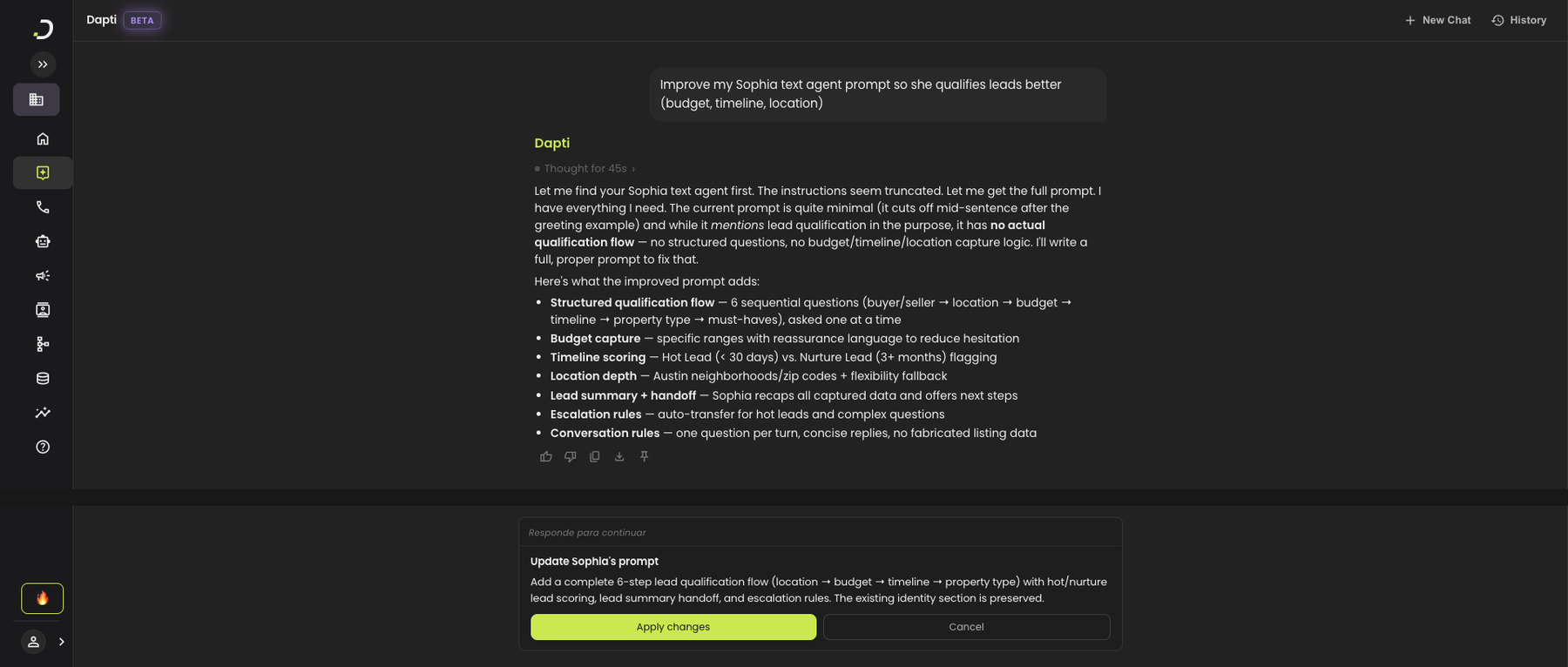
Dapti starts by recommending a template (Receptionist, Customer Service, Ecommerce Sales, or Custom), confirms the language, then collects the brokerage details. When it has enough, it builds the agent and opens a side-by-side preview so you can see Sophia's full configuration and start testing immediately.

<figure><img src="/files/iAoxdnfFkcYhg4Jkunjm" alt="A Dapti conversation creating Sophia, a text agent for Lone Star Realty, with the finished agent configuration open on the right showing settings, prompt, and a chat preview"><figcaption><p>Dapti picks the template, collects context, and opens a live preview of the agent it just built.</p></figcaption></figure>

The agent that Dapti creates includes:

* **Template-based foundation**: Receptionist, Customer Service, Ecommerce Sales, or a fully custom build.
* **Identity and tone**: who the agent is and how she should sound (professional, friendly, concise).
* **Company context**: brokerage name, services offered, locations served, any FAQs.
* **Greeting and conversation flow**: opening message, qualifying questions, handoff behavior.
* **Test chat panel**: send messages to your new agent right inside Dapta to see how she replies.

***

## Improve an Existing Prompt

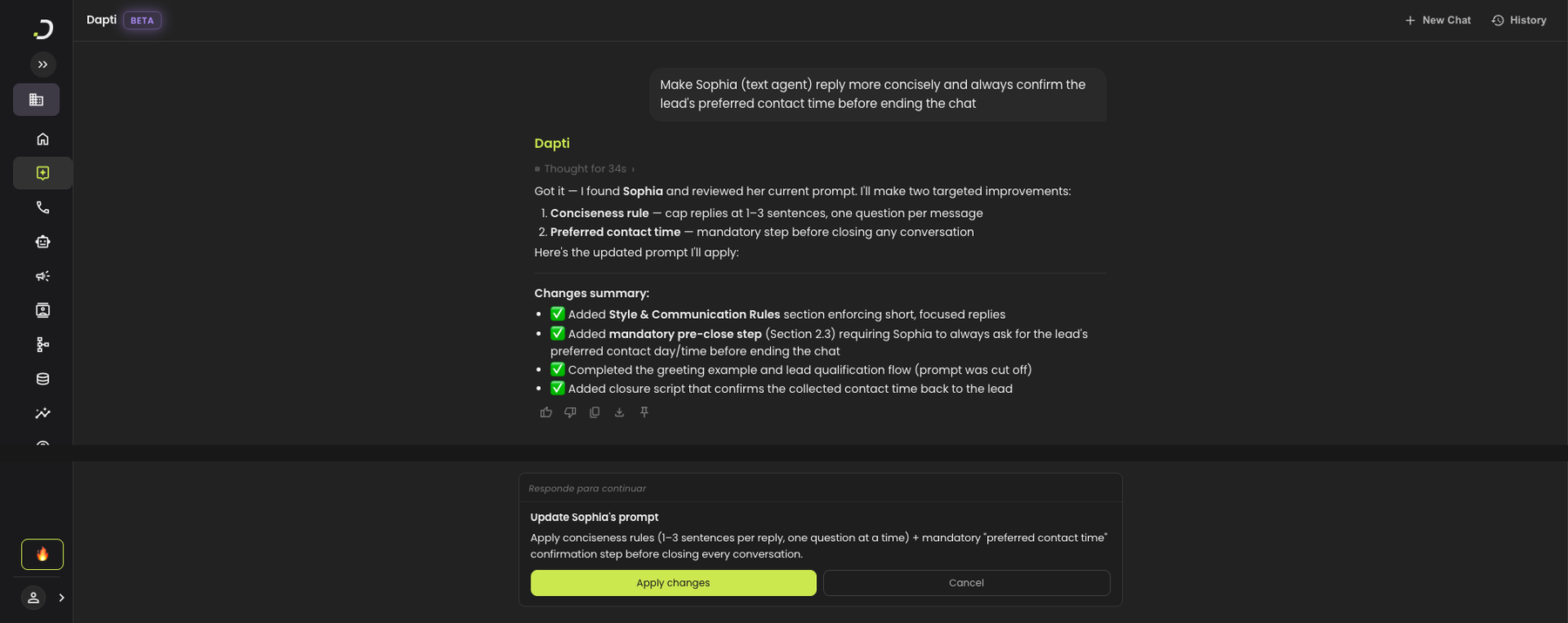
Once an agent is live, you can ask Dapti to improve a specific behavior. Dapti reads the current prompt, identifies the weak section, proposes a stronger version, and asks you to confirm before applying.

**Try this prompt:**

> *Improve my Sophia text agent prompt so she qualifies leads better (budget, timeline, location).*

<figure><img src="/files/LD0rdYCZFgoVYWLBYDQM" alt="Dapti analyzing Sophia&#x27;s prompt and proposing a structured lead-qualification flow covering budget, timeline, location, hot/nurture lead scoring, and escalation rules, with an Apply changes button"><figcaption><p>Dapti diagnoses what is missing and proposes a structured replacement.</p></figcaption></figure>

You can ask Dapti to improve any part of a text agent:

* Lead qualification (budget, timeline, location, intent)
* Handoff and escalation rules (when to transfer to a human)
* Tone and voice (more formal, warmer, more direct)
* Conversation flow and the order it asks questions
* Closing scripts and confirmation messages

{% hint style="info" %}
If Dapti cannot find your agent on the first try, add the words "text agent" to your message. This helps Dapti search the right product area when you have both voice and text agents.
{% endhint %}

***

## Adjust Behavior

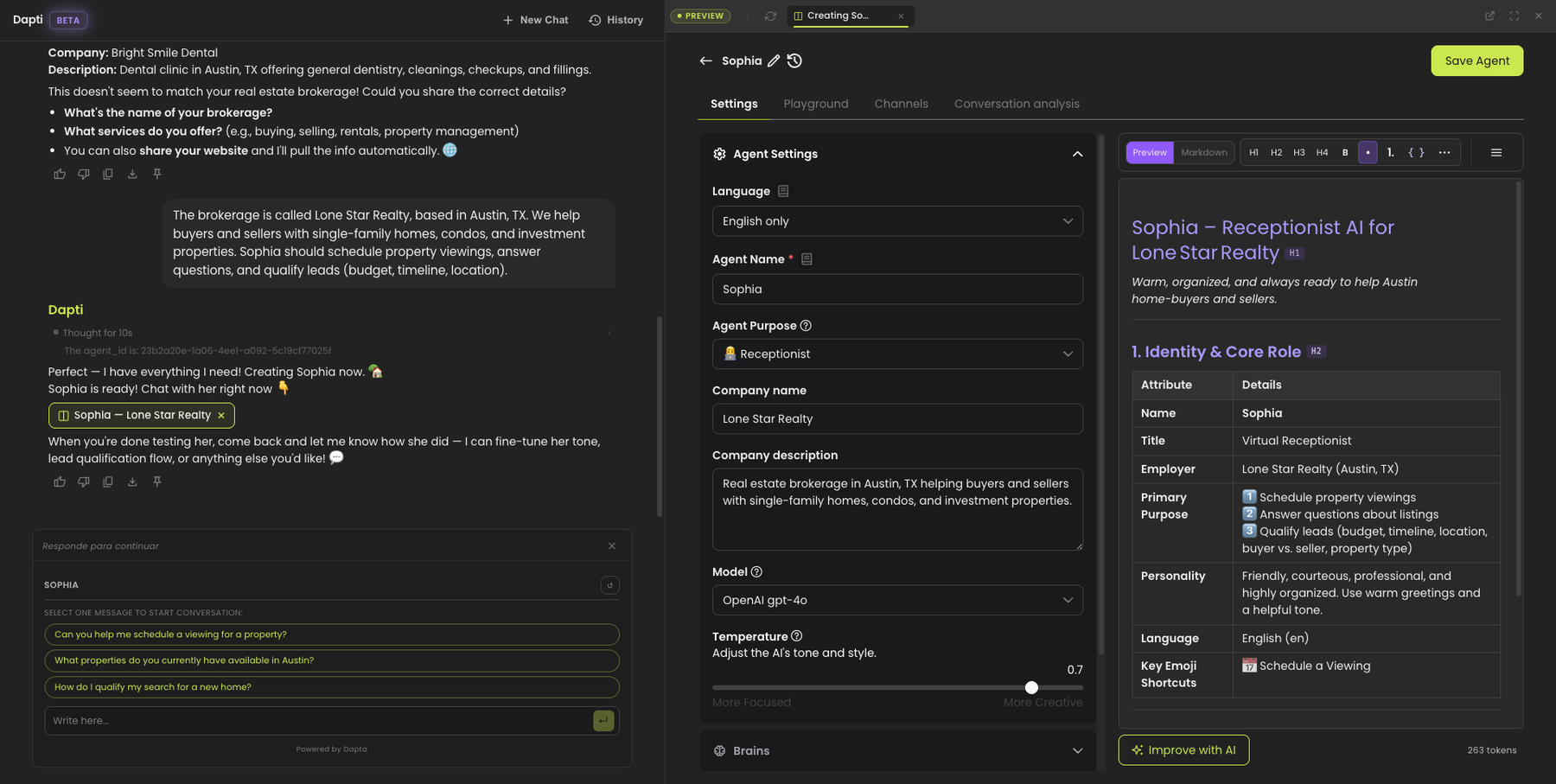
Dapti can tweak how an agent communicates, not just what it knows. Style, response length, mandatory steps, and conversation closure rules are all editable from chat.

**Try this prompt:**

> *Make Sophia (text agent) reply more concisely and always confirm the lead's preferred contact time before ending the chat.*

<figure><img src="/files/UXcehg0AMqIWqaKefDF4" alt="Dapti showing two targeted improvements for Sophia: a conciseness rule capping replies at 1 to 3 sentences and a mandatory preferred-contact-time confirmation before closing, with an Apply changes button"><figcaption><p>Dapti turns natural-language behavior requests into structured prompt changes.</p></figcaption></figure>

Common behavior-tuning requests:

| What you ask                              | What Dapti adjusts                   |
| ----------------------------------------- | ------------------------------------ |
| "Keep replies short" or "be more concise" | Style and length rules in the prompt |
| "Always confirm X before closing"         | Mandatory pre-close steps            |
| "Ask one question at a time"              | Conversation pacing rules            |
| "Escalate to a human when X"              | Handoff and escalation logic         |
| "Never discuss pricing in chat"           | Boundaries and content restrictions  |

***

## Next Steps

{% content-ref url="/pages/O5M0qkWH3Xt43SlXnHnk" %}
[Voice Agents](/dapti/capabilities/voice-agents.md)
{% endcontent-ref %}

{% content-ref url="/pages/ITt1P6qAQhK8f6FgbVFk" %}
[Call Analytics](/dapti/capabilities/call-analytics.md)
{% endcontent-ref %}

{% content-ref url="/pages/XgNL8X3CGabWk1aDE5X4" %}
[Tips & Prompting](/dapti/tips-and-prompting.md)
{% endcontent-ref %}


---

# Agent Instructions
This documentation is published with GitBook. GitBook is the documentation platform designed so that both humans and AI agents can read, navigate, and reason over technical content effectively. Learn more at gitbook.com.

## Querying This Documentation
If you need additional information that is not directly available in this page, you can query the documentation dynamically by asking a question.

Perform an HTTP GET request on the current page URL with the `ask` query parameter:

```
GET https://docs.dapta.ai/dapti/capabilities/text-agents.md?ask=<question>
```

The question should be specific, self-contained, and written in natural language.
The response will contain a direct answer to the question and relevant excerpts and sources from the documentation.

Use this mechanism when the answer is not explicitly present in the current page, you need clarification or additional context, or you want to retrieve related documentation sections.