> For the complete documentation index, see [llms.txt](https://docs.dapta.ai/llms.txt). Markdown versions of documentation pages are available by appending `.md` to page URLs; this page is available as [Markdown](https://docs.dapta.ai/dapti/dapti.md).

# Start here

Dapti is your AI assistant inside Dapta. What it can do, how to open it, and how to read what it gives you back.

**Dapti** is the AI assistant built into Dapta. Instead of clicking through menus to find what you need, you can just ask. Dapti understands your workspace, your agents, your data and the entire Dapta platform, and helps you turn that into insights and action.

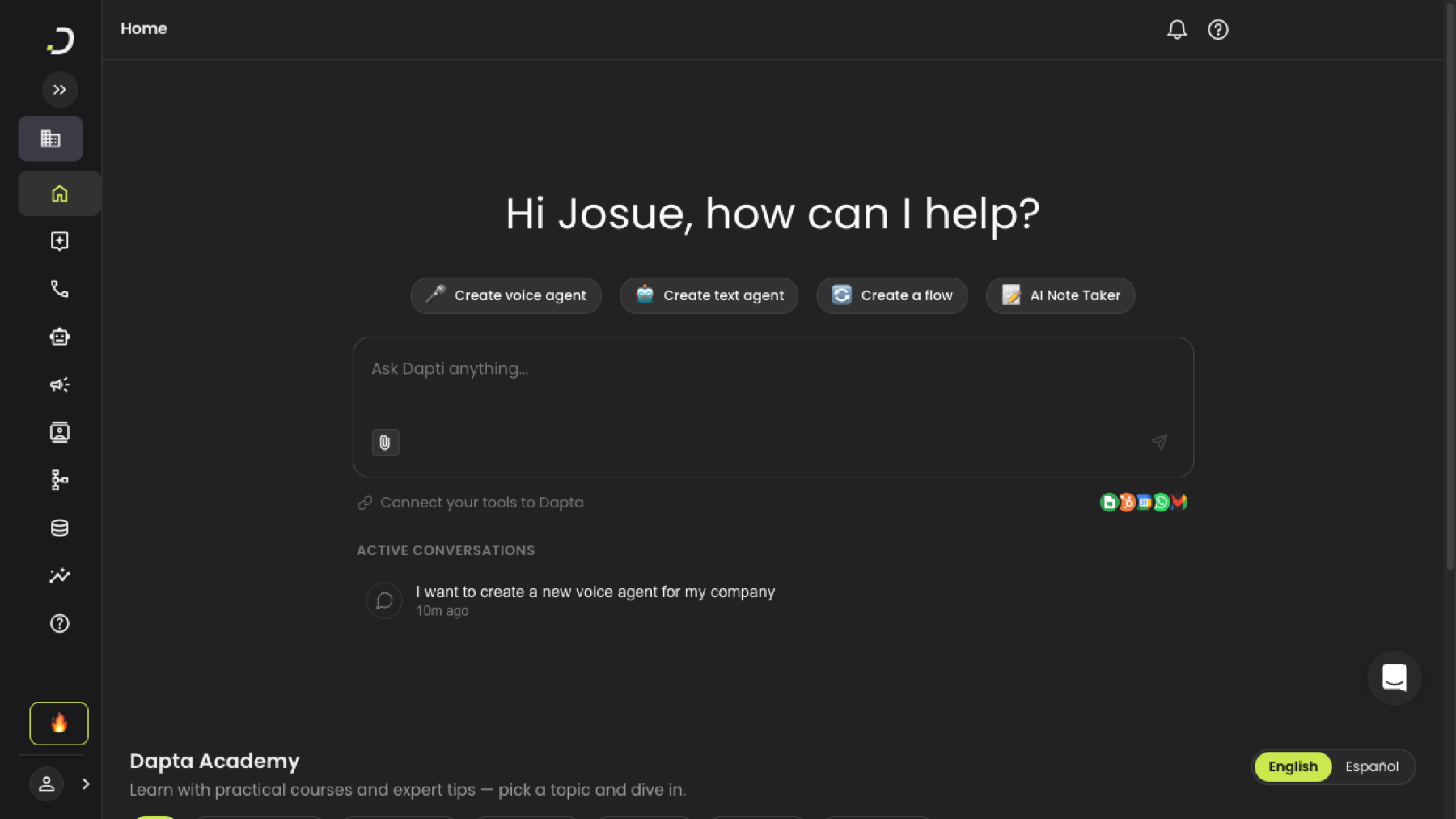
<figure><img src="https://3835013762-files.gitbook.io/~/files/v0/b/gitbook-x-prod.appspot.com/o/spaces%2FCy5rSNtQmtqYCGzJlNEB%2Fuploads%2Fgit-blob-f4d34dfbc00e07fa1d92af601654a9a82feef066%2Fdapti-home-welcome.png?alt=media" alt="Dapti welcome screen with greeting, quick action buttons, chat input, integrations, and active conversations"><figcaption><p>The Dapti welcome screen, with quick actions, a chat input, connected tools, and your recent conversations.</p></figcaption></figure>

{% hint style="info" %}
Dapti is currently in **Beta**. Features and capabilities continue to evolve as we improve the experience.
{% endhint %}

## What Dapti can do

|                               |                                                                                                                                      |
| ----------------------------- | ------------------------------------------------------------------------------------------------------------------------------------ |
| **Analyse your performance**  | Call statistics, connection rates, sentiment, outcomes, best times to call, and comparisons against privacy-safe industry benchmarks |
| **Create and improve agents** | Build a voice or text agent in a few turns, improve a prompt, tune voice and behaviour                                               |
| **Automate your workflows**   | Design, validate and deploy a Flow Studio automation from the chat, then put it on a schedule                                        |
| **Research the web**          | Search, read external pages, and generate a downloadable report                                                                      |
| **Manage your business**      | Credit balance, usage, subscription, invoices, demos and account changes                                                             |
| **Get answers and tutorials** | Ask "how do I…" and Dapti searches the docs and points to the right Academy video                                                    |

Each of these has its own page under [Capabilities](/dapti/capabilities.md), with example prompts and what to expect back.

***

## Open Dapti

You can reach Dapti from two places:

* **The Home page** — your default landing when you log in. The whole page is Dapti; start asking straight away.
* **The sidebar** — click **Dapti**, marked with a small `BETA` tag, to open the dedicated page.

Both show the same welcome screen: a personalised greeting, **quick action buttons** (create a voice agent, create a text agent, create a flow, AI Notetaker), the **chat input**, shortcuts to **connect your tools**, and your **active conversations**.

## Ask your first question

Type into **Ask Dapti anything...** and press **Enter**.

{% hint style="info" %}
Dapti understands plain English, Spanish, and any other language you write in. No special syntax or commands needed.
{% endhint %}

You can also click a quick action to start with a pre-filled prompt, open an active conversation to resume it with full history, or attach an image with the paperclip — Dapti can read screenshots, charts and configurations.

As soon as you send a message from the Home page, Dapti moves you to `/dapti`, where the conversation continues.

## Read the response

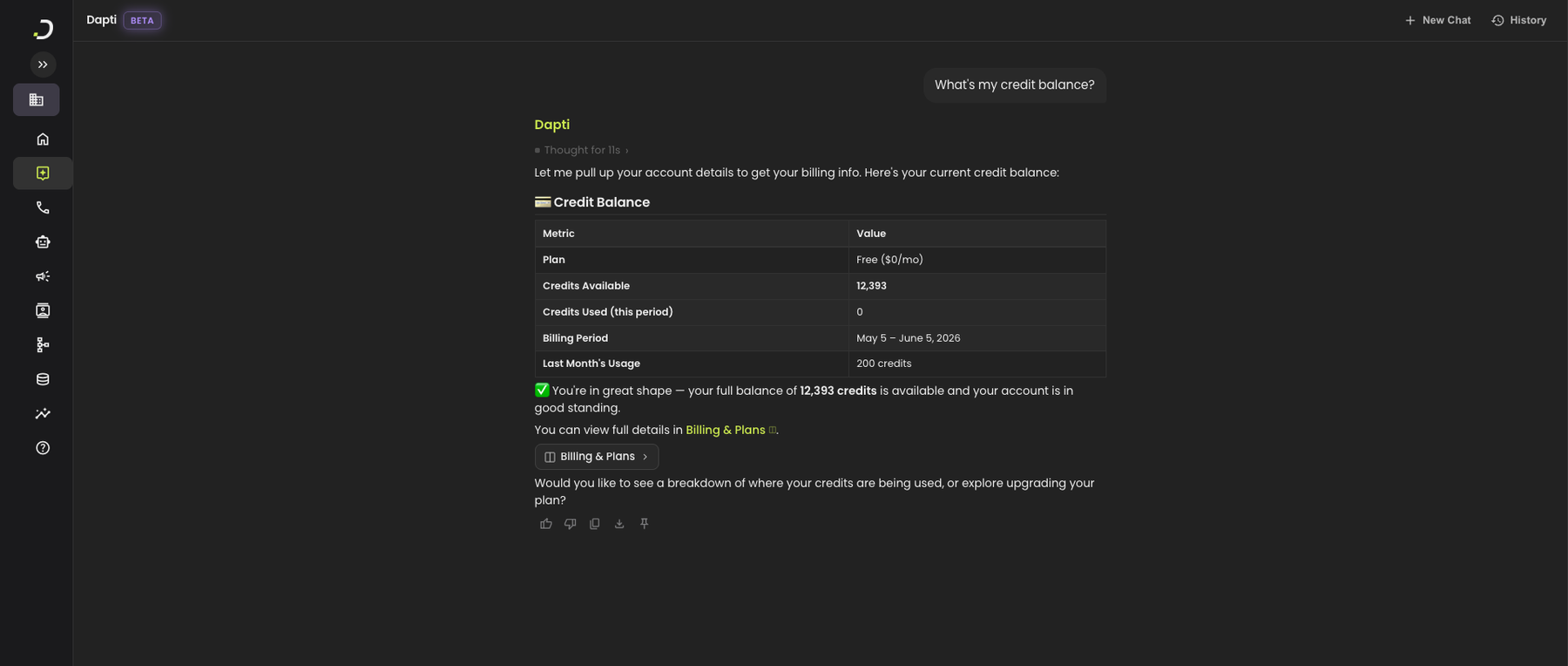
While Dapti works, a **thinking indicator** shows what it is doing. When it finishes, that collapses into a single line — **Thought for Ns** — and you can click it to open the Activity panel and see the reasoning step by step.

<figure><img src="https://3835013762-files.gitbook.io/~/files/v0/b/gitbook-x-prod.appspot.com/o/spaces%2FCy5rSNtQmtqYCGzJlNEB%2Fuploads%2Fgit-blob-3428d4dfdaf8ac31e0bdc4979fe505f62be365b3%2Fdapti-response-complete.png?alt=media" alt="A complete Dapti response showing the collapsed thinking summary, formatted tables, inline links, an interactive button, and message actions"><figcaption><p>A complete Dapti response, with tables, links, an interactive button and message actions.</p></figcaption></figure>

Responses can include formatted text, **tables** for structured data, **inline links** that jump straight to that agent, call or flow in Dapta, **interactive buttons**, and suggested follow-ups.

Under every response there is a row of actions: **👍 / 👎** to say whether it helped (thumbs down opens a short feedback form), **📋 Copy**, **⬇️ Download**, and **📌 Pin**.

## Keep going

Dapti remembers the current conversation, so follow up instead of starting over — *"only show calls longer than 90 seconds"*, *"now group those by patient type"*. To start fresh, click **New Chat**; the previous one is saved in **History**.

***

## Where to go next

{% content-ref url="/pages/01v2oqCpyko6kA3SQ8uv" %}
[Interface Guide](/dapti/interface-guide.md)
{% endcontent-ref %}

{% content-ref url="/pages/tGdZKRq1oCqpksmxm3rK" %}
[Capabilities](/dapti/capabilities.md)
{% endcontent-ref %}

{% content-ref url="/pages/z2MqYMcg82nfTMVD8SSU" %}
[Use Cases](/dapti/use-cases.md)
{% endcontent-ref %}

{% content-ref url="/pages/XgNL8X3CGabWk1aDE5X4" %}
[Tips & Prompting](/dapti/tips-and-prompting.md)
{% endcontent-ref %}

{% content-ref url="/pages/WlLQa9OkMJ9pDvj852NH" %}
[Privacy & Scope](/dapti/privacy-and-scope.md)
{% endcontent-ref %}


---

# Agent Instructions
This documentation is published with GitBook. GitBook is the documentation platform designed so that both humans and AI agents can read, navigate, and reason over technical content effectively. Learn more at gitbook.com.

## Querying This Documentation
If you need additional information that is not directly available in this page, you can query the documentation by asking a question.

Perform an HTTP GET request on the following URL with the `ask` and `goal` query parameters:

```
GET https://docs.dapta.ai/dapti/dapti.md?ask=<question>&goal=<user_goal>
```

`ask` is the immediate question: it should be specific, self-contained, and written in natural language.
`goal` is what the user is ultimately trying to achieve, the reason they need the answer. Sharing it helps GitBook give you a better, more relevant answer. A goal is most helpful when it describes the outcome the user wants rather than restating the question. For example, with `ask=how do I create an API token`, a goal like `automate deployments from our CI pipeline` lets GitBook tailor the answer to that use case.

The response will contain a direct answer to the question and relevant excerpts and sources from the documentation.

Use this mechanism when the answer is not explicitly present in the current page, you need clarification or additional context, or you want to retrieve related documentation sections.