> For the complete documentation index, see [llms.txt](https://docs.dapta.ai/llms.txt). Markdown versions of documentation pages are available by appending `.md` to page URLs; this page is available as [Markdown](https://docs.dapta.ai/dforms/connect/delivery-and-retries.md).

# Delivery, retries & history

How dForms delivers submissions to webhooks, HubSpot, Google Sheets, Salesforce, HighLevel and email without ever blocking a respondent: which phase each one receives, the queue, the retry schedule wi

Every integration in dForms follows the same rule: **store the submission first, deliver afterwards, retry on failure, and keep a log.** This page explains that pipeline so you know what to expect when an endpoint is slow, a CRM is down, or a respondent submits twice.

***

## Nothing blocks a submission

When a respondent passes the partial submit point or finishes the form, their answers are saved immediately and they see the next step or the ending screen. Only then does dForms queue the deliveries for each enabled integration:

| Integration       | What gets queued                                                                              | On which phase                                                                                                                                                                 |
| ----------------- | --------------------------------------------------------------------------------------------- | ------------------------------------------------------------------------------------------------------------------------------------------------------------------------------ |
| **Webhook**       | One POST per webhook                                                                          | Partial and/or complete, per the **Trigger on** boxes                                                                                                                          |
| **HubSpot**       | Contact upsert and mapped properties                                                          | Partial and complete by default; complete only with **Send partial responses too** off (score, outcome, static properties, note and form-submission activity only on complete) |
| **Google Sheets** | One new row in the attached spreadsheet                                                       | Complete only, always                                                                                                                                                          |
| **Salesforce**    | One Contact or Lead update, or one new Lead                                                   | Complete only by default; partial too with **Send partial responses too** on                                                                                                   |
| **HighLevel**     | One contact upsert, then the tags                                                             | Complete only by default; partial too with **Send partial responses too** on                                                                                                   |
| **Emails**        | One **New submission notice** per address on **Send to**, and the **Respondent confirmation** | Complete only                                                                                                                                                                  |
| **Booking sync**  | HubSpot booking properties                                                                    | After a scheduler booking, about 15 seconds later                                                                                                                              |

HubSpot, Salesforce and HighLevel each have a **Send partial responses too** switch on their card, like the webhook's **Trigger on** boxes. It starts on for HubSpot, so a HubSpot card keeps doing what it always did, and off for Salesforce and HighLevel. Google Sheets has no switch: a spreadsheet only appends, so a partial would leave a half row above the full one.

On a Slides screen that shows several questions, the partial is sent when the respondent submits the screen that holds the partial submit point. With [spam protection](https://docs.dapta.ai/dforms/connect/spam-protection.md) on, a partial is saved but nothing is queued for webhooks or CRMs, whatever their switch says: only the verified complete submission is delivered. A Google Sheets card that is switched on but has no spreadsheet attached queues nothing at all.

A slow or broken destination therefore never slows the respondent down, and it never loses the answers: the submission is already in **Submissions** and the CSV export before any delivery is attempted.

***

## Retry schedule

A delivery is picked up within a few seconds. If it fails in a way that might work on another try (a non-2xx status from a webhook, a redirect, a timeout, a network error, a provider that is down or over its rate limit) it is retried with exponential backoff: about **1 s, 2 s, 4 s, 8 s…** between attempts, capped at 5 minutes, for a maximum of **5 attempts**. While retries are pending the row reads **In progress** and the attempt count increases.

<figure><img src="https://3835013762-files.gitbook.io/~/files/v0/b/gitbook-x-prod.appspot.com/o/spaces%2FCy5rSNtQmtqYCGzJlNEB%2Fuploads%2Fgit-blob-affa4325c16e7c1d9e556f4bf4666d1ef3b45a85%2Fforms-delivery-and-retries-02-in-progress.png?alt=media" alt="The Webhook history dialog with two rows marked In progress, HTTP 500, 2 attempts"><figcaption><p>Between retries a delivery shows as <strong>In progress</strong> with its attempt count.</p></figcaption></figure>

After the fifth failure the delivery is marked **Failed** and kept as a record, with the last error and the endpoint's last response.

<figure><img src="https://3835013762-files.gitbook.io/~/files/v0/b/gitbook-x-prod.appspot.com/o/spaces%2FCy5rSNtQmtqYCGzJlNEB%2Fuploads%2Fgit-blob-af3ca27080783dd094ec7eb17d48ee6403d3552c%2Fforms-delivery-and-retries-03-failed-row.png?alt=media" alt="A Failed row expanded in the Webhook history dialog showing the body under What we sent and the response under What came back HTTP 500"><figcaption><p>A delivery that gave up after <strong>5 attempts</strong>. The transcript stays available.</p></figcaption></figure>

***

## What the statuses mean

<figure><img src="https://3835013762-files.gitbook.io/~/files/v0/b/gitbook-x-prod.appspot.com/o/spaces%2FCy5rSNtQmtqYCGzJlNEB%2Fuploads%2Fgit-blob-f0e77dbc7915f0abffce079deb021688be64c868%2Fforms-delivery-and-retries-01-history-statuses.png?alt=media" alt="The Webhook history dialog listing Delivered rows, some with a Test badge"><figcaption><p>Status pills and the <strong>Test</strong> badge in a history dialog.</p></figcaption></figure>

| Status            | Meaning                                                                                                                                                                                                                                                                                                                                                                                                                                                                                                                                                                    | Retried?                                                                       |
| ----------------- | -------------------------------------------------------------------------------------------------------------------------------------------------------------------------------------------------------------------------------------------------------------------------------------------------------------------------------------------------------------------------------------------------------------------------------------------------------------------------------------------------------------------------------------------------------------------------- | ------------------------------------------------------------------------------ |
| **Delivered**     | The destination accepted it (2xx for a webhook, a successful API call for HubSpot, the mail was handed off for emails).                                                                                                                                                                                                                                                                                                                                                                                                                                                    | No need.                                                                       |
| **In progress**   | Queued, being sent, or waiting for its next attempt.                                                                                                                                                                                                                                                                                                                                                                                                                                                                                                                       | Yes, automatically.                                                            |
| **Failed**        | Retries exhausted. The row keeps the last error message and, for webhooks, **What came back**.                                                                                                                                                                                                                                                                                                                                                                                                                                                                             | No. Fix the destination; the next submission or **Send test** will go through. |
| **Not delivered** | Not performed, for good, with the reason on the row. Either the provider refused it in a way a retry cannot change (Salesforce's validation rules, a required field, a permission the integration user lacks, a spreadsheet that no longer exists), or it could not apply (a HubSpot or Salesforce submission with no email, a HighLevel submission with no email and no phone, a booking sync on a form whose HubSpot destination was turned off in the meantime, a booking that spam protection could not match to a verified respondent). Recorded once, never retried. | No. Fix the cause; the next submission goes through.                           |

A refusal shows the provider's own words after dForms' own sentence. For Salesforce that is the error code and message, such as *Refused by Salesforce with HTTP 400: FIELD\_CUSTOM\_VALIDATION\_EXCEPTION: Region is required for web leads \[Region\_\_c]*, so you can tell which rule or field to fix. dForms' half of the sentence is translated when you read the history in Spanish; the provider's half is always kept exactly as the provider wrote it. Open the row to see **What we sent** and **What came back**.

<figure><img src="https://3835013762-files.gitbook.io/~/files/v0/b/gitbook-x-prod.appspot.com/o/spaces%2FCy5rSNtQmtqYCGzJlNEB%2Fuploads%2Fgit-blob-553429a2ec44571ab7f4c939279a6c2ff0f846ac%2Fforms-salesforce-05-not-delivered.png?alt=media" alt="An expanded Not delivered row in the Salesforce history with the error code and message from Salesforce"><figcaption><p><strong>Not delivered</strong>: refused by the provider, with its reason, and not retried.</p></figcaption></figure>

> **⚠️ Note:** There is no manual resend button. Failed deliveries are a log, not a queue you can replay. If a lead was lost because your endpoint was down, export the submission from **Submissions** or ask the respondent to submit again.

***

## Per-integration history

The **Connect** tab keeps a log per integration: **Webhook history**, **HubSpot history**, **Google Sheets history**, **Salesforce history**, **HighLevel history** and **Email history**, each opened with **View history** and showing the latest 25 rows, newest first, with times in your workspace timezone. When some of them need a look, a red chip such as **Needs attention: 2** sits next to the title. It counts exactly the rows painted red in the dialog: **Failed** rows, and complete responses the provider refused (**Not delivered**). A partial answer that was skipped is listed as **Not delivered** but is not counted.

Each row names the moment that sent it: **Complete response**, **Partial response**, **Booking update** (a [booking sync](https://docs.dapta.ai/dforms/connect/hubspot/booking-sync.md) on HubSpot), **New response notice**, **Confirmation to the respondent** or **Invitation**. Webhook rows include the full request and response; HubSpot rows include any error the CRM returned; Google Sheets rows include Google's answer, such as *Refused by Google Sheets with HTTP 404: Requested entity was not found.* for a spreadsheet that was deleted; Salesforce rows include the fields sent and Salesforce's answer; HighLevel rows include HighLevel's answer, with its own message when it refused a value; email rows show which notice was sent, one row per recipient.

Only **Webhook history** explains test deliveries ("Test deliveries are listed too, marked as tests…"), because the webhook is the only card with **Send test**.

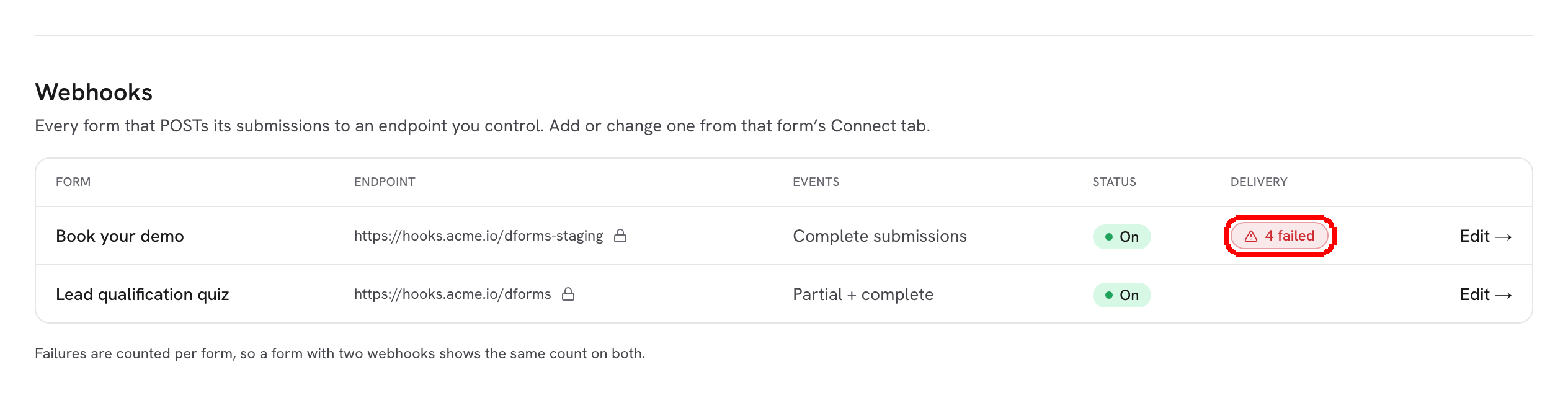
At the account level, the **Webhooks** inventory on the [Integrations](https://docs.dapta.ai/dforms/connect/connections.md) page shows a **Delivery** column per form: empty when healthy, or a red **{n} failed** with **Last failure {date}**. Failures are counted per form, so a form with two webhooks shows the same count on both rows.

<figure><img src="https://3835013762-files.gitbook.io/~/files/v0/b/gitbook-x-prod.appspot.com/o/spaces%2FCy5rSNtQmtqYCGzJlNEB%2Fuploads%2Fgit-blob-a0328e94840305c0f3486ac596d293765b8dd9c0%2Fforms-delivery-and-retries-04-connections-delivery.png?alt=media" alt="The Webhooks table on the Integrations page with a red 4 failed badge in the Delivery column"><figcaption><p>The inventory flags forms whose webhook has failed deliveries.</p></figcaption></figure>

***

## No duplicates on resubmit

Each delivery carries an idempotency key (`submission:{submissionId}:{phase}:webhook:{index}`, sent as `x-forms-delivery` and as `id` in the body). If the same session submits the same phase again, for example because the respondent went back and pressed Submit twice, pending deliveries for that phase are replaced rather than doubled, and a phase that already landed is not queued again. HubSpot is keyed by the respondent's email, so a repeat updates the same contact instead of creating a new one. Salesforce looks the email up before every attempt, so a retry updates the record the first attempt created. HighLevel matches the contact by email or phone on every attempt, and adding a tag it already has changes nothing, so a retry never duplicates a contact or a tag. Google Sheets only takes the complete submission, once. On your own endpoint, store the key and ignore a request whose key you already processed.

***

## Saving changes on the Connect tab

Everything you change on the Connect tab saves by itself. Two indicators tell you how that went: a status in the bottom corner of the page, and the status in the top bar next to **Preview**. Both always show the same state.

<figure><img src="https://3835013762-files.gitbook.io/~/files/v0/b/gitbook-x-prod.appspot.com/o/spaces%2FCy5rSNtQmtqYCGzJlNEB%2Fuploads%2Fgit-blob-47cab2efc1cb5680a4f540493fa454316fbb6e25%2Fforms-delivery-and-retries-06-save-saved.png?alt=media" alt="The Connect tab with Saved in the top bar and Changes saved automatically in the bottom corner"><figcaption><p>A save that landed: <strong>Saved</strong> at the top, <strong>Changes saved automatically</strong> at the bottom.</p></figcaption></figure>

| Bottom corner                                           | Top bar          | What it means                                                                                                                                                                            |
| ------------------------------------------------------- | ---------------- | ---------------------------------------------------------------------------------------------------------------------------------------------------------------------------------------- |
| **Saving…**                                             | **Saving…**      | The change is on its way.                                                                                                                                                                |
| **Changes saved automatically**                         | **Saved**        | The change is stored. After a moment the corner shrinks to **Saved** and then goes away.                                                                                                 |
| **Saved everything except the webhook.** and the reason | **Partly saved** | Everything was stored except a webhook that cannot be saved yet, for example one switched on with no URL: "Paste the webhook URL to start sending. Until then the webhook is not saved." |
| **Connection lost: retrying…**                          | **Retrying…**    | The server could not be reached. Your change is kept and saved again automatically.                                                                                                      |
| **Could not save integrations.** or the reason          | **Not saved**    | The save failed. Your change is not stored.                                                                                                                                              |

<figure><img src="https://3835013762-files.gitbook.io/~/files/v0/b/gitbook-x-prod.appspot.com/o/spaces%2FCy5rSNtQmtqYCGzJlNEB%2Fuploads%2Fgit-blob-453d29b96081c32ef804c1bdd186c4976106939b%2Fforms-delivery-and-retries-07-partly-saved.png?alt=media" alt="The Webhook card switched on with an empty Endpoint URL, Partly saved in the top bar and Saved everything except the webhook in the bottom corner"><figcaption><p>A webhook without a URL is the usual reason for <strong>Partly saved</strong>.</p></figcaption></figure>

If you leave the tab while a save is still running, dForms keeps trying a few times in the background. If it still cannot save, the top bar ends on **Not saved**, a notice says so once, and the next time you open the Connect tab a message at the top reads "Your last change on this tab could not be saved after you left it, so it is not in the integrations below." Click **Got it** to dismiss it, then make the change again.

Some cards also say on the card itself when something is saved but not sent yet, for example **Nothing is sent yet: create or choose a spreadsheet.** on Google Sheets, or "Saved. Choose the Salesforce field to send it." under an unfinished Salesforce row.

## What's next

* [Webhooks](https://docs.dapta.ai/dforms/connect/webhooks.md) and [Test & delivery history](https://docs.dapta.ai/dforms/connect/webhooks/test-and-history.md)
* [Google Sheets](https://docs.dapta.ai/dforms/connect/google-sheets.md), [Salesforce](https://docs.dapta.ai/dforms/connect/salesforce.md) and [HighLevel](https://docs.dapta.ai/dforms/connect/highlevel.md)
* [How the HubSpot sync works & troubleshooting](https://docs.dapta.ai/dforms/connect/hubspot/how-sync-works.md)
* [Submission emails](https://docs.dapta.ai/dforms/connect/emails.md)
* [Troubleshooting](https://docs.dapta.ai/dforms/troubleshooting.md)


---

# Agent Instructions
This documentation is published with GitBook. GitBook is the documentation platform designed so that both humans and AI agents can read, navigate, and reason over technical content effectively. Learn more at gitbook.com.

## Querying This Documentation
If you need additional information that is not directly available in this page, you can query the documentation by asking a question.

Perform an HTTP GET request on the following URL with the `ask` and `goal` query parameters:

```
GET https://docs.dapta.ai/dforms/connect/delivery-and-retries.md?ask=<question>&goal=<user_goal>
```

`ask` is the immediate question: it should be specific, self-contained, and written in natural language.
`goal` is what the user is ultimately trying to achieve, the reason they need the answer. Sharing it helps GitBook give you a better, more relevant answer. A goal is most helpful when it describes the outcome the user wants rather than restating the question. For example, with `ask=how do I create an API token`, a goal like `automate deployments from our CI pipeline` lets GitBook tailor the answer to that use case.

The response will contain a direct answer to the question and relevant excerpts and sources from the documentation.

Use this mechanism when the answer is not explicitly present in the current page, you need clarification or additional context, or you want to retrieve related documentation sections.