> For the complete documentation index, see [llms.txt](https://docs.dapta.ai/llms.txt). Markdown versions of documentation pages are available by appending `.md` to page URLs; this page is available as [Markdown](https://docs.dapta.ai/ai-voice-agents/how-to-create-your-first-campaign-in-dapta/call-logic-and-limits.md).
# Call Logic & Limits
Understand how Dapta manages call execution, batch processing, scheduling, retry attempts, and cooldown rules to keep your voice sequences efficient and compliant.
Dapta voice sequences are built around a set of timing rules, batch controls, and retry logic that work together to maximize contact rates while protecting call quality. This page explains every mechanism that governs how and when your contacts are called, so you can configure sequences with confidence.
## Sequence Statuses
Every sequence moves through a lifecycle represented by its status. You can see the current status on the sequence list and on the sequence detail page.
| Status | Description |
| ------------------ | ------------------------------------------------------------------------ |
| **Draft** | Sequence created but not yet scheduled or activated. |
| **Scheduled** | Sequence is set to run at the configured date and time. |
| **Running** | Sequence is actively placing calls to contacts. |
| **Completed** | All contacts in the sequence have been processed. |
| **Failed** | Sequence encountered an error and stopped. |
| **Paused** | Sequence was manually paused by a user. |
| **Manual Running** | Sequence is running a manual test triggered by the **Run** button. |
| **Waiting** | Sequence is between batches or waiting for the next available time slot. |
{% hint style="info" %}
A sequence in **Waiting** status has not finished — it is simply idle until the next batch or time slot opens.
{% endhint %}
***
## Batch Processing
Dapta processes contacts in batches rather than all at once. This gives the system time to handle responses and keeps call pacing predictable.
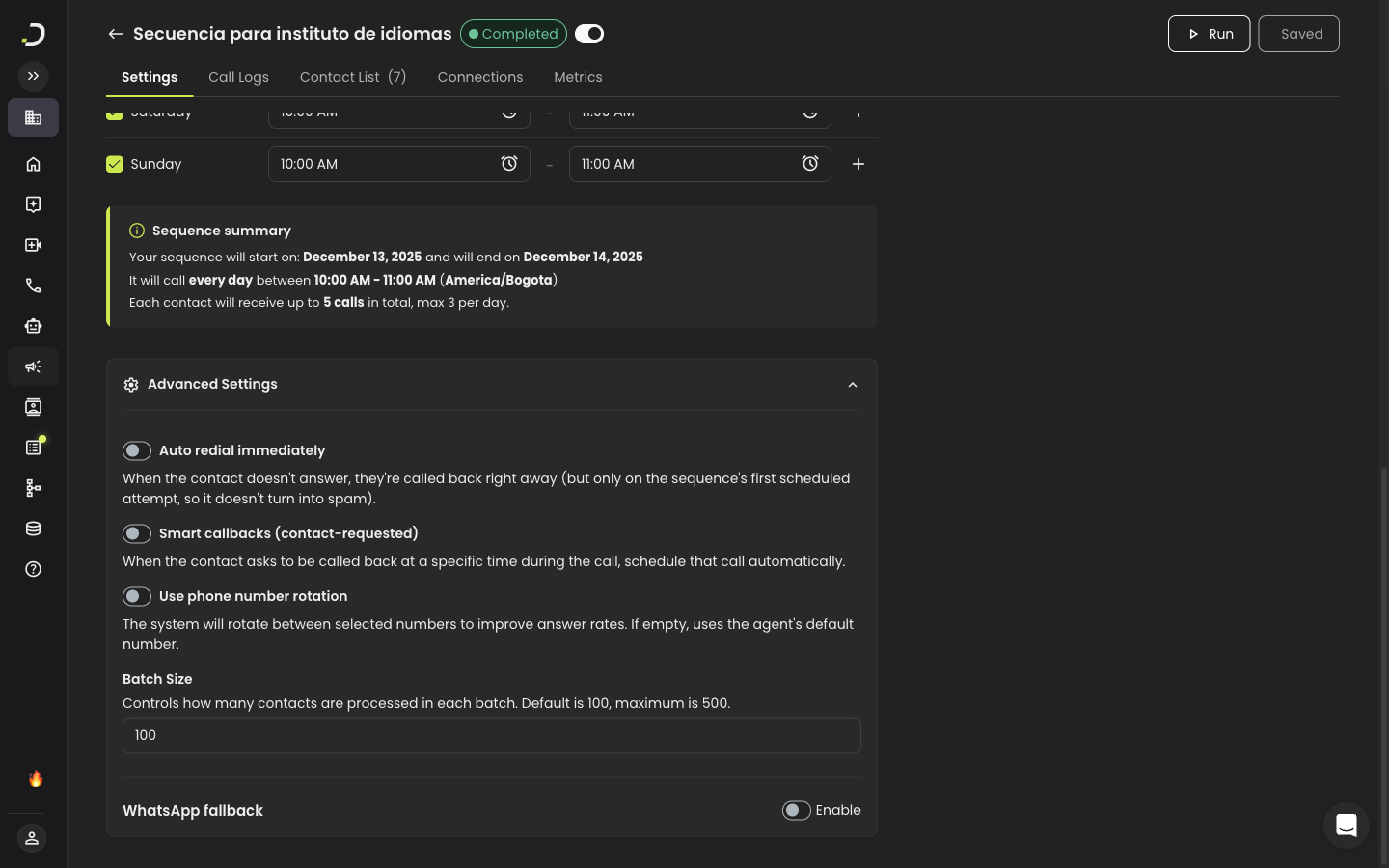
**Batch size** is configurable from **1 to 500 contacts** per batch. The default value is **100**. You can adjust it in the **Advanced Settings** accordion on your sequence's **Settings** tab.
Within each batch, contacts are called sequentially at a fixed rate of **1 call every 3 seconds**. Once every contact in the current batch has been attempted, Dapta moves on to the next batch.
> **💡 Tip:** Smaller batch sizes give you more granular control and quicker feedback during testing. Larger batches are better for high-volume production sequences.
***
## Calling Schedule
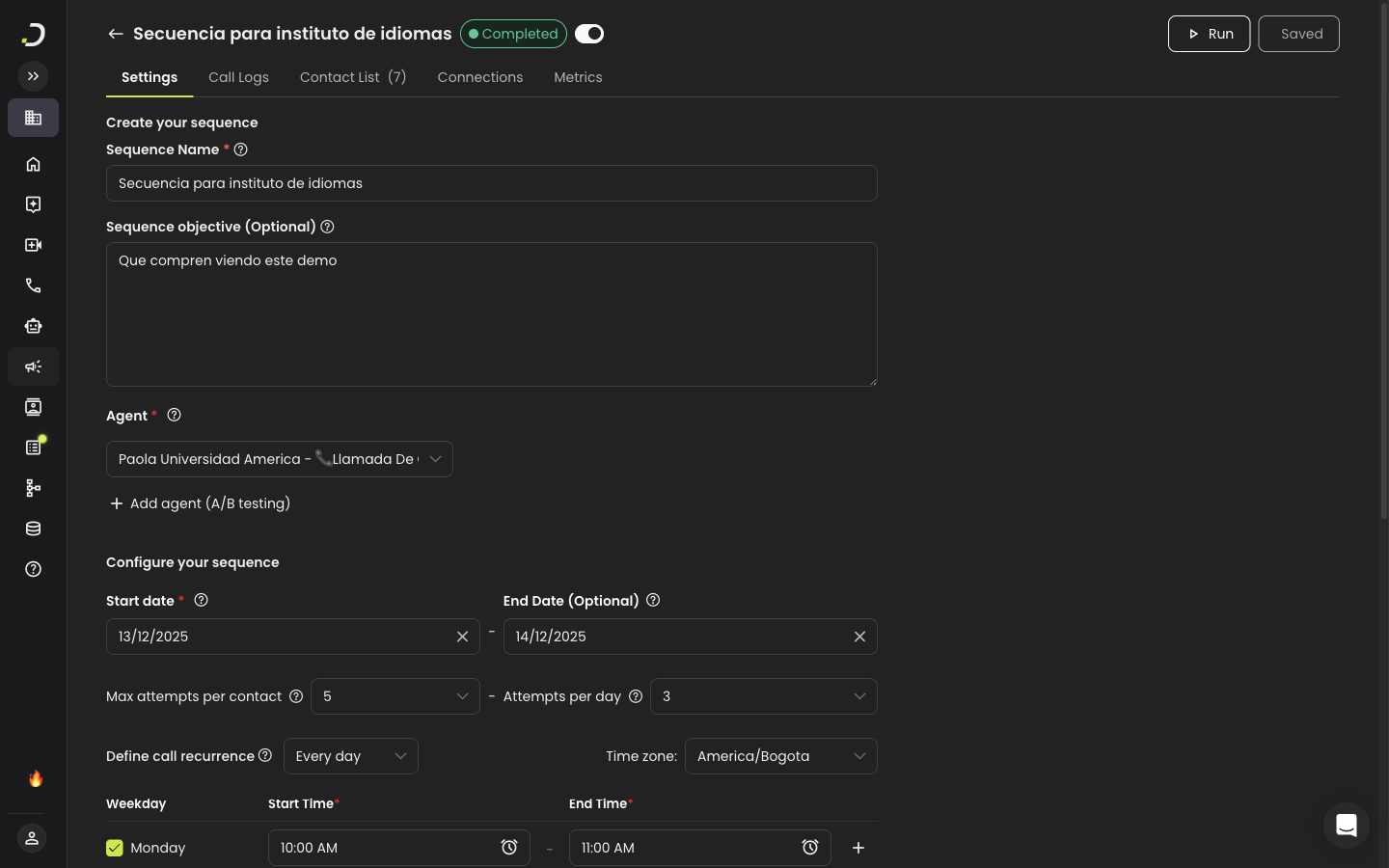
The calling schedule determines **which days** and **which hours** your sequence is allowed to place calls. All times follow the **time zone** configured on the sequence.
### Time zone and country
The sequence's **Time zone** sets the clock used for calling windows. Some time zones (for example `America/Phoenix`) are observed in more than one country, in which case Dapta also asks you to pick a **Country** so it knows how to dial bare phone numbers (numbers in your file without a `+` prefix). For details, see [Create a sequence — Country selection](/ai-voice-agents/how-to-create-your-first-campaign-in-dapta/create-a-campaign.md#country-selection-for-multi-country-time-zones).
### Calling Days
Choose one of three options:
* **Every Day** — the sequence runs seven days a week.
* **Weekdays (Mon–Fri)** — the sequence runs only on business days.
* **Custom** — pick the specific days of the week you want.
### Weekly Schedule
The schedule is configured through a **day-by-day table** where each day of the week can have its own independent time slots. This means you can set different calling windows for different days — for example, 8:00 AM – 6:00 PM on weekdays and 10:00 AM – 2:00 PM on Saturdays.
For each active day, you can:
* **Enable or disable** the day using the checkbox.
* **Set one or more time slots** with a start and end time.
* **Add additional time slots** by clicking the **+** button (for example, a morning window and an afternoon window).
* **Remove a time slot** by clicking the delete button next to it.
### Time Slot Rules
The following rules apply to time slots:
* Slots **cannot overlap** with each other within the same day.
* The **start time must be before the end time** within each slot.
* Times use the **HH:MM AM/PM** format.
* At least **one day must be enabled** with at least one time slot.
{% hint style="warning" %}
If the sequence reaches a point where no time slot is open, any remaining calls are automatically rescheduled for the next available slot. No contacts are skipped.
{% endhint %}
***
## Attempt Limits
You can control how aggressively Dapta retries contacts that do not answer or cannot be reached.
| Setting | Range | Description |
| ---------------------------- | ------ | ------------------------------------------------------------------------------------------------------------------------------------------------------ |
| **Max Attempts Per Contact** | 1 – 40 | Total number of call attempts across the entire sequence lifetime. The available range adjusts dynamically based on your **Attempts Per Day** setting. |
| **Attempts Per Day** | 1 – 5 | Maximum attempts allowed for a single contact within one calendar day. |
If an attempt cannot be made because the current time slot has closed, it is **not counted as a failed attempt**. Instead, it is rescheduled for the next available slot.
> **💡 Tip:** A common starting configuration is **3 max attempts** with **1 attempt per day**, spreading retries across multiple days to improve answer rates without overwhelming contacts.
{% hint style="info" %}
When the call attempt you choose doesn't reach a contact, because nobody answered or a voicemail picked up, you can have Dapta send them an approved WhatsApp template. See [WhatsApp fallback](/ai-voice-agents/how-to-create-your-first-campaign-in-dapta/whatsapp-fallback.md).
{% endhint %}
***
## Contact Cooldown
To prevent contacts from receiving back-to-back calls, Dapta enforces a **1-hour cooldown** per contact. This rule applies **globally across all sequences** — if a contact was attempted in any sequence within the last hour, no other sequence will call them until the cooldown period has passed.
This protects the recipient experience and reduces the risk of your numbers being flagged as spam.
***
## Parallel Execution
You can run **multiple sequences simultaneously** without any conflicts. Each sequence operates independently with its own batch queue, schedule, and call pacing.
Every active sequence places **1 call every 3 seconds**, regardless of how many other sequences are running at the same time.
{% hint style="info" %}
The 1-hour contact cooldown still applies across sequences. If two sequences share contacts, the cooldown prevents a contact from being called by both sequences within the same hour.
{% endhint %}
***
## Concurrency
How many calls can be live at the same time is an **account limit set by your plan**, not a sequence setting. Sequences use your account's **outbound** limit, which is separate from the inbound limit. When it is full, new sequence calls are deferred and show as **Concurrency Limit Reached**.
{% content-ref url="/pages/WucGUiNgqHGWH63OWDys" %}
[Concurrent calls](/ai-voice-agents/phone-numbers/concurrent-calls.md)
{% endcontent-ref %}
***
## Phone Number Rotation
Phone number rotation distributes your outbound calls across multiple phone numbers, reducing the likelihood that any single number gets flagged as spam.
**How to enable it:**
1. Open your sequence's **Settings** tab.
2. Expand the **Advanced Settings** accordion.
3. Toggle **Phone Number Rotation** on.
4. Select two or more outbound phone numbers from the list. Each number displays its nickname and SIP trunk status tag.
When enabled, Dapta automatically rotates between the selected numbers as it places calls. This is especially useful for high-volume sequences where a single number might otherwise accumulate too many outbound calls in a short period.
***
## Manual Test / Run
Before activating a sequence for automatic execution, you can run a **manual test** to verify that everything works as expected.
**Step 1:** Make sure the sequence is **not active** — toggle the activation switch off.
***
**Step 2:** Click the **Run** button on the sequence detail page to start the manual test.
***
**Step 3:** Monitor progress using the progress bar, which shows the completion percentage and the phone number of the contact currently being called.
***
**Step 4:** Click **Stop** at any time to halt the test. The sequence will return to its previous status automatically.
After the manual test completes (or is stopped), the sequence returns to whatever status it had before the test began. No permanent state changes are made.
{% hint style="warning" %}
You cannot run a manual test while the sequence is active. Deactivate the sequence first, then click **Run**.
{% endhint %}
---
# Agent Instructions
This documentation is published with GitBook. GitBook is the documentation platform designed so that both humans and AI agents can read, navigate, and reason over technical content effectively. Learn more at gitbook.com.
## Querying This Documentation
If you need additional information that is not directly available in this page, you can query the documentation by asking a question.
Perform an HTTP GET request on the following URL with the `ask` and `goal` query parameters:
```
GET https://docs.dapta.ai/ai-voice-agents/how-to-create-your-first-campaign-in-dapta/call-logic-and-limits.md?ask=&goal=
```
`ask` is the immediate question: it should be specific, self-contained, and written in natural language.
`goal` is what the user is ultimately trying to achieve, the reason they need the answer. Sharing it helps GitBook give you a better, more relevant answer. A goal is most helpful when it describes the outcome the user wants rather than restating the question. For example, with `ask=how do I create an API token`, a goal like `automate deployments from our CI pipeline` lets GitBook tailor the answer to that use case.
The response will contain a direct answer to the question and relevant excerpts and sources from the documentation.
Use this mechanism when the answer is not explicitly present in the current page, you need clarification or additional context, or you want to retrieve related documentation sections.